
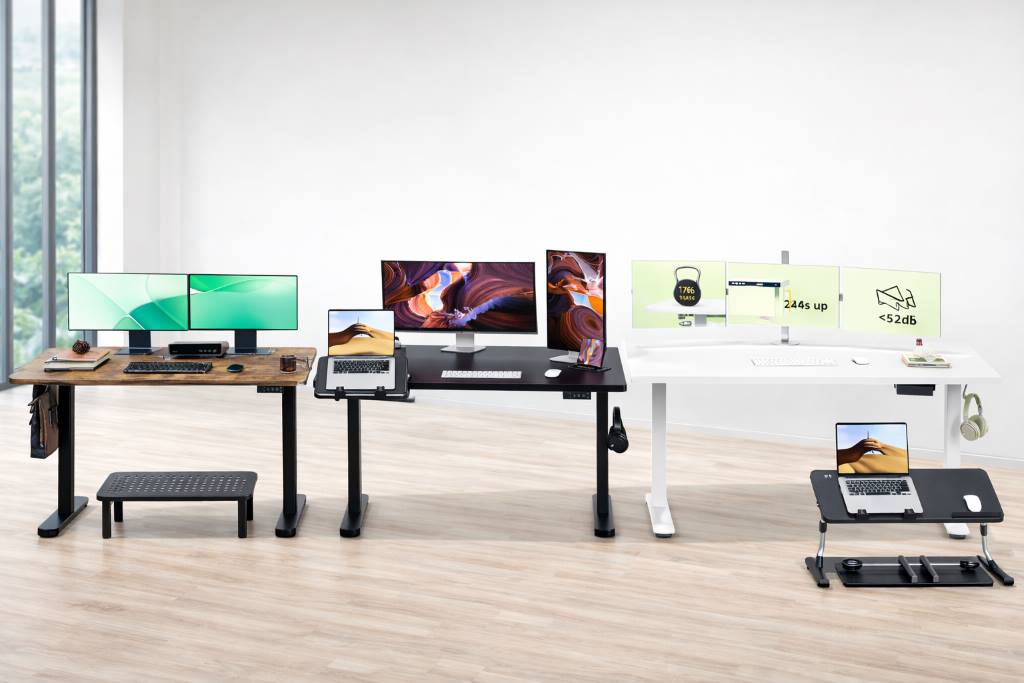
Modern work routines keep people seated for long stretches. Research from the World Health Organization links prolonged sitting with higher risks of cardiovascular disease and metabolic issues, while a CDC report notes that adults spend over six hours daily seated on average. Adjustable desks and risers offer a practical way to break that pattern without redesigning a workspace.
Budget friendly adjustable sit-stand desk options now range from compact monitor risers to full electric desks. Each option solves a slightly different problem. Some improve posture and desk organization, while others support full standing work sessions. This guide looks closely at eight affordable adjustable desk setups, focusing on real use comfort, practical benefits, and everyday limitations.
A Quick Overview of The Best Budget-Friendly Adjustable Sit-Stand Desk
These adjustable sit-stand desk products cover different workspace needs, from compact monitor lifts to full electric standing desks suitable for daily work.
- WALI Computer Monitor Stand for Desk
- ErGear Height Adjustable Electric Standing Desk
- Amazon Basics Adjustable Computer Monitor Riser
- SAIJI Adjustable Portable Foldable Laptop Desk
- Claiks Electric Standing Desk
- Monitor Stand Riser Adjustable Ergonomic Desktop Computer Stand
- Veken Electric Standing Desk Adjustable Height Computer Desk
- FEZIBO Electric Standing Desk Adjustable Height Computer Workstation
Best Budget-Friendly Adjustable Sit-Stand Desk Reviews of 2026
These adjustable sit-stand desks and risers represent practical entry points into ergonomic workspace upgrades. Each brings a different balance of portability, stability, and flexibility.
WALI Computer Monitor Stand for Desk
Compact riser with built in storage
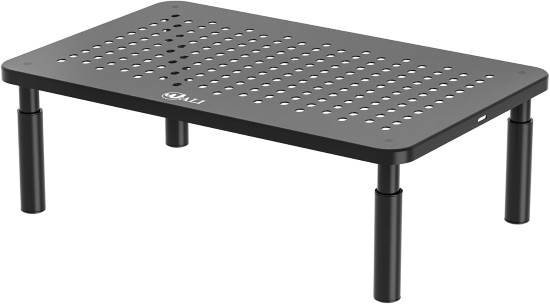
This stand feels simple yet surprisingly useful once in daily rotation. The metal frame supports monitors or laptops while creating a tidy storage zone underneath. Its adjustable height system relies on stackable legs, which makes changes quick but not ideal for frequent adjustments during the day.
The footprint works well on smaller desks where clutter tends to build up. Students and home office users benefit most because the added storage clears notebooks and accessories. The surface remains stable under normal loads, though heavier monitors can introduce minor vibration when typing.
Cleaning is straightforward since the metal surface resists dust buildup. The only maintenance involves checking leg stability if you move it often. It may not suit users who want quick sit stand transitions, but it works well as a posture improvement tool.
User Review — Daniel K.
I placed this under my work monitor and immediately gained extra space for my keyboard and planner. It feels sturdy and took seconds to assemble. I only wish the height adjustment was more flexible for daily switching.
Key Features
• Stackable height design improves posture while allowing gradual adjustments without tools
• Open storage space underneath keeps desks organized and reduces visual clutter
• Compact footprint suits tight workstations where large desks would feel overwhelming
• Metal surface supports daily device weight with minimal flex during typing
• Simple assembly reduces setup effort though adjustment flexibility remains limited
Pros and Cons
| Pros | Cons |
| Easy quick assembly process | Limited frequent height changes |
| Useful under desk storage | Slight vibration heavy monitors |
| Compact small desk footprint | Not full standing solution |
ErGear Height Adjustable Electric Standing Desk
Reliable electric desk with memory presets
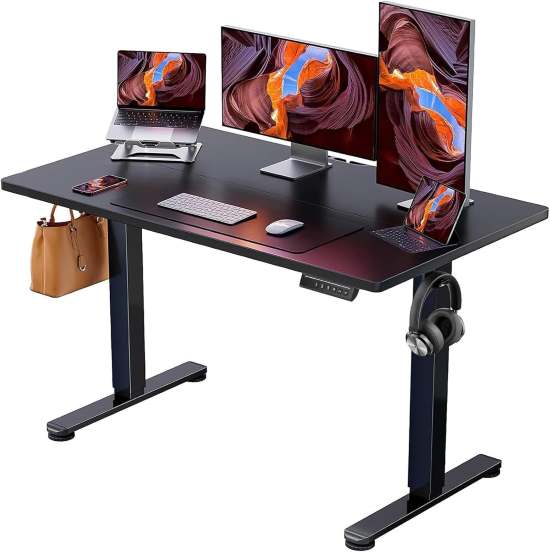
This desk feels like a genuine workspace upgrade rather than a basic riser. The motor operates quietly and transitions smoothly between sitting and standing heights. The desktop size accommodates dual monitors comfortably without feeling bulky.
Preset memory buttons simplify daily use, especially for shared spaces. Stability remains solid at standing height, though minor wobble can appear if pushed against uneven floors. The assembly process takes patience but feels manageable with clear instructions.
It suits remote workers and professionals who switch positions throughout the day. Maintenance involves occasional screw tightening and cable management to prevent snagging. Users with extremely heavy setups might need additional stabilization, but overall performance feels dependable.
User Review — Melissa R.
The memory buttons made a bigger difference than expected. I switch positions several times daily without thinking. Assembly took time, but once set up, the desk feels stable and quiet.
Key Features
• Electric height adjustment supports seamless transitions without interrupting workflow
• Memory presets reduce repetitive adjustments especially in shared workspaces
• Moderate desktop size fits dual monitors while preserving room for accessories
• Quiet motor operation maintains focus even during frequent movement
• Stable frame design supports daily use though floor leveling may be necessary
Pros and Cons
| Pros | Cons |
| Smooth quiet motor movement | Assembly requires patience |
| Memory presets simplify switching | Minor wobble uneven floors |
| Comfortable dual monitor surface | Limited heavy load tolerance |
Amazon Basics Adjustable Computer Monitor Riser
Minimalist riser with reliable stability
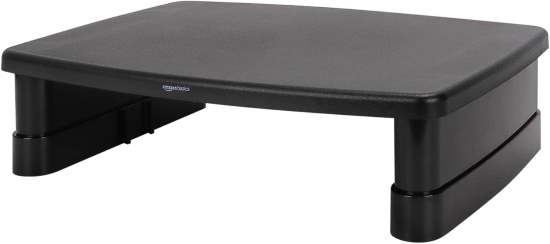
This riser emphasizes simplicity. The plastic frame feels lightweight yet stable for typical monitors or laptops. Height adjustment relies on stackable columns, which makes it more of a static ergonomic tool than a dynamic sit stand solution.
The surface accommodates office accessories while improving screen height for better neck alignment. It fits well in corporate settings where subtle ergonomic upgrades matter. Cleaning involves basic wipe downs since dust gathers around the plastic joints.
It works best for users seeking posture correction without needing full standing functionality. Those wanting frequent transitions may find the adjustment process too manual.
User Review — Sarah L.
I needed something simple to raise my monitor, and this worked perfectly. It feels sturdy and helped reduce neck strain. I do not adjust the height often, so the design suits me fine.
Key Features
• Stackable columns allow ergonomic positioning with minimal setup complexity
• Lightweight build supports portability across workstations or study areas
• Wide platform accommodates monitor accessories improving workflow organization
• Stable base reduces typing vibration during everyday tasks
• Low maintenance plastic surface simplifies cleaning though joints collect dust
Pros and Cons
| Pros | Cons |
| Lightweight portable design | Limited dynamic adjustment capability |
| Stable everyday monitor support | Plastic aesthetic feels basic |
| Quick ergonomic improvement solution | Dust gathers around joints |
SAIJI Adjustable Portable Foldable Laptop Desk
Flexible portable desk for relaxed work
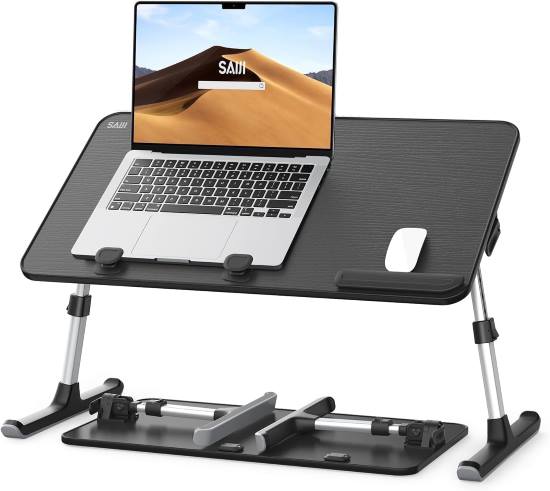
This foldable desk feels designed for comfort rather than strict productivity. Adjustable legs and tilting surfaces make it suitable for bed, sofa, or floor use. The cushioning underneath improves stability on soft surfaces.
Its portability stands out. Folding it flat makes storage easy, though the hinge mechanism benefits from occasional tightening. The tilting platform works well for reading and writing but may feel less stable for intensive typing sessions.
Students, casual users, and flexible workers benefit most. Heavy professional setups might outgrow it quickly, yet it excels as a secondary workstation.
User Review — Kevin M.
I use this on the couch for evening work sessions. The adjustable angles help with reading and writing. It is not ideal for long typing sessions, but it works great for casual use.
Key Features
• Adjustable leg height supports varied seating positions improving comfort flexibility
• Tilting surface enhances reading and tablet use though typing stability varies
• Foldable frame simplifies storage for small living spaces
• Cushioned base protects legs and bedding during extended use
• Lightweight portability enables multi room use with occasional hinge maintenance
Pros and Cons
| Pros | Cons |
| Highly portable foldable design | Less stable heavy typing |
| Comfortable soft surface support | Limited professional workspace capacity |
| Adjustable reading angle flexibility | Hinges need occasional tightening |
Claiks Electric Standing Desk
Stable electric workstation for daily productivity
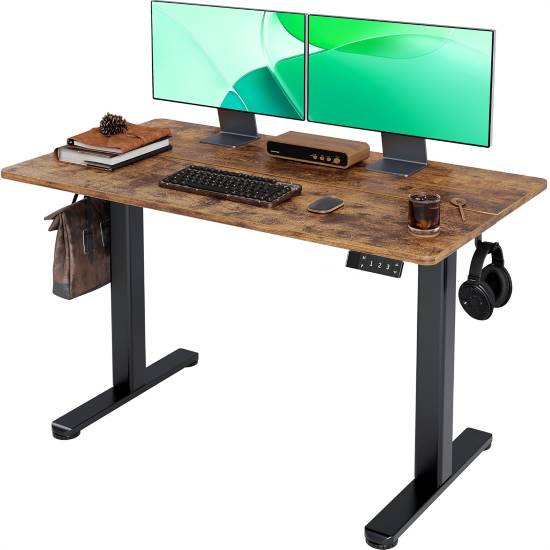
This desk balances affordability with dependable stability. The motor transitions smoothly, and the frame feels sturdier than many entry level electric desks. The surface size accommodates standard work setups without dominating small rooms.
Assembly takes moderate effort, though instructions feel clear. Daily use reveals consistent performance with minimal noise. Cable routing becomes important to avoid tangling during movement.
It suits professionals and students working long hours who want posture flexibility. Maintenance includes routine tightening and motor care. Users seeking premium finishes might find the aesthetic simple, but functionality remains strong.
User Review — James P.
I work from home full time and needed something reliable. The desk moves smoothly and feels stable. Setup took time, but daily use has been hassle free.
Key Features
• Electric height adjustment supports regular posture changes improving long term comfort
• Sturdy frame enhances standing stability reducing distraction during typing
• Moderate desktop size fits essential equipment without overcrowding rooms
• Quiet motor ensures minimal disruption in shared environments
• Simple control panel streamlines operation though design remains basic
Pros and Cons
| Pros | Cons |
| Strong stable standing performance | Basic visual design finish |
| Smooth quiet motor operation | Assembly requires time |
| Good daily productivity balance | Limited advanced features |
Monitor Stand Riser Adjustable Ergonomic Desktop Computer Stand
Ergonomic riser with practical storage layout
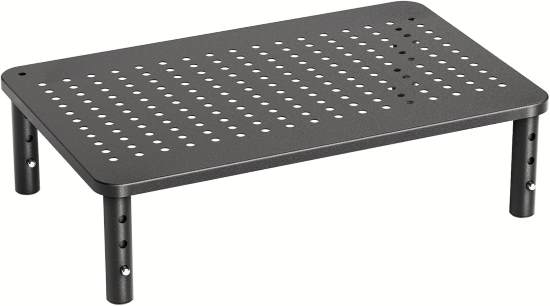
This riser combines posture improvement with organization benefits. The adjustable legs allow several height options, and the storage compartments keep accessories accessible. The build feels durable with minimal flex.
It works well in shared desks or study spaces where organization matters. Cleaning requires attention to storage areas where dust can collect. Frequent adjustment is possible but less convenient than electric options.
Users seeking a tidy desk with ergonomic benefits will appreciate its design. Heavy multi monitor setups may push its limits.
User Review — Olivia T.
The extra storage compartments made my desk feel organized instantly. I adjusted the height once and left it there. It feels sturdy and supports my monitor comfortably.
Key Features
• Adjustable leg system improves viewing angles supporting neck comfort
• Integrated storage compartments organize accessories reducing clutter
• Durable construction supports daily monitor use with minimal flex
• Compact footprint suits small desks while maintaining functionality
• Simple adjustment mechanism offers flexibility though not quick transitions
Pros and Cons
| Pros | Cons |
| Useful storage organization layout | Adjustment not quick daily |
| Sturdy ergonomic monitor support | Limited heavy monitor capacity |
| Compact tidy desk footprint | Storage collects dust easily |
Veken Electric Standing Desk Adjustable Height Computer Desk
Quiet electric desk with streamlined controls
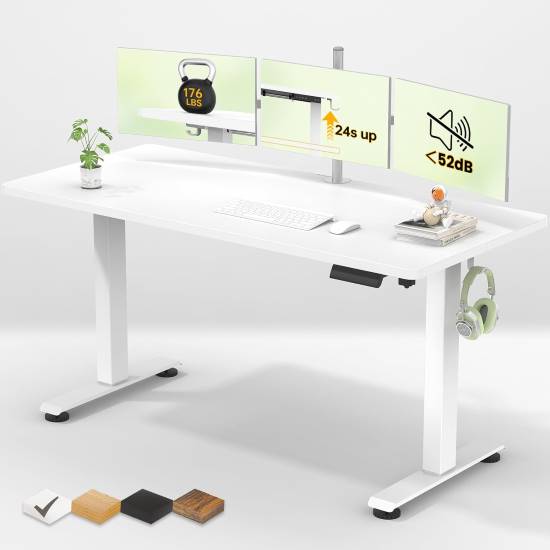
This desk delivers smooth movement and an easy learning curve. The control panel feels intuitive, and transitions remain quiet even during frequent adjustments. The desktop supports standard office setups with comfortable spacing.
Stability holds up well for normal use, though extremely heavy equipment may introduce slight movement. Assembly requires time but follows a logical process. Regular maintenance involves checking connections and managing cables.
It fits remote workers and hybrid setups looking for reliable posture changes without complexity. Users wanting premium finishes may look elsewhere, yet performance remains practical.
User Review — Rachel S.
I like how quiet the motor is. I switch between sitting and standing throughout the day without distraction. Assembly took an evening, but the desk works smoothly now.
Key Features
• Quiet motor supports distraction free adjustments during work sessions
• Simple control panel improves usability reducing learning time
• Moderate surface size fits daily equipment without overwhelming rooms
• Stable frame handles typical office loads though heavy setups may wobble
• Consistent movement enhances ergonomic habits with minimal effort
Pros and Cons
| Pros | Cons |
| Quiet smooth height transitions | Limited heavy equipment stability |
| Easy intuitive control panel | Assembly takes moderate time |
| Comfortable everyday workspace size | Basic aesthetic design |
FEZIBO Electric Standing Desk Adjustable Height Computer Workstation
Balanced electric desk with flexible configurations
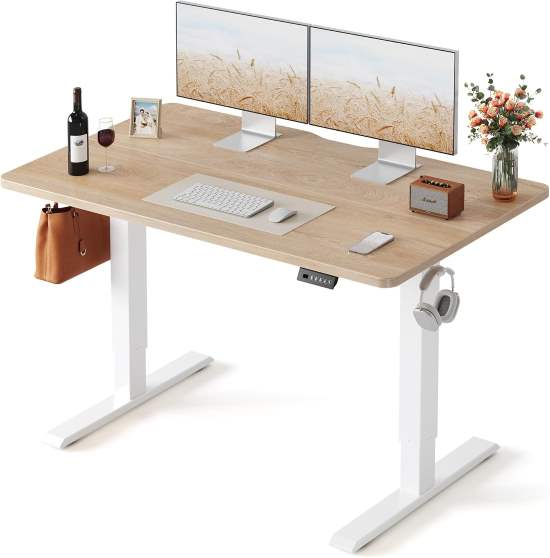
This desk offers a balanced experience between stability and flexibility. The motor responds quickly, and the frame supports standing work with confidence. Some configurations include accessory hooks or cable management, improving daily usability.
Assembly feels manageable, though careful alignment helps prevent wobble. Daily use highlights reliable transitions and a comfortable surface area. Maintenance mainly involves periodic tightening and motor care.
It suits users who want an adaptable desk with optional organizational features. Extremely compact spaces might find the footprint slightly large.
User Review — Mark D.
I appreciate the accessory hooks and smooth movement. It took time to assemble, but the desk feels stable and comfortable for long workdays.
Key Features
• Responsive motor enables quick posture changes improving workflow rhythm
• Optional organizational accessories enhance usability reducing desk clutter
• Stable frame supports extended standing sessions with minimal vibration
• Spacious surface accommodates multi device setups though space planning matters
• Consistent adjustment performance supports ergonomic routines with simple upkeep
Pros and Cons
| Pros | Cons |
| Stable extended standing comfort | Larger footprint small rooms |
| Useful accessory organization options | Assembly requires careful alignment |
| Smooth responsive motor control | Limited premium design appeal |
Adjustable Sit-Stand Desk Buying Guide
What Actually Matters Before Choosing
Core performance factors
Height adjustment range and stability define daily usability. A desk that reaches proper standing height without wobble supports long work sessions. Many buyers focus only on movement speed, but stability matters more for typing comfort and monitor safety. Long term satisfaction depends on how natural position changes feel.
Material quality and durability
Frame material affects both longevity and perceived sturdiness. Steel frames usually outlast lighter materials, while desktop surfaces influence resistance to scratches and moisture. Buyers often overlook joint strength and fasteners, yet these areas determine how the desk ages after repeated adjustments.
Comfort and usability considerations
Control panels, memory presets, and adjustment mechanisms influence workflow flow. A desk that requires effort to adjust discourages posture changes. Users sometimes underestimate how small usability details shape daily habits. Comfort also includes desk depth, which affects monitor distance and wrist positioning.
Maintenance and ownership effort
Electric desks require occasional tightening and cable management. Manual risers demand less mechanical care but may collect dust in joints or storage areas. Buyers frequently assume maintenance will be negligible, yet small routine checks preserve stability and noise levels over time.
Environmental compatibility
Room size, flooring, and nearby furniture affect desk performance. Electric desks need clearance for height changes, while portable desks require stable surfaces. Many buyers overlook floor leveling, which can introduce wobble even in well built desks. Matching the desk to the environment prevents frustration.
Safety considerations
Weight capacity and motor reliability protect equipment and users. Overloading desks stresses frames and reduces lifespan. Buyers often focus on surface size while ignoring load limits. Safe operation ensures smooth adjustments without sudden drops or instability.
Common Buyer Mistakes
Many buyers assume electric desks always outperform manual risers. In reality, simple risers can meet posture needs with less maintenance. Evaluating adjustment frequency helps determine the right approach.
Another common mistake involves choosing desks solely based on surface size. Larger surfaces feel appealing but may overwhelm small rooms. Measuring workspace clearance prevents cramped setups.
Buyers also underestimate assembly complexity. Electric desks often require careful alignment, and rushed setups can lead to wobble. Reviewing assembly expectations improves long term satisfaction.
Ignoring cable management creates daily frustration. Height changes can tug on cables, leading to clutter or damage. Planning cable routing improves usability.
Some users expect standing desks to solve all discomfort issues. Ergonomic benefits depend on proper monitor placement and movement habits. A desk alone cannot replace good posture practices.
Another mistake involves overlooking weight capacity. Heavy monitors or desktop PCs can strain frames. Matching equipment weight to desk limits ensures durability.
Finally, buyers sometimes prioritize aesthetics over function. A visually appealing desk may lack stability or ergonomic range. Balancing design with usability leads to better results.
How to Match Products to Specific Needs
Casual users benefit from monitor risers or portable desks. These options improve posture without major investment or assembly effort. They work well for occasional work sessions and study routines.
Heavy daily users require stable electric desks with smooth adjustment. Frequent position changes demand reliable motors and sturdy frames. Long term comfort depends on consistent performance rather than advanced features.
Small spaces favor compact risers or foldable desks. Portability and storage flexibility matter more than surface size. These solutions help maintain adaptable living areas.
Budget conscious buyers focused on longevity should prioritize build quality over features. A simple sturdy desk often outlasts feature rich alternatives. Evaluating frame material and joint design improves value perception.
Advanced users with multi monitor setups benefit from larger electric desks. Stability and surface depth support complex workflows. Matching load capacity and cable management features ensures smooth integration.
Discover Also:
Can You Use an Under-Desk Elliptical on a Carpet in the Office?
Best Ways to Clean the Foot Pedals of a Desk Elliptical in the Office
Conclusion
Affordable adjustable desks and risers offer meaningful ergonomic improvements without overwhelming complexity. The right choice depends less on features and more on daily habits, workspace size, and adjustment frequency.
Monitor risers suit posture correction and desk organization, while electric desks support full sit stand routines. Evaluating stability, usability, and long term maintenance helps narrow options effectively.
Consider how often you plan to switch positions and how much space your setup requires. That clarity makes selecting a practical desk far easier and ensures consistent comfort over time.
FAQs
Are budget standing desks reliable for daily use
Yes, many entry level electric desks provide consistent performance when assembled and maintained properly.
Do monitor risers count as sit stand solutions
They improve posture but do not enable full standing work like adjustable desks.
How often should I switch between sitting and standing
Experts generally suggest changing position every 30 to 60 minutes for comfort.
Are portable laptop desks suitable for full time work
They work best for casual or flexible sessions rather than intensive daily productivity.
Do electric standing desks require maintenance
Yes, occasional tightening and cable management help preserve stability and motor performance.