
Key Takeaways
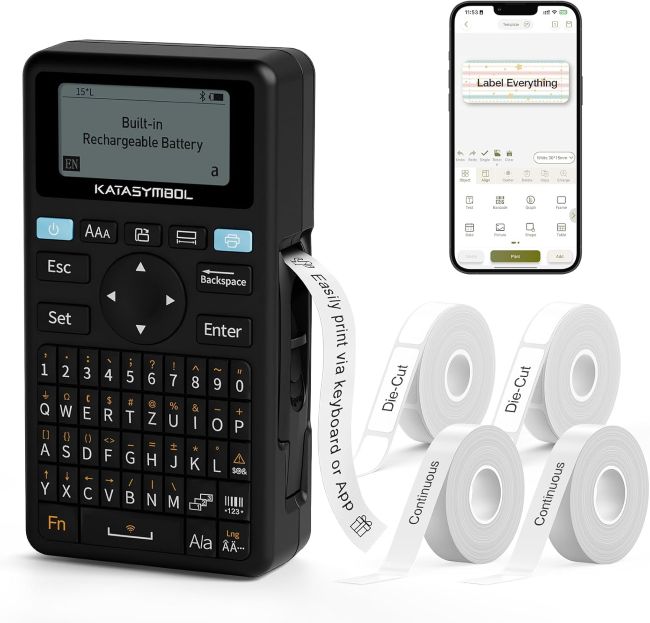
- The SUPVAN E11 label maker combines a built-in QWERTY keyboard with Bluetooth app connectivity, letting you print quick labels directly or design more elaborate ones through your phone.
- Its companion app unlocks 30+ fonts, 50+ frames, and 660+ icons, along with support for 17 languages, all free to use without a subscription.
- Minimal margin printing trims label borders to just 0.2 inches, roughly half the margin of many competing label makers, which reduces wasted tape.
- A 1200 mAh rechargeable battery provides up to a month of typical use per charge, though some buyers report needing to recharge more often than expected.
- It works with both continuous and die-cut label tapes, but only genuine SUPVAN tape is compatible with the device.
- Real buyer feedback is generally positive, with some noting a learning curve for the app and print speeds that feel adequate rather than especially fast.
A label maker earns its keep by making organization faster, not by adding another gadget you need to figure out. The best ones balance quick, no-fuss printing for everyday labels with enough design flexibility to handle more creative or detailed projects when you need them. Striking that balance well is harder than it sounds, especially at a mid-range price point.
The SUPVAN E11 takes a dual-approach strategy to solve this, pairing a built-in keyboard for fast, direct printing with a full-featured Bluetooth app for anyone who wants more control over fonts, icons, and layout. That combination has made it a popular pick for home organizers, small office use, and anyone tired of choosing between simplicity and customization.
Product at a Glance
SUPVAN E11 label maker
| Attribute | Details |
|---|---|
| Printing Methods | Built-in QWERTY keyboard or Bluetooth app |
| App Fonts & Icons | 30+ fonts, 50+ frames, 660+ icons |
| Battery | 1200 mAh rechargeable, up to 1 month per charge |
| Weight & Size | 0.5 lb, 5.7″ x 2.9″ x 1.3″ |
| Print Margin | 0.2 inches |
| Tape Compatibility | Genuine SUPVAN continuous and die-cut label tape only |
Detailed Review
Why This Product Stands Out
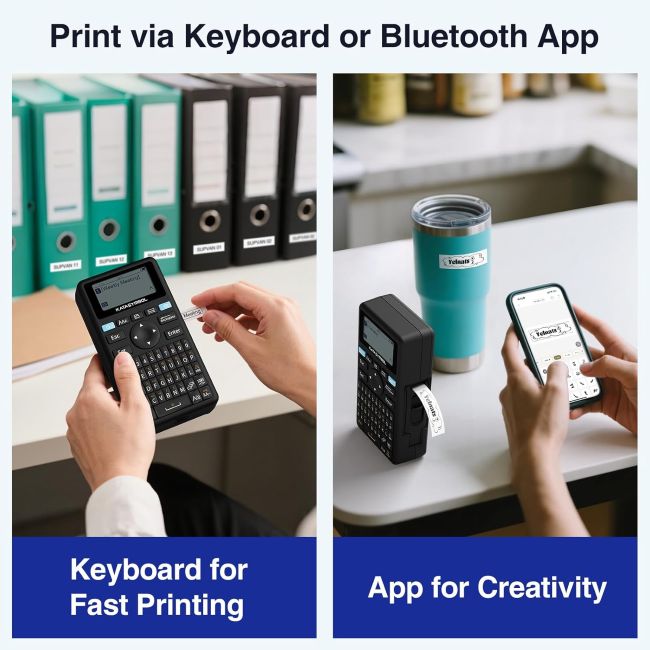
Many label makers force a choice between a simple, keyboard-only device or a more limited app-only design. The SUPVAN E11 offers both printing methods on the same device, letting you type and print a quick label directly on the keyboard for speed, or switch to the Katasymbol app when you want access to its full library of fonts, icons, and frames.
That flexibility matters directly for anyone whose labeling needs vary day to day, handling a fast pantry label one moment and a more detailed, icon-based organizational label the next, without needing two separate devices.
Key Specifications
| Spec | Value |
|---|---|
| Printing Technology | Thermal, inkless |
| Charging | USB-C |
| App Name | Katasymbol |
| Supported Label Types | Continuous and die-cut/fixed-size |
| Additional App Features | Barcode/QR code generation, image insertion |
| Languages Supported | 17, including Spanish and French |
Design & Build Quality
At just 0.5 lb and a compact 5.7 x 2.9 x 1.3 inch footprint, the E11 is genuinely easy to keep on a desk or toss in a bag for on-the-go labeling. The built-in QWERTY keyboard sits directly on the device, which several users specifically point to as a convenient feature for fast, frequent labeling without needing to pull out a phone every time.
The minimal margin printing design, at roughly 0.2 inches compared to the 0.4-inch margins common on competing label makers, means less wasted tape on every label you print, which adds up in savings over regular use.
Materials & Construction
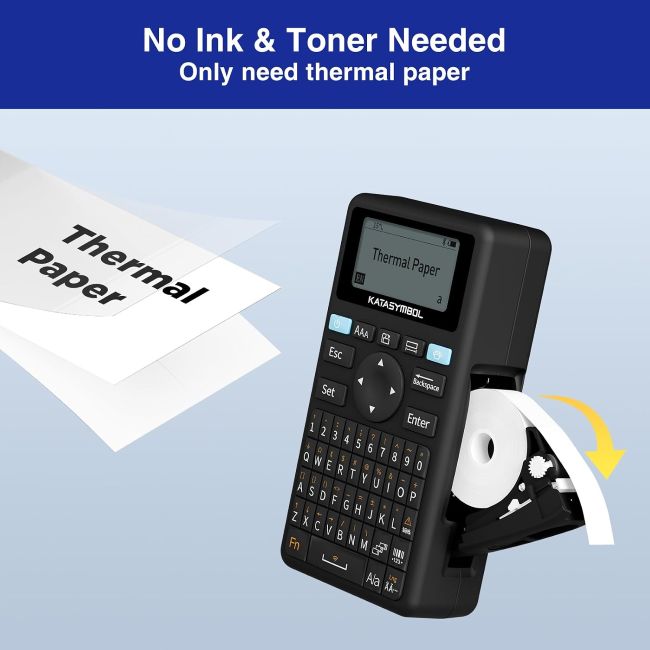
The E11 uses thermal printing technology, eliminating the need for ink or toner cartridges and simplifying long-term maintenance to just keeping tape stocked. It’s built specifically to work with genuine SUPVAN tape, supporting both continuous rolls for custom-length labels and die-cut, fixed-size labels for batch printing tasks.
Performance
The Katasymbol app significantly expands what the E11 can do beyond basic text labels, adding barcode and QR code generation along with simple image insertion, features not typically found on entry-level label makers in this price range. Combined with 660+ icons and 50+ frames, the app gives users real creative range for organizing everything from kitchen containers to office files.
Real buyer feedback on print speed is mixed: some users describe it as decent for regular use, while others note it feels slower than expected for larger batches of labels. Similarly, while the 1200 mAh battery is rated for up to a month of typical use, some reviewers report needing to charge more frequently than that estimate suggests, particularly with heavier daily use.
Comfort / Usability
Printing directly from the keyboard is straightforward once set up, letting you type and print in seconds for quick, frequent labeling tasks. The app requires a bit more of a learning curve; several users note the interface takes some initial exploration to feel fully intuitive, though most describe getting comfortable with it fairly quickly.
Features Explained
Dual printing methods matter because they let you choose the right tool for the task, keyboard printing for speed, app-based design for detail, rather than being locked into a single workflow regardless of what a given label actually needs.
Minimal margin printing matters because it directly reduces the amount of tape wasted on every label, which becomes a meaningful cost and efficiency difference over months of regular use.
Barcode and QR code generation matters because it extends the E11’s usefulness beyond basic home organization into small business or office inventory applications where scannable labels add real functional value.
Real World Usage
A common use case is labeling kitchen containers and pantry items using quick keyboard-printed text labels, then switching to the app for more detailed organizational projects like labeling file folders with custom icons or color-coded frames. Small business or home office users also take advantage of the app’s barcode and QR code features for basic inventory tracking or asset labeling.
Benefits
- Dual keyboard and app printing methods cover both quick and detailed labeling needs
- Extensive app library of fonts, icons, and frames supports genuine customization
- Minimal margin printing reduces tape waste over time
- Barcode and QR code generation adds functional value beyond basic labeling
- Compact, lightweight design supports portable, on-the-go use
Limitations
- Only compatible with genuine SUPVAN tape, limiting third-party tape options
- Some buyers report the battery draining faster than the advertised one-month estimate
- The companion app has a learning curve, with not every feature immediately intuitive
Who Should Buy It?
This label maker fits home organizers, small office users, and anyone who wants both quick keyboard printing and more advanced app-based design in a single device. It’s a strong option for users who want features like barcode generation without stepping up to a dedicated industrial labeling system.
Who Should Avoid It?
Buyers who already have a stockpile of a different brand’s tape should factor in the cost of switching to genuine SUPVAN tape, since the device won’t work with other tape brands. Anyone prioritizing the fastest possible print speed for high-volume batch labeling may want to compare speeds carefully, since some users note the E11 feels adequate rather than especially fast.
Comparison with Similar Products
Compared to SUPVAN’s own E10 model, the E11 offers a similar core feature set, keyboard and app printing, minimal margin design, with the E11 bundle specifically including 4 tapes and a slightly larger icon library in some listings. Compared to Brother’s PT-N10, which uses colorful Btag tape but lacks Bluetooth app connectivity, the SUPVAN E11 offers considerably more design flexibility and smart features at a comparable price point, trading Brother’s simpler operation for a steeper initial learning curve.
Key Features Table
| Feature | Why It Matters |
|---|---|
| Keyboard & App Dual Printing | Covers both quick labeling and detailed design needs |
| 660+ Icons, 50+ Frames, 30+ Fonts | Provides genuine customization for varied labeling projects |
| 0.2″ Minimal Margin Printing | Reduces tape waste compared to standard-margin label makers |
| Barcode/QR Code Generation | Extends usefulness into inventory and asset labeling |
| 1200 mAh Rechargeable Battery | Supports portable, cord-free use |
| Continuous & Die-Cut Tape Support | Adapts to both custom-length and batch label printing |
Pros & Cons Table
| Pros | Cons |
|---|---|
| Flexible dual printing methods | Only works with genuine SUPVAN tape |
| Extensive free app design library | Battery life varies from the advertised estimate for some users |
| Reduces tape waste with minimal margins | App has a learning curve at first |
| Barcode and QR code support | Print speed feels average rather than fast to some users |
Cleaning Tips
Wipe the exterior casing and keyboard with a soft, dry cloth to keep the device free of dust and residue from handling. Avoid liquid cleaners near the tape compartment or USB-C charging port to prevent internal damage.
Maintenance Tips
Keep the device charged regularly via USB-C rather than letting the battery fully deplete repeatedly, which supports more consistent long-term battery performance. Store spare SUPVAN tape rolls in a cool, dry place to preserve adhesive quality and print clarity.
Troubleshooting Tips
If the app doesn’t connect via Bluetooth, confirm that location services are enabled on your smartphone, since some Android devices require location permissions for Bluetooth pairing to complete successfully. If print quality seems inconsistent, check the battery level first, since low charge can affect thermal print consistency on battery-powered label makers.
What Real Buyers Appreciate
Buyer feedback on the SUPVAN E11 frequently highlights the convenience of having a built-in keyboard directly on the device, especially for users who label items frequently at both home and work. Reviewers also commonly mention the well-defined print quality and the practical value of supporting both fixed-size and continuous tape formats. That said, feedback isn’t uniformly positive: several buyers mention the battery needing more frequent charging than expected, and a few note the app’s interface takes some getting used to before every feature feels intuitive.
Frequently Asked Questions
Does the SUPVAN E11 require the app to print labels?
No, you can print directly from the built-in QWERTY keyboard for quick labels, or use the Katasymbol app via Bluetooth for more advanced design options.
How long does the battery last on a single charge?
It’s rated for up to one month of typical use, though some buyers report needing to charge more frequently depending on usage patterns.
Can I use third-party label tape with this device?
No, the SUPVAN E11 is only compatible with genuine SUPVAN label tape.
Does the app cost money to use?
No, the Katasymbol app and all its design features, including fonts, icons, and frames, are free to use without a subscription.
Can this label maker print barcodes or QR codes?
Yes, the companion app supports barcode and QR code generation in addition to standard text and icon labels.
What types of label tape does the E11 support?
It works with both continuous label tape for custom lengths and die-cut, fixed-size labels for batch printing.
Is the app easy to use for beginners?
Most users get comfortable with it fairly quickly, though several note the interface isn’t fully intuitive on the very first use.
How much tape margin does this label maker use?
It prints with approximately 0.2 inches of margin, about half the margin of many standard label makers, which reduces tape waste.
Final Verdict
The SUPVAN E11 delivers genuine value by combining fast keyboard printing with a feature-rich, free companion app, giving users flexibility that many label makers in this price range don’t offer. If you’re comparing the Best Affordable Label Maker, the SUPVAN E11 stands out for its minimal margin printing, extensive design library, and barcode capability. While battery life and app intuitiveness vary somewhat by user experience, these features make it a smart, well-rounded investment for home, office, and school organization.
Call To Action
If you want a label maker that adapts to both quick everyday labeling and more detailed design projects, the SUPVAN E11 is worth adding to your organization toolkit. Compare current pricing and tape bundle options to find the right setup for your labeling needs.