

In today’s fast-paced world, staying organized is more important than ever. Whether you’re managing a busy household, running a small business, or just trying to keep your workspace tidy, a reliable label maker can be a game-changer. The right tool not only saves time but also reduces stress and boosts productivity. With so many options available, choosing the best battery-powered label maker can feel overwhelming.
I remember the first time I used a label maker to organize my home office. Before that, I spent hours searching for documents, cables, and supplies. After labeling everything, I noticed a dramatic improvement in my workflow. Tasks that once took minutes now took seconds. If you’re ready to experience the same transformation, this guide will help you pick the perfect label maker for your needs.
Why You Need a Battery-Powered Label Maker
A battery-powered label maker offers flexibility and convenience. Unlike plug-in models, you can use it anywhere—whether you’re labeling storage bins in the garage, organizing your pantry, or managing inventory in a warehouse. According to recent studies, the global label makers market is expected to grow to $8.9 billion by 2033, reflecting their increasing popularity in both home and professional settings.
One of the biggest advantages is portability. You’re not limited by the length of a power cord, so you can label items on the go. This is especially useful for small business owners or anyone who needs to label items in different locations. Additionally, battery-powered models are often more compact, making them easier to store when not in use.
For example, I used the best battery powered label maker to label all my moving boxes during a recent relocation. The ability to print labels anywhere saved me countless trips back and forth to a power outlet.
Key Features to Look For
1. Print Quality and Speed
The quality of the labels your machine produces is crucial. Look for a model that offers clear, smudge-resistant text. Thermal printing is a popular choice because it doesn’t require ink, which means less maintenance and lower long-term costs. However, thermal labels can fade over time, especially when exposed to heat or sunlight.
Print speed is another important factor. If you have a lot of items to label, a faster print speed will save you time. Most modern label makers can print between 10 to 30 millimeters per second, which is sufficient for most home and office tasks.
2. Battery Life and Power Options
Since you’re opting for a battery-powered model, battery life is a top priority. Look for a label maker that uses rechargeable batteries or has a long battery life. Some models even come with a USB charging option, which is convenient if you’re often on the move.
Additionally, consider whether the label maker can also be powered by an AC adapter. This gives you the flexibility to use it plugged in when you’re working at a desk for extended periods.
3. Label Size and Customization
Different tasks require different label sizes. For example, labeling small cables might need narrow labels, while storage bins might require wider ones. Choose a label maker that supports a variety of label widths and lengths.
Customization options are also important. Can you change the font size, style, or add symbols? Some advanced models even allow you to print barcodes or QR codes, which can be useful for inventory management.
4. Ease of Use and Connectivity
A user-friendly interface is essential. Look for a label maker with a clear display and intuitive controls. Some models come with a QWERTY keyboard, which makes typing labels faster and easier.
Connectivity features, such as Bluetooth or Wi-Fi, can also enhance your experience. These allow you to create and print labels directly from your smartphone or computer, which is especially useful if you need to print a large number of labels or want to design custom labels with graphics.
Types of Battery-Powered Label Makers
Handheld Label Makers
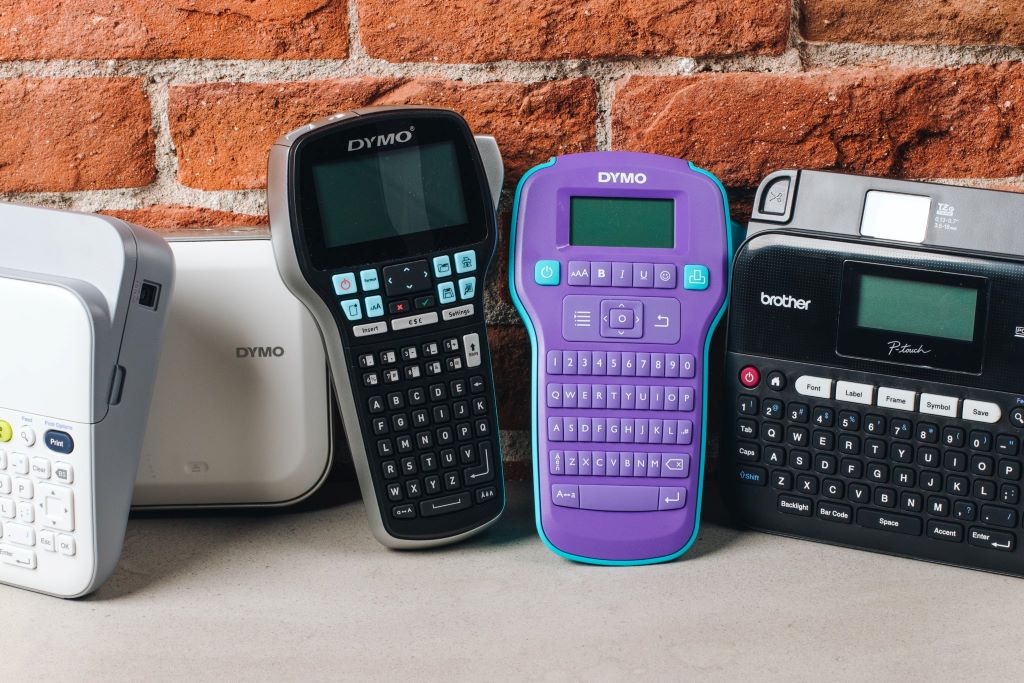
Handheld label makers are compact and easy to carry. They’re ideal for home use or small offices where you need to label items in different locations. These models are usually battery-powered and offer basic features like text formatting and simple graphics.
Desktop Label Makers
Desktop label makers are larger and more powerful. They’re designed for heavy-duty use, such as in offices or warehouses. While they’re not as portable as handheld models, they often come with advanced features like higher print speeds, larger label capacities, and more customization options.
Smart Label Makers
Smart label makers connect to your smartphone or tablet via Bluetooth or Wi-Fi. They’re perfect for tech-savvy users who want to create and print labels from their devices. These models often come with companion apps that offer additional features, such as label templates and cloud storage.
How to Choose the Right Model for Your Needs
For Home Use
If you’re using a label maker primarily for home organization, a handheld model is usually sufficient. Look for one that’s easy to use, offers a variety of label sizes, and has a long battery life. Customization options, such as different fonts and symbols, can also add a personal touch to your labels.
For Office Use
For office use, consider a desktop or smart label maker. These models offer faster print speeds and more advanced features, such as barcode printing and network connectivity. If you’re labeling a large number of items, such as files or inventory, a model with a high label capacity will save you time and effort.
For Small Businesses
Small business owners should look for a label maker that offers both portability and advanced features. A smart label maker with Bluetooth connectivity can be a great choice, as it allows you to print labels from your computer or smartphone. Additionally, look for models that support barcode or QR code printing, which can streamline inventory management.
Tips for Maximizing Your Label Maker’s Potential
Use Consistent Labeling Systems
Consistency is key when it comes to labeling. Use the same font, size, and style for all your labels to create a uniform look. This not only makes your space look more organized but also makes it easier to find items quickly.
Label Everything
Don’t limit yourself to just files and storage bins. Label cables, power strips, and even your kitchen pantry items. The more you label, the easier it will be to keep your space tidy and efficient.
Keep Your Label Maker Accessible
Store your label maker in a place where it’s easy to access. This encourages you to use it regularly and keeps your organization system up to date.
Conclusion
Choosing the best battery-powered label maker can transform the way you organize your home, office, or business. By considering factors like print quality, battery life, label size, and ease of use, you can find a model that perfectly suits your needs.
Investing in a quality label maker is an investment in efficiency and peace of mind. Whether you’re labeling moving boxes, organizing your pantry, or managing inventory, the right tool can make all the difference.
Ready to take the next step? Share your favorite labeling tips or ask any questions in the comments below. And if you found this guide helpful, don’t forget to share it with your friends and colleagues!
FAQs
What is the best battery-powered label maker for home use?
For home use, a handheld label maker with a long battery life and a variety of label sizes is ideal. Models like the DYMO LetraTag or Brother P-Touch are popular choices due to their ease of use and portability.
Can I print color labels with a battery-powered label maker?
Most battery-powered label makers print in black and white. However, some advanced models, like the Epson LabelWorks LW-PX800, offer color printing options.
How long do the batteries last in a battery-powered label maker?
Battery life varies by model. Most handheld label makers use AA or AAA batteries, which can last for several hours of continuous use. Rechargeable models typically offer longer battery life and can be charged via USB.
Are thermal labels durable?
Thermal labels are durable for indoor use but can fade over time when exposed to heat or sunlight. For outdoor use, consider using laminated or weather-resistant labels.
Can I connect my label maker to my smartphone?
Yes, many modern label makers offer Bluetooth or Wi-Fi connectivity, allowing you to create and print labels from your smartphone or tablet.