
Key Takeaways
- A compact, easy-to-use label maker from Brother’s popular P-Touch line, built for everyday home and home-office organization with a straightforward one-touch key layout.
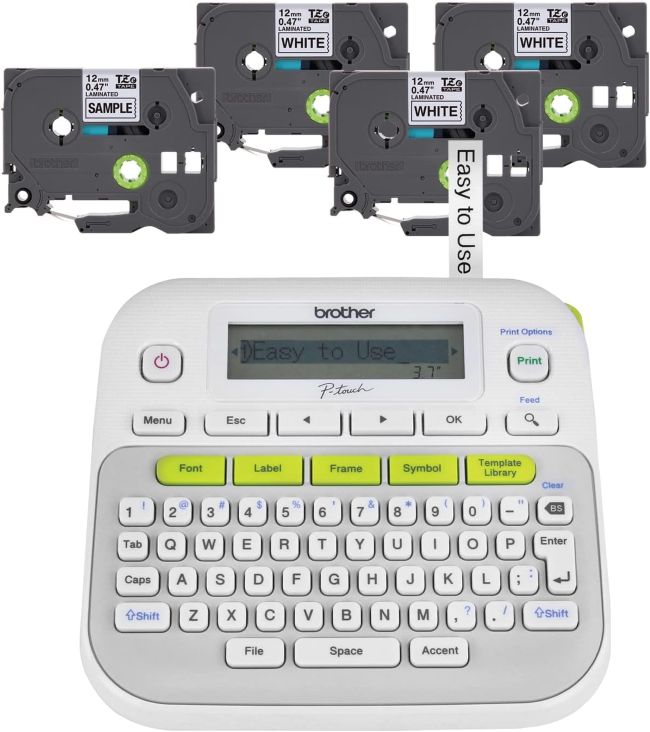
- The bundle includes four label tapes — one sample and three full-length black-on-white laminated TZe cassettes — giving buyers a generous starter supply that adds real value to the purchase.
- Prints on Brother’s laminated TZe tapes in four widths (3.5mm, 6mm, 9mm, and 12mm / up to ~1/2″), with tapes that are water-resistant, fade-resistant, and durable enough for indoor and outdoor use.
- Offers 27 preset label templates, multiple font styles and sizes, a large symbol library, and frame options — enough customization for most home and office labeling jobs.
- Compact, portable design operates on six AAA batteries or an optional AC adapter, with an optional protective carrying case available for on-the-go storage.
- Backed by Brother’s strong reputation in the label maker category, with the bundle offering a low total cost of entry for durable, professional-looking labels.
Introduction
There is a particular satisfaction that comes from turning a chaotic drawer or an unmarked shelf into a clearly labeled system. The right label maker makes that transformation fast, repeatable, and even a little fun. The Brother P-Touch PT-D210 is aimed squarely at that everyday organizational moment. It is not a professional or connected device; it is a compact, affordable, standalone label maker designed for the home, dorm, or small office where the goal is simple — produce clean, durable labels without a steep learning curve.
This review examines what the PT-D210 bundle does well, where it makes deliberate trade-offs to hit its price point, and whether its combination of compact size, one-touch formatting, and the included four-tape bundle makes it worth buying. The focus is on real-world usability: how it feels to operate, how the labels hold up, and how the total value compares once you account for the generous starter tape supply and the ongoing cost of refills.
Product at a Glance
Brother P-Touch PT-D210
| Feature | Details |
|---|---|
| Brand | Brother |
| Product type | Compact handheld/desktop label maker (bundle) |
| Model | P-Touch PT-D210 |
| Color | White/Gray |
| Print technology | Thermal transfer (laminated TZe tapes) |
| Tape widths | 3.5mm, 6mm, 9mm, 12mm (up to ~1/2″) |
| Tape types | Brother Genuine TZe laminated tapes, assorted colors and finishes |
| Display | Monochrome LCD |
| Keyboard | One-touch keys for fonts, symbols, frames, and templates |
| Preset templates | 27 |
| Font options | Multiple fonts, sizes, and styles |
| Symbols | Large built-in symbol library |
| Frame options | Multiple frame/border styles |
| Max lines | 2 |
| Power | 6 x AAA batteries or optional AC adapter (sold separately) |
| Optional accessories | Protective carrying case (CC-D210), AC adapter (AD-24) |
| In the box (bundle) | Label maker, 1 sample TZe tape, 3 full-length TZe black-on-white tapes |
| Warranty | 1 year limited |
| Best for | Home, dorm, and small office everyday organization |
Detailed Review
Why This Product Stands Out
The PT-D210 stands out for two reasons that work together. The first is its compact, genuinely portable design. Brother engineered this model to be small enough for any desk, shelf, or bag, with a one-touch key layout that keeps the most-used functions a single press away. For users who want a label maker they can pick up, use, and put away without fuss, the compact form factor is a real advantage over larger, more complex desktop machines.
The second reason is the bundle itself. The package includes one sample TZe tape and three full-length black-on-white laminated TZe tapes, which means a buyer can start a serious labeling project the day the box arrives without immediately buying refills. That starter supply is more generous than what most competing label makers include, and it meaningfully lowers the real cost of entry — the four tapes alone would cost a noticeable amount if purchased separately.
A Complete Starter Bundle
What separates a “label maker” from a “ready-to-label kit” is whether the user can actually start labeling with what is in the box. The PT-D210 bundle qualifies as a true starter kit because it ships with enough genuine laminated TZe tape to handle a household’s worth of file folders, storage bins, cables, and containers before the first refill is needed. The included tapes are black-on-white, the most versatile color combination, so there is no need to hunt for a specific color before beginning.

Key Specifications
- Print technology: Thermal transfer with automatic lamination
- Tape widths: 3.5mm, 6mm, 9mm, 12mm (up to ~1/2″)
- Tape compatibility: Brother Genuine TZe tapes (laminated, extra-strength, acid-free, cable/wire, fabric iron-on, and more)
- Display: Monochrome LCD for previewing labels before printing
- Keyboard: One-touch keys for fonts, symbols, frames, and templates
- Preset templates: 27 pre-designed labels for files, gifts, and decorative patterns
- Fonts: Multiple font styles and sizes
- Symbols: Large built-in symbol library
- Frames: Multiple frame and border styles
- Lines per label: Up to 2
- Power: 6 x AAA batteries or optional AC adapter (AD-24, sold separately)
- Optional case: Protective carrying case (CC-D210) for storage and portability
- Warranty: 1 year limited
Design & Build Quality
The PT-D210 has the clean, functional design Brother is known for across the P-Touch line. The white-and-gray housing is compact and lightweight, sized to fit on a desk, shelf, or in a bag between uses. There is nothing premium about the materials, but the fit is consistent, the cassette bay opens and closes cleanly, and the one-touch keys have a positive, responsive action.
Compact and Portable
The compact design is the headline feature, and it is genuinely useful. A label maker that is small enough to live on a desk or in a drawer is one that actually gets used, rather than being stored away and forgotten. The optional protective carrying case (CC-D210) adds storage for batteries and extra tapes, making the PT-D210 a practical choice for users who label in multiple locations — home, office, classroom, or craft room.
The One-Touch Key Layout
The keyboard uses dedicated one-touch keys for the most-used functions — fonts, symbols, frames, and templates. This keeps the learning curve short, since the controls you reach for most often are a single press away rather than buried in menus. For the short, everyday labels this device is built for, the one-touch layout is well matched to the task.
Materials & Construction
The body is a lightweight plastic shell that is rigid enough for a handheld device. The cassette compartment is the most important mechanical element, and Brother’s drop-in TZe cassette design is among the simplest in the category — the tape spool seats with a click, and the laminating mechanism is self-contained in the cassette, so there is no separate laminating unit to clean or maintain.
The button membrane is responsive and the navigation keys have a clear, tactile action. The build is consistent with Brother’s reputation for reliable, no-nonsense office equipment — not luxurious, but dependable. The TZe tape system itself is the strongest part of the construction story, since the laminated output is what gives the labels their exceptional durability.
Performance
In everyday use, the PT-D210 does what a label maker should: it produces clean, crisp, durable labels reasonably quickly, with formatting that is easy to control. The thermal transfer print quality is sharp for text at standard sizes, and the laminated output feels noticeably more substantial and professional than plain thermal labels.
Print Quality and Readability
Labels print with crisp, dark text against the tape background. At normal font sizes the text is sharp and easy to read; at the smallest sizes on the narrowest tapes legibility drops off, as you would expect. The range of font sizes gives you control over how much information fits on a label, and the two-line capability lets you stack a name and a date, or a category and contents, on a single piece of tape. The automatic lamination seals the print under a clear layer, so the text stays legible even when the label is handled, wiped, or splashed.
Tape Handling and the Margin Question
TZe cassettes load and swap easily — drop in the cassette, close the bay, and you are ready to print. The most frequently noted performance complaint is tape wastage: the PT-D210 leaves a margin of roughly 3/4 inch at the front and back of each label, even for very short text. A margin setting can reduce the waste somewhat, but the gap between the cassette and the cutter imposes a floor on how short a label can be. For users who print many small labels, this adds up to wasted tape over time, though the generous bundle helps offset the initial impact.
Comfort & Usability
The compact, one-hand-friendly shape is a genuine usability advantage. You can hold the device and operate the one-touch keys with the same hand, which is useful when you are standing in front of a shelf deciding what to label. The learning curve is short — most users report producing their first clean label within minutes of unboxing, and the 27 preset templates speed up common jobs like file folders, gift tags, and decorative labels.
The display is functional but has drawn criticism for contrast — some buyers find the on-screen text hard to read against the background, particularly in bright light. It shows enough to confirm what will print, but it is not a screen for designing elaborate labels. The biggest usability caveat is the battery-only default: six AAA batteries are not included, and the optional AC adapter is sold separately. For users who label in short bursts, batteries are fine; for longer sessions, the adapter is worth picking up.
Features Explained
Compact, Portable Design
The small footprint and light weight make the PT-D210 a label maker that actually gets used — it lives on a desk or in a bag rather than being stored away. The optional carrying case adds storage for tapes and batteries for on-the-go labeling.
One-Touch Formatting Keys
Dedicated keys for fonts, symbols, frames, and templates keep the most-used controls a single press away, making label creation fast and reducing the learning curve for new users.
Laminated TZe Tape System
TZe tapes print and laminate in one pass, sealing the text under a clear protective layer. The result is labels that resist water, fading, chemicals, and abrasion — durable enough to go from the freezer to the microwave to the dishwasher.
Four Tape Widths (3.5mm–12mm)
Support for four tape widths means one device handles everything from a tiny wire label to a wider shelf or bin label, adapting to the surface and the amount of text without changing machines.
27 Preset Label Templates
Pre-built templates cover common labeling jobs — file folders, gift tags, and decorative labels with patterns — so you can start a standard label with a single selection and customize from there.
Multiple Fonts, Sizes, Frames, and Symbols
A broad selection of fonts, sizes, frame styles, and symbols lets you tailor labels to their use, from a plain cable label to a styled gift tag. The depth of options is generous for a device at this price.
Two-Line Printing
Two-line capability lets you put more information on a single label — a category on the first line and contents or a date on the second.
Specialty Tape Compatibility
Beyond standard laminated tapes, the PT-D210 accepts extra-strength adhesive tapes for rough surfaces, acid-free tapes for photos, cable and wire tapes, and fabric iron-on tapes for clothing and linens — extending the device’s usefulness well beyond simple file labels.
Real World Usage
In a typical home or small office, the PT-D210 finds work in nearly every room. Kitchens benefit from dated food-container and pantry labels that survive the dishwasher. Home offices use it for file folders, binders, and cable identification. Closets and storage bins get labeled for seasonal rotation. Parents and students use it for school supplies and personal belongings. Crafters use it for gift tags and scrapbook pages. Small business owners use it for shelf labels and inventory bins.
The device is light enough to carry from room to room, and the one-touch keys mean anyone in the household can use it without instruction. The generous four-tape bundle means a new owner can tackle a substantial organization project before the first refill is needed, which is a meaningful practical advantage over label makers that ship with only a short sample tape.
Benefits
- Compact, portable design suits any desk, shelf, or bag and encourages regular use
- Bundle includes four TZe tapes (one sample plus three full-length), lowering the real cost of entry
- Laminated TZe tapes produce water-, fade-, and chemical-resistant labels for indoor and outdoor use
- One-touch keys keep fonts, symbols, frames, and templates a single press away
- 27 preset templates speed up common labeling jobs
- Supports four tape widths for versatile labeling
- Two-line printing fits more information on a single label
- Compatible with specialty tapes (extra-strength, acid-free, cable/wire, iron-on)
- Optional protective carrying case for on-the-go storage
- Backed by Brother’s established reputation and support network
Limitations
- Tape wastage: roughly 3/4″ margin at front and back of each label adds up over time
- Display contrast is weak — some buyers find the on-screen text hard to read
- Batteries and AC adapter are not included — an extra purchase either way
- No USB or Bluetooth connectivity — standalone operation only
- Maximum tape width of ~1/2″ (12mm) — wider labels require a higher model
- No PC or phone app integration for designing labels on a larger screen
- Locked into Brother’s proprietary TZe tape cassettes for ongoing supply
- Instructions can be unclear; some users recommend a quick video tutorial
Who Should Buy It
The PT-D210 bundle is a smart buy for anyone who wants a simple, affordable, portable label maker for everyday home, dorm, or small-office organization. It is ideal for users who value compact size, one-touch ease of use, and durable laminated labels, and who want enough starter tape to begin a real project immediately. Parents, students, home organizers, and small business owners doing moderate labeling volume will get strong value here — especially from the four-tape bundle, which meaningfully lowers the cost of getting started.
Who Should Avoid It
Users who need wider labels (over 1/2″) should step up to a higher Brother model. Anyone who wants to design labels on a computer or phone and send them to the printer should choose a connected model with USB or Bluetooth — the PT-D210 is a standalone device. Users who print a very high volume of tiny labels may find the fixed margins waste too much tape over time. And anyone sensitive to display contrast should test the screen before committing, since some buyers find it hard to read.

Key Features Table
| Feature | What It Means in Use |
|---|---|
| Compact, portable design | Lives on a desk or in a bag and gets used instead of being stored away |
| One-touch formatting keys | Fonts, symbols, frames, and templates are a single press away |
| 4-tape bundle (1 sample + 3 full-length) | Start a real labeling project the day you unbox, with low refill pressure |
| Laminated TZe tapes | Labels resist water, fading, chemicals, and abrasion for indoor and outdoor use |
| TZe tape widths 3.5mm–12mm | One device handles tiny cable labels to wider bin labels |
| 27 preset templates | Start common label jobs with a single selection |
| Multiple fonts, sizes, frames, symbols | Broad customization for any labeling need |
| 2-line printing | Stack a name and date or category and contents |
| Specialty tape compatibility | Extra-strength, acid-free, cable/wire, and iron-on tapes extend usefulness |
| Optional carrying case (CC-D210) | Store the device, batteries, and tapes for on-the-go labeling |
| Battery or AC adapter power | Use six AAA batteries or the optional AD-24 adapter |
| Brother reputation and support | Decades of reliability and a strong support network back the device |
Pros & Cons
Pros
- Compact, portable design that encourages regular use
- Bundle includes four TZe tapes — a generous, value-adding starter supply
- Laminated labels are durable enough for indoor and outdoor use
- One-touch keys make it easy for anyone to use without a learning curve
- 27 preset templates speed up common labeling jobs
- Supports four tape widths and specialty tapes for versatile labeling
- Two-line printing fits more information per label
- Affordable price point backed by Brother’s reputation
- Optional carrying case available for portability
Cons
- Tape wastage from fixed margins on every label
- Display contrast is weak and hard to read for some users
- Batteries and AC adapter not included
- No USB or Bluetooth — standalone operation only
- Maximum 1/2″ tape width limits label size
- Instructions can be unclear; a video tutorial helps
- Locked into proprietary Brother TZe tape cassettes
Setup & Usage Tips
- Pick up batteries or the AC adapter with the label maker. Six AAA batteries are not included; the optional AD-24 AC adapter is sold separately. Have power ready so you can label the day you unbox it.
- Start with the sample tape. Use the included sample TZe cassette to get comfortable with typing, formatting, and the cutter before moving on to the three full-length tapes.
- Use the one-touch keys. Fonts, symbols, frames, and templates each have a dedicated key — use them instead of hunting through menus for faster labeling.
- Adjust the margin setting to reduce tape waste. The PT-D210 leaves a fixed margin on each label; changing the margin setting in the menu trims the waste somewhat, though the cassette-to-cutter gap sets a floor.
- Use the 27 templates for common jobs. The preset templates cover file folders, gift tags, and decorative labels — start from a template and customize rather than building every label from scratch.
- Pick the right tape width. Use 3.5mm or 6mm for cables and small items, 9mm for file folders, and 12mm for shelves and bins — matching width to the surface keeps labels clean and legible.
- Clean and dry the surface first. Laminated TZe labels stick best to clean, dry, smooth surfaces; wipe the target area before applying for the strongest adhesion.
- Watch a quick video tutorial. Some buyers find the printed instructions unclear; a short video on loading the tape and using the one-touch keys gets you up to speed faster.
Care & Maintenance Tips
- Store the label maker in the optional carrying case. The CC-D210 case protects the device and holds spare tapes and batteries, keeping everything together for on-the-go use.
- Remove batteries for long storage. If you will not use the device for months, take the AAA batteries out to prevent leaks that can corrode the contacts.
- Clean the print head if prints fade. A soft, dry cloth on the print head removes adhesive residue and keeps prints crisp; consult Brother’s support guide if quality issues persist.
- Keep spare TZe cassettes on hand. Running out mid-project is the most common frustration; a spare black-on-white 12mm cassette covers most everyday jobs.
- Use only genuine Brother TZe tapes. Third-party cassettes can jam, print poorly, or lack the laminated durability the system is designed for.
- Close the cassette bay when not in use. This protects the print head from dust and keeps the tape path clean between sessions.
- Store tapes flat and away from heat. TZe cassettes store well at room temperature; avoid direct sunlight or hot cars, which can affect the adhesive and laminate.
What Real Buyers Appreciate
Buyers and reviewers consistently highlight several themes about the PT-D210:
- Easy to use with a short learning curve. Reviewers repeatedly call the device “easy to use” and note that intuitive navigation and one-touch keys let users create labels in seconds without technical frustration.
- Reliable and long-lasting. Buyers report using the PT-D210 for a long time with consistent performance, and many say it works really well for household and office organization.
- Good value, especially in the bundle. Multiple reviewers cite the affordable price and the included tapes as a key reason to buy, noting that the bundle lowers the real cost of getting started.
- Durable, professional-looking labels. Buyers praise the laminated TZe labels for sticking well to glass, wood, and plastic and for staying legible through handling and even dishwasher cycles.
- Compact and portable. The small size is repeatedly called out as a convenience that keeps the device accessible and easy to carry room to room.
- Versatile across tasks. Buyers use it for file folders, storage bins, cables and chargers, school supplies, gift tags, and scrapbook pages, praising its adaptability.
- Honest caveats noted. Some buyers report tape wastage from the fixed margins, weak display contrast that makes the screen hard to read, unclear instructions, and the cost of replacement tapes over time. These are fair, useful caveats rather than dealbreakers for most buyers.
Frequently Asked Questions
What tapes does the Brother PT-D210 use?
The PT-D210 uses Brother Genuine TZe laminated tapes in four widths: 3.5mm, 6mm, 9mm, and 12mm (up to ~1/2″). TZe tapes are available in a wide range of colors and finishes, including black-on-white, black-on-clear, and assorted color combinations. The PT-D210 also accepts specialty tapes such as extra-strength adhesive, acid-free, cable and wire, and fabric iron-on. Only genuine Brother TZe tapes are recommended for best print quality and laminated durability.
What comes in the PT-D210 bundle?
The bundle includes the PT-D210 label maker, one sample black-on-white TZe laminated label tape, and three full-length black-on-white TZe laminated label tapes. Batteries (six AAA) and the optional AC adapter are not included and must be purchased separately. Some bonus bundle variants (such as the PT-D210SV) also include a protective carrying case, an AC adapter, and additional sample tapes — check the specific package before buying.
Are the labels durable enough for outdoor or wet use?
Yes. TZe tapes are laminated, which makes them water-resistant, fade-resistant, and chemical-resistant. Labels survive splashes, wiping, and outdoor exposure far better than plain thermal labels, and can go from the freezer to the microwave to the dishwasher. For consistently wet or harsh environments, choose a wider or stronger-adhesive TZe tape and apply to a clean, dry surface.
Does the PT-D210 connect to a computer or phone?
No. The PT-D210 is a standalone label maker; it does not have USB or Bluetooth connectivity. All labels are designed and printed on the device itself using its keyboard, display, and built-in fonts, frames, and symbols. If you want to design labels on a computer or phone, look at Brother’s connected models such as the PT-D410 or PT-D610BT.
What power options does the PT-D210 support?
The PT-D210 runs on six AAA batteries or an optional AC adapter (model AD-24). Neither is included with the standard bundle, so plan to pick up batteries or the adapter at the same time you buy the label maker. An optional protective carrying case (CC-D210) is also available for storage and portability.
Final Verdict
The Brother P-Touch PT-D210 bundle earns its place as one of the best value everyday label makers by combining a compact, genuinely portable design with a generous four-tape starter supply and Brother’s durable laminated TZe tape system. The one-touch keys and 27 preset templates make it easy for anyone to produce clean, professional-looking labels within minutes, and the included tapes lower the real cost of entry enough that a new owner can tackle a substantial organization project before buying a single refill.
Its weaknesses are honest and well-documented: the fixed margins waste tape on every label, the display contrast is weak, batteries and the adapter are not included, and there is no computer or phone connectivity. If you’re comparing options for the Best Affordable Label Maker, these limitations are worth considering, especially if you need advanced connectivity or more efficient tape usage. None of them are fatal for the everyday organizer who wants durable labels from a standalone device they can keep close at hand. For that user, the PT-D210 bundle delivers the right features, the right portability, and the right starter value — and that makes its compact design genuinely worth it.
Call To Action
If you are ready to turn clutter into a clearly labeled system with a compact device you will actually keep within reach, the Brother P-Touch PT-D210 bundle is an affordable, easy-to-use label maker that ships with four laminated TZe tapes so you can start organizing the day it arrives. Pick one up with a pack of AAA batteries, choose your first project, and start labeling — a more organized home or office is just an afternoon away.