
Key Takeaways
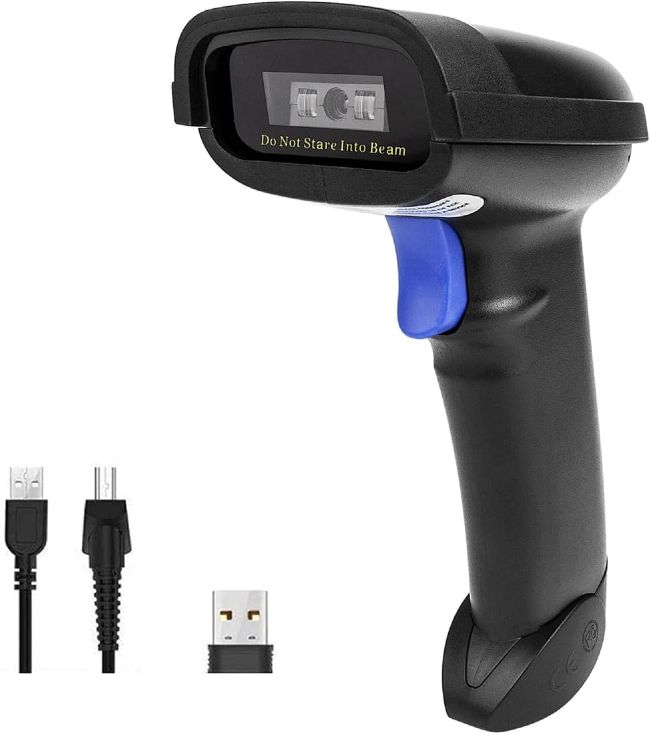
- The NETUM NT-1228BC barcode scanner supports three separate connection methods, Bluetooth, 2.4G wireless via USB dongle, and wired USB, giving it more flexibility than single-mode scanners.
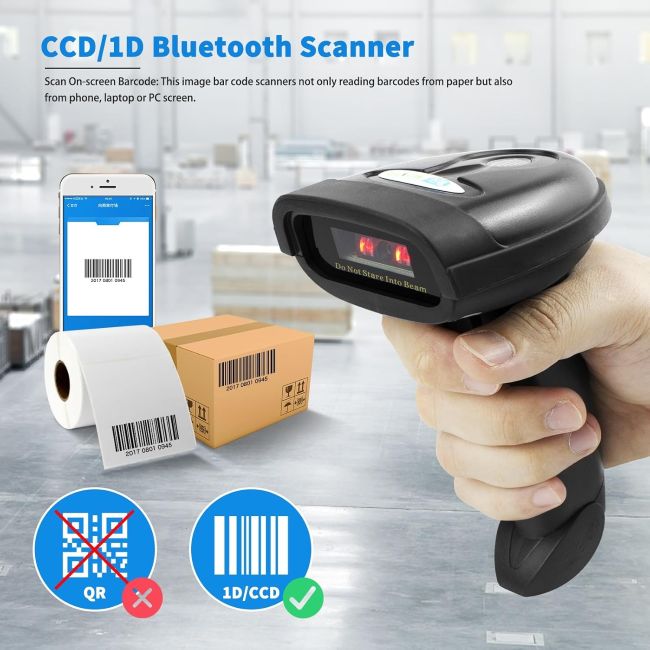
- Its 2500-pixel CCD sensor reads 1D barcodes directly from paper or from a screen, including smartphones, tablets, and computer monitors.
- A rechargeable battery supports up to 30 hours of continuous scanning, with a full recharge taking about 2 hours via USB.
- Storage mode lets the scanner hold up to 100,000 barcodes offline, useful for inventory work done outside Bluetooth or wireless range.
- It works across Windows, Mac, Android, iOS, and Linux, though it’s explicitly not compatible with Square POS systems.
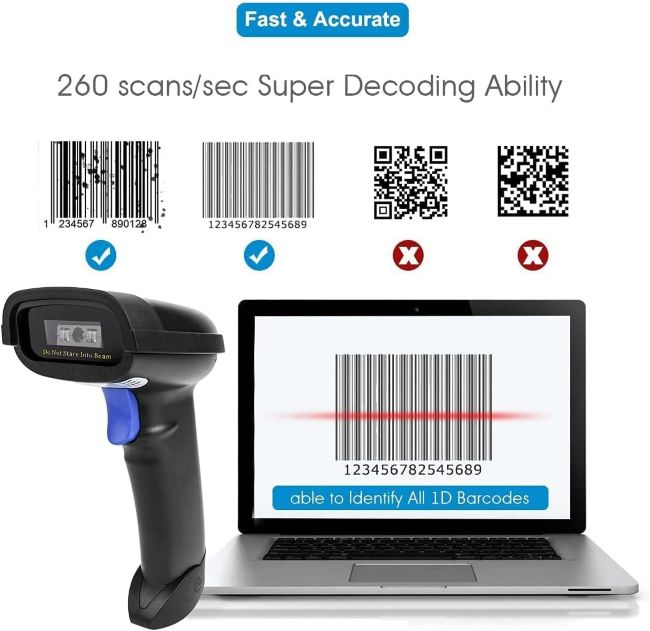
- This model reads only 1D and stacked barcodes, not 2D or QR codes, which is an important limitation to confirm against your specific use case before buying.
Introduction
Barcode scanners tend to fail buyers in one of two ways: locking them into a single, sometimes unreliable connection method, or struggling to read barcodes displayed digitally on a phone or tablet screen rather than printed on paper. Either limitation can turn a simple inventory or checkout task into a recurring frustration.
The NETUM NT-1228BC addresses both issues directly, combining three separate connectivity options with a CCD sensor specifically capable of reading barcodes off a screen as well as paper. That combination has made it a popular choice for small retail operations, warehouses, and mobile workers who need dependable scanning without being tied to one specific setup.
Product at a Glance
NETUM NT-1228BC barcode scanner
| Attribute | Details |
|---|---|
| Sensor Type | 2500-pixel CCD |
| Barcode Types | 1D and stacked barcodes (not 2D/QR) |
| Connectivity | Bluetooth, 2.4G wireless (USB dongle), wired USB |
| Battery Life | Up to 30 hours continuous scanning |
| Charge Time | Approximately 2 hours via USB |
| Offline Storage | Up to 100,000 barcodes in storage mode |
Detailed Review
Why This Product Stands Out
Many barcode scanners commit to a single connection method, typically Bluetooth alone, which becomes a problem the moment you’re working in an environment with Bluetooth interference or need to connect to a device without Bluetooth support. The NT-1228BC’s three-in-one connectivity design, Bluetooth, 2.4G wireless, and wired USB, gives you a reliable backup option regardless of what a specific work environment throws at you.
That flexibility matters directly for anyone using the scanner across multiple settings, like a retail counter one day and an inventory audit in a Bluetooth-congested warehouse the next.
Key Specifications
| Spec | Value |
|---|---|
| Scanning Modes | Manual trigger, continuous scan, auto-sensing |
| Bluetooth Modes Supported | HID, SPP, BLE |
| Operating Systems | Windows, Mac OS, Android, iOS, Linux |
| Languages Supported | English, Spanish, German, French, Italian, Japanese, and others |
| Barcode Symbologies | UPC-A/E, EAN-8/13, Code 128, Code 39, Code 93, Codabar, and more |
| POS Compatibility | Not compatible with Square POS |
Design & Build Quality
The CCD sensor is specifically engineered to read barcodes directly off a computer monitor, smartphone, or tablet screen, in addition to standard printed labels, which sets it apart from simpler laser scanners that only read printed barcodes reliably. That screen-reading capability also extends to scanning through glass surfaces or plastic shrink wrap, situations where standard laser scanners often struggle.
The compact, ergonomic housing is designed for comfortable extended handling, which matters directly for retail or warehouse workers using the scanner repeatedly throughout a full shift.
Materials & Construction
The scanner’s rechargeable battery is built to support extended continuous use, up to 30 hours per charge according to manufacturer specifications, reducing how often you need to interrupt work to recharge. USB charging keeps the process straightforward, typically restoring a full charge in about 2 hours.
Performance
The 2500-pixel CCD sensor decodes 1D and stacked barcodes quickly and accurately, including barcodes that are worn, damaged, faded, or printed with poor quality, which matters directly for real-world inventory conditions where labels aren’t always in pristine shape. Three available scanning modes, manual trigger, continuous, and auto-sensing, let you match the scanning behavior to your specific task, whether that’s deliberate one-at-a-time scanning or rapid continuous inventory counts.
Storage mode is a particularly useful performance feature, letting the scanner hold up to 100,000 barcodes internally when you’re working outside Bluetooth or wireless range, then upload the full batch once you reconnect to a device.
Comfort / Usability
Setup is designed to be straightforward: trigger the scan button and the device automatically begins the Bluetooth pairing process, with a solid blue light confirming a successful connection. The scanner also supports keyboard language configuration, ensuring barcode output matches your device’s keyboard settings for accurate data entry, an important detail for international or multilingual work environments.
Features Explained
Three-in-one connectivity matters because it removes the single point of failure that comes with relying on just one connection method, giving you Bluetooth for mobile convenience, 2.4G wireless for interference resistance, and wired USB as a dependable fallback.
Screen and paper barcode reading matters because it extends the scanner’s usefulness beyond traditional printed labels to digital boarding passes, mobile coupons, and other barcodes displayed on a screen rather than printed.
100,000-barcode storage mode matters because it lets you continue working productively in areas without reliable Bluetooth or wireless connectivity, then sync your data in bulk once you’re back in range.
Real World Usage
A common use case is a small retail store using the scanner in Bluetooth mode at the checkout counter for daily sales, then switching to storage mode during a periodic inventory count in stockroom areas where a wireless signal doesn’t reliably reach. Mobile workers also rely on the scanner’s ability to read barcodes directly off a phone screen, useful for verifying digital tickets, coupons, or shipping confirmations without needing a printed copy.
Benefits
- Three connectivity options provide reliable backup regardless of environment
- CCD sensor reads barcodes from both paper and digital screens
- Long battery life supports a full workday of continuous scanning
- Storage mode enables offline barcode collection for later syncing
- Broad symbology support covers most common 1D barcode formats
Limitations
- Reads only 1D and stacked barcodes, not 2D or QR codes
- Not compatible with Square POS systems
- Bluetooth range can be more limited in environments with physical obstructions
Who Should Buy It?
This scanner fits small retail businesses, warehouses, and mobile inventory workers who need dependable 1D barcode scanning with flexible connectivity options. It’s a strong choice for anyone who occasionally works outside stable Bluetooth or wireless range and needs offline storage capability.
Who Should Avoid It?
Businesses needing to scan 2D barcodes or QR codes, common in modern ticketing, marketing, or mobile payment systems, should look at a scanner specifically built for that format instead. Square POS users should also confirm compatibility carefully, since this model explicitly does not work with that platform.
Comparison with Similar Products
Compared to Bluetooth-only barcode scanners from competing brands, the NT-1228BC’s added 2.4G wireless and wired USB options give it more reliable fallback connectivity in challenging environments. Compared to 2D-capable scanners, this model trades broader barcode format support for a more affordable price point focused specifically on reliable 1D and stacked barcode reading.
Key Features Table
| Feature | Why It Matters |
|---|---|
| Three-in-One Connectivity | Provides reliable backup across Bluetooth, wireless, and wired setups |
| 2500-Pixel CCD Sensor | Reads barcodes accurately from both paper and screens |
| 100,000-Barcode Storage Mode | Enables offline scanning with later bulk data sync |
| Three Scanning Modes | Adapts to manual, continuous, or automatic scanning needs |
| Up to 30-Hour Battery Life | Supports a full workday without frequent recharging |
| Broad Symbology Support | Covers most common 1D barcode formats out of the box |
Pros & Cons Table
| Pros | Cons |
|---|---|
| Flexible three-mode connectivity | Limited to 1D and stacked barcodes only |
| Reads barcodes from screens as well as paper | Not compatible with Square POS |
| Long battery life for extended use | Bluetooth range affected by physical obstructions |
| Offline storage mode for up to 100,000 barcodes | No 2D or QR code support |
Cleaning Tips
Wipe the scanner’s exterior and sensor window with a soft, dry cloth to keep the CCD sensor free of dust or smudges that could affect scan accuracy. Avoid liquid cleaners near the USB charging port or sensor window to prevent internal damage.
Maintenance Tips
Keep the scanner charged regularly rather than letting the battery fully deplete repeatedly, which supports more consistent long-term battery performance. Periodically check for firmware updates or configuration barcodes in the manual if you notice inconsistent scanning behavior, since reprogramming settings can resolve certain performance issues.
Troubleshooting Tips
If the scanner won’t pair via Bluetooth, confirm it’s in discoverable mode with the blue indicator flashing, and check that your device’s Bluetooth settings show “Netum Bluetooth” in the list of available devices. If output text doesn’t match your keyboard layout, reconfigure the scanner’s keyboard language setting to match your computer’s, since mismatched language settings can cause incorrect characters during scanning.
What Real Buyers Appreciate
Buyer feedback on the NETUM NT-1228BC frequently highlights its multi-mode connectivity as a genuine practical advantage over Bluetooth-only competitors, particularly for users who’ve dealt with Bluetooth interference in busy retail or warehouse environments. Reviewers also commonly mention the scanner’s accuracy reading damaged or poorly printed barcodes as consistently reliable across various lighting conditions. Some buyers note the 1D-only limitation as a drawback if their workflow later expands to include QR codes, which is worth considering carefully based on your specific and future scanning needs.
Frequently Asked Questions
Can the NETUM NT-1228BC scan QR codes?
No, this model reads only 1D and stacked barcodes; it cannot decode 2D or QR codes.
What connection options does this scanner support?
It supports three methods: Bluetooth, 2.4G wireless via USB dongle, and wired USB connection.
How long does the battery last?
It supports up to 30 hours of continuous scanning on a full charge, which typically takes about 2 hours via USB.
Does this scanner work with Square POS?
No, the NT-1228BC is explicitly not compatible with Square POS systems.
Can it read barcodes displayed on a phone or computer screen?
Yes, its CCD sensor is specifically designed to read 1D barcodes from screens as well as printed paper.
What operating systems does this scanner work with?
It’s compatible with Windows, Mac OS, Android, iOS, and Linux.
Does the scanner work without an active Bluetooth or wireless connection?
Yes, its storage mode can hold up to 100,000 barcodes offline for later bulk upload once reconnected.
Is this scanner good for a small retail business?
Yes, its flexible connectivity, long battery life, and reliable 1D barcode reading make it a practical choice for small retail and inventory management, provided Square POS compatibility isn’t required.
Final Verdict
The NETUM NT-1228BC delivers genuine practical value through its three-mode connectivity and reliable CCD sensor capable of reading barcodes from both paper and screens. If you’re also exploring workplace technology, Best Leading Biometric Attendance Machines for Businesses offers another useful resource for businesses looking to streamline employee attendance tracking. While its 1D-only barcode support and Square POS incompatibility are worth confirming against your specific needs beforehand, it remains a smart, dependable buy for small businesses and mobile workers who prioritize flexible, reliable scanning over broader barcode format support.
Call To Action
If you need a dependable, flexible barcode scanner that adapts to different connectivity environments, the NETUM NT-1228BC is worth adding to your business toolkit. Compare current pricing and bulk purchase options to find the right fit for your inventory or retail setup.