
Key Takeaways
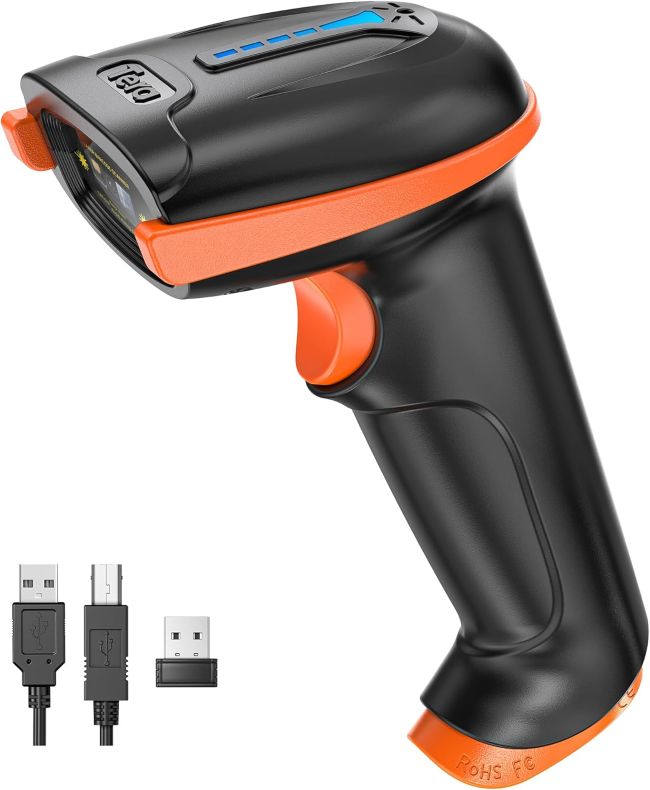
- The Tera 5100 is a 1D laser barcode scanner with a versatile 2-in-1 design: it works as a 2.4GHz wireless scanner with the included USB receiver, or as a USB 2.0 wired scanner with the included cable — no driver installation needed.
- Wireless range reaches up to 328 feet in a barrier-free environment and roughly 30–100 feet indoors, giving genuine freedom to roam a warehouse, library, or stockroom away from the host PC or laptop.
- A 32-bit decoding engine reads at speeds up to 300 scans per second and handles damaged, fuzzy, reflective, and smudged barcodes, supporting virtually all common 1D symbologies including Code 39, Code 128, EAN-13, UPC-A, and Interleaved 25.
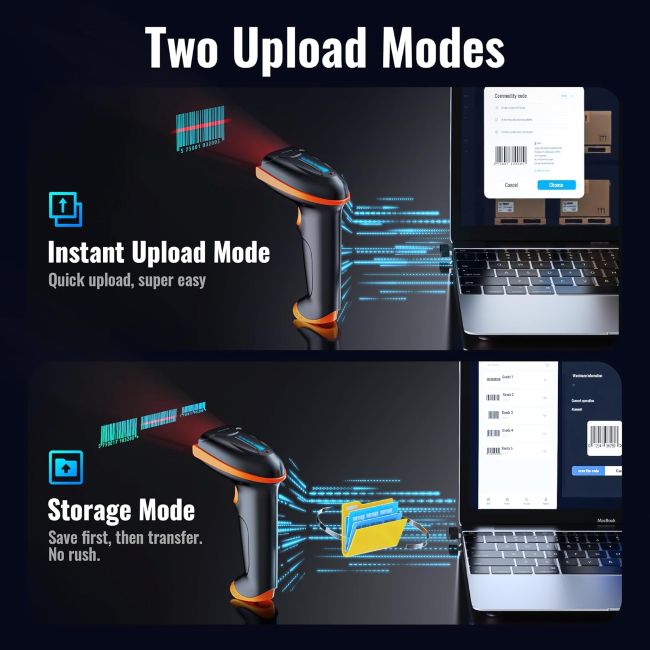
- Two scanning modes (Key Trigger and Continuous) and two upload modes (Instant Upload and Storage) let you tailor the scanner to selective scanning or high-volume batch work, with customizable prefixes and suffixes.
- An orange anti-shock silicone cover protects against drops from up to 6.56 feet, and IP54 sealing guards against dust, making it suited to retail, warehouse, library, and logistics use.
- A built-in battery level indicator, adjustable audio and tactile feedback, and a rechargeable battery round out the practical feature set.
- Buyer feedback is strongly positive on ease of setup, scanning speed, and durability, with the main caveats being occasional defective units, the need to program certain barcode types, and the 1D-only limitation.
Introduction
Manual data entry is slow, error-prone, and genuinely painful at volume — which is why anyone running a shop, a warehouse, a library, or a small logistics operation eventually reaches for a barcode scanner. The question is whether you need an expensive enterprise device or whether a budget-friendly handheld can handle the job. The Tera 5100 Wireless Barcode Scanner targets exactly that middle ground: a 1D laser scanner that offers both 2.4GHz wireless and USB wired connectivity, a long transmission range, a robust drop-resistant build, and plug-and-play setup, all at a price that leaves room in the budget. Tera positions it as a versatile tool for retail stores, supermarkets, warehouses, libraries, and small offices, and the spec sheet reads that way — a 32-bit decoding engine, multiple scanning and upload modes, and an IP54 dust-resistant housing wrapped in an anti-shock silicone cover.
The trade-off, of course, is the cut type. The 5100 reads 1D (linear) barcodes only, so it won’t help with QR codes or other 2D symbologies, and it connects to PCs and laptops via the 2.4GHz dongle rather than to smartphones or tablets via Bluetooth. This review pulls together the manufacturer’s specifications, the feature set, and genuine buyer feedback to help you decide whether the Tera 5100 genuinely simplifies daily scanning for your situation, or whether the savings and wireless convenience come at too high a cost in capability.
Product at a Glance
Tera 5100 Wireless Barcode Scanner
| Specification | Details |
|---|---|
| Scanner type | 1D laser (linear) barcode reader |
| Connectivity | 2-in-1: 2.4GHz wireless + USB 2.0 wired |
| Wireless range | Up to 328 ft barrier-free; 30–100 ft indoors |
| Host compatibility | PC and laptop via USB receiver (not smartphones/tablets) |
| Decode speed | Up to 300 scans per second |
| Decoding engine | 32-bit CPU |
| Barcode support | Codabar, Code 11, Code 39, Code 93, Code 128, EAN-8, EAN-13, EAN-128, UPC-A, ISBN, MSI, Industrial 25, Interleaved 25, Standard 25, Matrix |
| Difficult-barcode handling | Reads damaged, fuzzy, reflective, and smudged barcodes |
| Scanning modes | Key Trigger Mode, Continuous Mode |
| Upload modes | Instant Upload, Storage Mode |
| Customization | Adjustable prefixes and suffixes |
| Battery | Rechargeable, with battery level indicator |
| Feedback | Adjustable audio beep and tactile vibration (each can be disabled) |
| Drop protection | Orange silicone cover rated for 6.56 ft drops |
| Ingress protection | IP54 (dust resistant) |
| Setup | Plug and play, no driver installation |
| Target use | Retail, warehouse, library, logistics, small office |
Detailed Review
Why This Product Stands Out
The barcode scanner market is crowded with look-alike handhelds that all claim “wireless” and “plug and play,” so standing out requires more than a spec list. The Tera 5100 differentiates itself on three points: a genuine 2-in-1 design that lets you switch between cordless 2.4GHz operation and USB wired operation with the same device, a long wireless range that gives real freedom to roam away from the host computer, and a ruggedized build with an orange silicone cover and IP54 sealing that survives the kind of knocks a warehouse or retail floor dishes out. Together these turn barcode scanning from a tethered, delicate chore into something you can do anywhere in the room.
Buyer feedback reinforces that the scanner earns its place in real work settings. A library worker reported using three of these scanners to inventory an entire library in three months, a Pack & Ship store clerk uses one all day, and reviewers consistently describe it as “really simple to use” with setup that’s a genuine “plug and play” experience. That combination of wireless freedom, decoding speed, and drop-resistant build is exactly what makes it feel like a step above the cheapest wired scanners while staying well below the price of an enterprise device.
Key Specifications
The scanning engine is a 1D laser reader built around a 32-bit CPU with a decode speed rated up to 300 scans per second. That speed is more than fast enough for manual trigger scanning and comfortably handles the Continuous Mode, where the scanner auto-reads barcodes presented to it for high-volume work. The supported symbology list covers virtually all common 1D barcodes — Codabar, Code 11, Code 39, Code 93, Code 128, EAN-8, EAN-13, EAN-128, UPC-A, ISBN, MSI, and the Industrial/Interleaved/Standard 2-of-5 variants — and the engine is specifically rated to read damaged, fuzzy, reflective, and smudged barcodes, which is a meaningful real-world advantage on worn shipping labels and faded product tags.
Connectivity is the headline feature: a 2-in-1 design supporting both 2.4GHz wireless and USB 2.0 wired operation. The wireless range reaches up to 328 feet in a barrier-free environment and roughly 30–100 feet indoors, which is substantial for a scanner in this price bracket. The 2.4GHz dongle connects to any PC or laptop with a USB port, but the scanner does not support Bluetooth and is not designed for smartphones or tablets — an important compatibility boundary to understand before buying.
Design & Build Quality
Handheld Form Factor
The 5100 is built around a classic handheld pistol-grip design familiar to anyone who has used a retail or warehouse scanner. The trigger falls naturally to hand, the body is balanced enough for extended use, and the overall size is large enough to grip comfortably without being so big that it’s unwieldy. The control layout is simple — a trigger, a volume/feedback adjustment accessible via the included programming booklet, and a USB port for charging and wired operation. There’s no learning curve, which suits the small-business and casual-user audience it targets.
Ruggedized Construction
The defining build feature is the orange anti-shock silicone cover that wraps around the scanner body. Tera rates the cover to withstand drops of up to 6.56 feet, which should handle most accidental falls from a counter or scanning station to a hard floor. Beneath the cover, the housing carries an IP54 rating for dust resistance, helping protect the internal electronics from dust and fine debris commonly found in warehouses, stockrooms, and loading areas. The construction feels functional rather than premium, but it suits the demanding environments where the scanner is designed to operate—an advantage over many budget scanners with exposed plastic housings.
Materials & Construction
The scanner body is a plastic housing with the laser engine and decoding board inside, sheathed in the removable orange silicone cover that provides the drop protection and grip. The USB receiver is a small dongle that stays plugged into the host computer, and the package includes a USB charging cable that doubles as the wired connection cable. The materials are standard for this price tier — nothing feels over-engineered, but nothing feels flimsy in a way that would worry a careful user. The silicone cover is the standout material choice because it directly addresses the most common failure mode for handheld scanners: drops. Tera notes that the scanner is quality-tested before shipping, so a few scuffs from testing may be present — a normal and harmless detail.
Performance
Scanning Speed and Accuracy
Loaded with a clear, standard 1D barcode, the 5100 performs the way buyers describe: the laser locks on quickly, the beep (or vibration, if you’ve switched the audio off) confirms the read, and the data lands in whatever field has focus on the host computer. The 32-bit engine and 300-scans-per-second rating translate into a scanner that feels instant in normal use, and the ability to read damaged, fuzzy, reflective, and smudged barcodes is a genuine real-world advantage that shows up on worn shipping labels and faded product tags. The laser is strong enough to penetrate clear bags and some glass, according to buyer feedback, which matters in retail and logistics where items are often wrapped.
Wireless Range in Practice
The 328-foot barrier-free rating is the ceiling; indoors, with walls, shelving, and metal racks in the way, expect 30–100 feet of reliable range. That’s still substantial — enough to walk a warehouse aisle or scan a shelf across a stockroom without dragging a cable — and it’s the feature that makes the wireless mode genuinely useful rather than a gimmick. The 2.4GHz connection is stable within range, and the plug-and-play USB receiver means there’s no pairing ritual or driver installation to worry about.
Battery Life and Charging
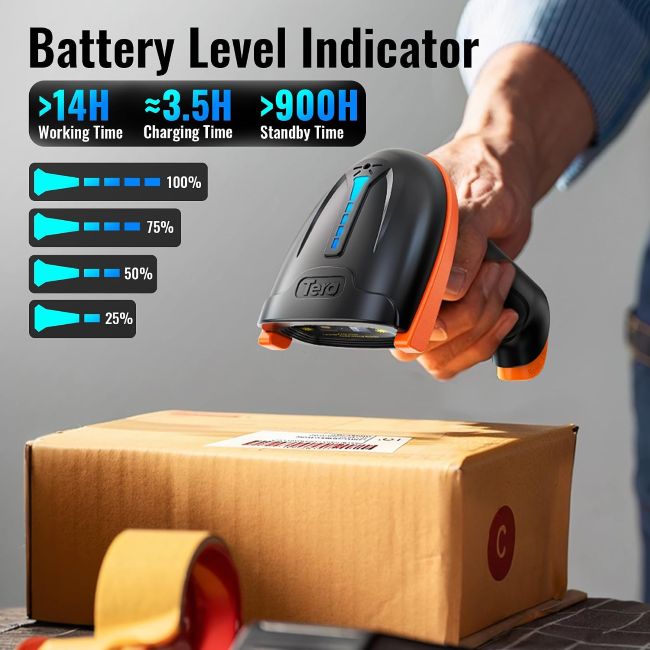
The rechargeable battery can support a full day of typical scanning, while the built-in battery level indicator lets you check the charge at a glance using a dedicated barcode in the manual. When the battery runs low, the included USB cable lets you recharge the scanner from a USB port or compatible charger. The same cable also supports wired mode, giving you a reliable connection when you need to scan while tethered or cannot use the wireless dongle. This dual-purpose cable adds practical flexibility and helps ensure you always have a way to stay connected.
Comfort & Usability
Day-to-day usability is one of the scanner’s genuine strengths. Plug the receiver into a PC and it works — no drivers, no software, no app to install. The data simply types into whatever field has focus, as if you’d entered the barcode number on a keyboard, which means it integrates with any application that accepts keyboard input: spreadsheets, POS software, inventory apps, library systems, and web forms. The two scanning modes (Key Trigger for selective scanning, Continuous for high-volume auto-scanning) and two upload modes (Instant for real-time entry, Storage for batch scanning when you’re out of range) cover virtually every workflow.
The adjustable audio and tactile feedback — each can be disabled independently — is a thoughtful touch for quiet environments like libraries. The main usability caveat is symbology configuration: certain barcode types (Interleaved 2 of 5 is the one buyers mention most) may need programming via the included booklet before they scan correctly, which is a setup step rather than a defect.
Features Explained
2-in-1 Wireless and Wired Connectivity
The same scanner works as a cordless 2.4GHz device with the USB receiver or as a USB 2.0 wired device with the included cable. In practice this means you can roam wirelessly for warehouse and retail work, then switch to wired mode for a stationary POS station or when the battery is low — all without buying a second scanner.
Long Wireless Range
Up to 328 feet barrier-free and 30–100 feet indoors gives genuine room to move. For warehouse aisles, library stacks, and stockroom shelves, that range is the difference between a scanner that frees you from the desk and one that merely removes the cable.
1D Laser Decoding
The laser engine reads virtually all common 1D symbologies and is rated for damaged, fuzzy, reflective, and smudged barcodes. It’s a proven, fast technology for linear barcodes, though it won’t read 2D codes like QR — a key limitation to understand before buying.
Two Scanning Modes
Key Trigger Mode fires the laser when you press the trigger, giving precise control for selective scanning. Continuous Mode keeps the laser active and auto-reads any barcode presented, ideal for high-volume rapid scanning at a packing station or checkout.
Two Upload Modes
Instant Upload Mode sends each scan to the host immediately, behaving like a keyboard. Storage Mode batch-scans barcodes into the scanner’s memory when you’re out of wireless range and uploads them later, which is invaluable for warehouse inventory work away from the computer.
Customizable Prefixes and Suffixes
You can program the scanner to add characters before or after each barcode — a tab, an enter, a custom prefix — so the output drops cleanly into your software’s expected format without manual editing. This is a power feature usually found on more expensive scanners.
Drop Protection and IP54 Sealing
The orange silicone cover absorbs impact from drops up to 6.56 feet, and the IP54 rating keeps dust out of the internals. For a device that lives on a retail counter or warehouse shelf, these are the features that determine how long it survives.
Battery Level Indicator
A dedicated barcode in the manual lets you scan to check the battery level, so you’re not caught off guard by a dead scanner mid-shift. It’s a small feature, but it directly addresses a common pain point with rechargeable scanners.
Real World Usage
In a typical small-business setting—scanning products at checkout, logging shipments at a packing station, or counting inventory on shelves—the Tera 5100 performs much as expected. Plug the receiver into your PC, start scanning, and the scanner sends the numbers to your software just like keyboard input. The wireless range lets you move around the workspace without dragging a cable, while the protective cover helps handle occasional drops. Storage mode also lets you batch-scan items along a warehouse aisle before returning to upload the data.
The scanner does have one clear limitation: it only reads 1D barcodes. If your products use QR codes or Data Matrix codes, you’ll need a 2D imager instead. Some buyers also report that certain 1D symbologies require initial programming, with Interleaved 2 of 5 being one example. Tera’s tech support, however, receives positive feedback for helping users configure the scanner. For everyday retail and logistics tasks involving printed labels, shipping barcodes, and product tags, the laser scanner offers reliable performance once you complete the initial setup.
Benefits
- Genuine 2-in-1 wireless and wired operation from a single device.
- Long wireless range (up to 328 ft barrier-free) gives real freedom to roam.
- Fast 32-bit decoding at up to 300 scans per second.
- Reads damaged, fuzzy, reflective, and smudged barcodes.
- Drop protection to 6.56 ft and IP54 dust sealing for rugged environments.
- Two scanning modes and two upload modes cover virtually every workflow.
- Customizable prefixes and suffixes for clean software integration.
- Plug-and-play setup with no driver installation.
- Battery level indicator and rechargeable battery for all-day use.
- Adjustable audio and tactile feedback for quiet environments.
Limitations
- 1D barcodes only — cannot read 2D codes such as QR or Data Matrix.
- Connects to PC and laptop only; no Bluetooth for smartphones or tablets.
- Certain symbologies (e.g., Interleaved 2 of 5) may require programming out of the box.
- Occasional defective units reported, including a beeping/no-laser failure mode.
- Laser must be roughly aligned with the barcode; not omnidirectional.
- Cannot scan “red bars on white background” or “black bars on blue background.”
- Needs white space after the last bar of a barcode to read reliably.
Who Should Buy It
The Tera 5100 suits small businesses, retail stores, warehouses, libraries, and logistics operations that primarily use 1D barcodes and want wireless freedom without the cost of an enterprise-grade scanner. If you scan printed labels, shipping barcodes, product SKUs, or library tags and need to move away from your computer, its 328-foot range, storage mode, and rugged build provide plenty of practical flexibility. The plug-and-play setup also eliminates the need for drivers or additional software, while the wireless and wired modes let you switch between scanning configurations as needed.
Who Should Avoid It
If your products use 2D barcodes — QR codes, Data Matrix, or PDF417 — the 1D laser engine simply won’t read them, and a 2D imager scanner is the right tool. If you need to scan into a smartphone or tablet rather than a PC or laptop, the lack of Bluetooth makes this the wrong pick; look for a Bluetooth-enabled scanner instead. And if you need an omnidirectional scanner that reads barcodes from any angle without aiming, a 2D imaging scanner will serve you better than this single-line laser.
Key Features Table
| Feature | What It Means for You |
|---|---|
| 1D laser engine | Fast, accurate reading of linear barcodes (not 2D/QR) |
| 2-in-1 connectivity | Use wirelessly or wired with the same device |
| 2.4GHz wireless | Cable-free operation with the included USB receiver |
| Up to 328 ft range | Roam a warehouse or stockroom away from the PC |
| USB 2.0 wired mode | Scan tethered or when the battery is low |
| 300 scans/sec | Fast decoding for high-volume work |
| Difficult-barcode support | Reads damaged, fuzzy, reflective, smudged labels |
| Key Trigger + Continuous modes | Selective or automatic scanning as needed |
| Instant + Storage upload modes | Real-time entry or batch scanning out of range |
| Custom prefixes/suffixes | Tailor output to your software’s format |
| Orange silicone cover | Drop protection from up to 6.56 ft |
| IP54 rating | Dust resistance for warehouse and retail environments |
| Battery level indicator | Check charge via a dedicated barcode |
| Adjustable feedback | Audio beep and/or vibration, each can be disabled |
| Plug and play | No driver installation; works like a keyboard |
Pros & Cons
Pros
- Genuine 2-in-1 wireless and wired operation in one affordable device.
- Long wireless range for real roaming freedom.
- Fast decoding that handles damaged and smudged barcodes.
- Ruggedized build with drop cover and IP54 dust sealing.
- Two scanning modes and two upload modes cover most workflows.
- Customizable prefixes and suffixes for clean software integration.
- Plug-and-play setup with no drivers.
- Battery level indicator and all-day rechargeable battery.
Cons
- 1D only — cannot read QR codes or other 2D barcodes.
- No Bluetooth; PC/laptop only, not smartphones or tablets.
- Some symbologies need programming out of the box.
- Occasional defective units with a beeping/no-laser failure.
- Not omnidirectional; the laser must be aimed at the barcode.
- Certain color combinations (red-on-white, black-on-blue) won’t scan.
Setup & Usage Tips
- Plug in the USB receiver before turning on the scanner. This ensures the host recognizes the device before the scanner tries to pair, giving a clean plug-and-play experience.
- Test with a known barcode first. A quick test confirms the scanner is transmitting and the host field is receiving, so you catch any setup issues before real work.
- Read the programming booklet for your symbology. Most 1D barcodes work out of the box, but types like Interleaved 2 of 5 may need a configuration scan to enable.
- Choose the right scanning mode. Key Trigger Mode for selective scanning, Continuous Mode for high-volume rapid work where the scanner auto-reads anything presented.
- Use Storage Mode for out-of-range work. Batch-scan barcodes into memory while walking a warehouse aisle, then return to upload — a feature that makes the wireless range genuinely useful.
- Set your prefixes and suffixes. If your software expects a tab or enter after each barcode, program it once and every scan lands cleanly without manual editing.
- Keep the silicone cover on. It’s the difference between a drop that bounces and a drop that breaks the housing.
- Check the battery level via the indicator barcode. Scan it at the start of a shift so you’re not surprised by a dead scanner mid-task.
- Charge via any USB port. The included cable works with standard USB chargers and computer ports, and doubles as the wired connection.
Care & Maintenance Tips
- Keep the laser window clean. Dust and grime on the scanning window degrade read accuracy; a soft dry wipe keeps it clear.
- Charge regularly, not just when dead. Lithium batteries last longer with top-up charging than with full discharge cycles, so plug it in at the end of a shift.
- Leave the silicone cover on during use. Removing it for daily work sacrifices the drop protection that is the scanner’s main durability advantage.
- Store out of direct sunlight. The laser engine and plastic housing degrade with prolonged UV exposure; a drawer or shelf extends working life.
- Keep the programming booklet handy. Symbology configuration and prefix/suffix settings live in the booklet, and you’ll need it if you change host software.
- Avoid scanning metallic or mirror surfaces directly. Reflective surfaces can confuse the laser; angle the scan or reposition the barcode.
- Contact Tera support for configuration issues. Buyer feedback describes Tera’s tech support as responsive and willing to send programming instructions, so don’t struggle alone.
What Real Buyers Appreciate
- Plug-and-play simplicity. Reviewers consistently describe setup as effortless — plug in the receiver and start scanning, with no drivers or software to install.
- Scanning speed and accuracy. A library team inventoried an entire library in three months using three of these scanners, and a Pack & Ship clerk uses one all day, every day.
- Rugged real-world durability. The drop cover and IP54 sealing give buyers confidence to use the scanner in busy, physical environments.
- Wireless freedom. The long range lets users walk warehouse aisles and stockroom shelves without dragging a cable.
- Versatile programming. The included booklet and customizable prefixes/suffixes let buyers tailor the scanner to their software.
- Readable feedback. The adjustable audio beep and tactile vibration confirm each scan, with each able to be disabled for quiet settings like libraries.
- Responsive tech support. Buyers who hit configuration issues report Tera support sending detailed programming emails to solve them.
A note on the caveats: a small number of buyers report defective units — one describes a scanner that started beeping continuously with the laser stopping after a few scans, with no troubleshooting help in the manual. A few buyers also note that certain symbologies (notably Interleaved 2 of 5) don’t work out of the box and require programming via the booklet, and that the laser must be roughly aligned with the barcode rather than scanned from any angle. These are minority reports, but they’re worth weighing, especially the configuration step if you work with less common 1D symbologies.
Frequently Asked Questions
Does it read 2D barcodes like QR codes?
No. The Tera 5100 is a 1D laser scanner designed for linear barcodes such as Code 39, Code 128, EAN-13, and UPC-A. It cannot read 2D codes like QR, Data Matrix, or PDF417. If you need 2D scanning, look for a 2D imaging scanner instead.
How does the 2-in-1 wireless and wired connection work?
The scanner ships with a USB receiver (dongle) and a USB cable. Plug the dongle into a PC or laptop for 2.4GHz wireless operation, or connect the USB cable for wired operation and charging. Both modes are plug and play with no driver installation.
What devices is it compatible with?
PCs and laptops with a USB port, via the 2.4GHz receiver or the USB cable. It is not compatible with smartphones or tablets, as it does not support Bluetooth. The scanner behaves like a keyboard, typing barcode data into whatever field has focus.
How far can it scan wirelessly?
Up to 328 feet (100 meters) in a barrier-free environment and roughly 30–100 feet indoors, depending on walls, shelving, and interference. That’s enough range to walk a warehouse aisle or scan across a stockroom.
How long does the battery last?
The rechargeable battery is designed for a full day of typical scanning. A battery level indicator — accessed by scanning a dedicated barcode in the manual — lets you check the charge, and the included USB cable recharges it from any USB port or charger.
Do I need to install drivers or software?
No. It’s plug and play. Plug in the USB receiver or cable, and the scanner works immediately, typing barcode data into any application that accepts keyboard input — POS software, spreadsheets, inventory apps, library systems, and web forms.
Can it store barcodes when out of range?
Yes. Storage Mode batch-scans barcodes into the scanner’s memory when you’re away from the host, then uploads them all at once when you’re back in range. This is useful for warehouse inventory work where you walk aisles away from the computer.
What if a barcode type doesn’t scan out of the box?
Most common 1D barcodes work immediately, but some symbologies — Interleaved 2 of 5 is the one buyers mention — may need a configuration scan from the included programming booklet. Tera’s tech support is described as responsive and willing to email programming instructions if you get stuck.
Is it durable enough for warehouse use?
The orange silicone cover protects against drops from up to 6.56 feet, and the IP54 rating keeps dust out of the internals. Buyers use it in libraries, Pack & Ship stores, warehouses, and retail settings, so it’s built for real-world environments, though it’s not rated for water immersion.
Final Verdict
The Tera 5100 Wireless Barcode Scanner is an honest, well-featured 1D laser scanner that earns its place by combining genuine 2-in-1 wireless and wired operation, a long 328-foot range, fast 32-bit decoding that handles damaged and smudged barcodes, and a ruggedized build with a drop cover and IP54 sealing — all at a price that leaves room in the budget. The plug-and-play setup, the two scanning modes, the two upload modes including batch storage, and the customizable prefixes and suffixes add up to a genuinely versatile tool that integrates with virtually any PC-based software without drivers or hassle. For retail stores, warehouses, libraries, and small logistics operations working primarily with 1D barcodes, it genuinely simplifies daily scanning.
Where it shows its limits is in capability and consistency: the 1D-only engine won’t read QR codes or other 2D symbologies, there’s no Bluetooth for smartphones or tablets, certain 1D symbologies need programming out of the box, and a small number of buyers have hit defective-unit failures. If you’re also evaluating workplace equipment, Best Leading Biometric Attendance Machines for Businesses can help you explore other tools for managing employee attendance. Treat the Tera 5100 as a capable, affordable 1D scanner for PC-based workflows rather than an all-format, all-device solution, program it for your specific symbology if needed, and it delivers reliable, fast, wireless scanning at a fair price. That balance of wireless freedom, rugged build, and broad 1D support is exactly what makes it a smart buy for its intended audience.
Call To Action
If your scanning is primarily 1D barcodes on printed labels, shipping tags, product SKUs, or library barcodes — and you want wireless freedom to roam a store, warehouse, or stockroom without paying enterprise prices — the Tera 5100 is a sound choice that pairs 2-in-1 connectivity with a rugged build and plug-and-play setup. Check the current price on Amazon, confirm whether you want the standalone scanner or the version with the stand (Model 5100-Z), and keep the programming booklet handy so you can configure any non-default symbologies from day one. If your products use 2D barcodes or you need to scan into a phone or tablet, look for a 2D Bluetooth scanner instead.