
Managing employee hours sounds simple until payroll errors start costing time and trust. The United States Department of Labor reports that payroll mistakes remain one of the most common compliance issues among small employers. The American Payroll Association estimates that manual time tracking can produce error rates of up to 8 percent.
That margin matters.
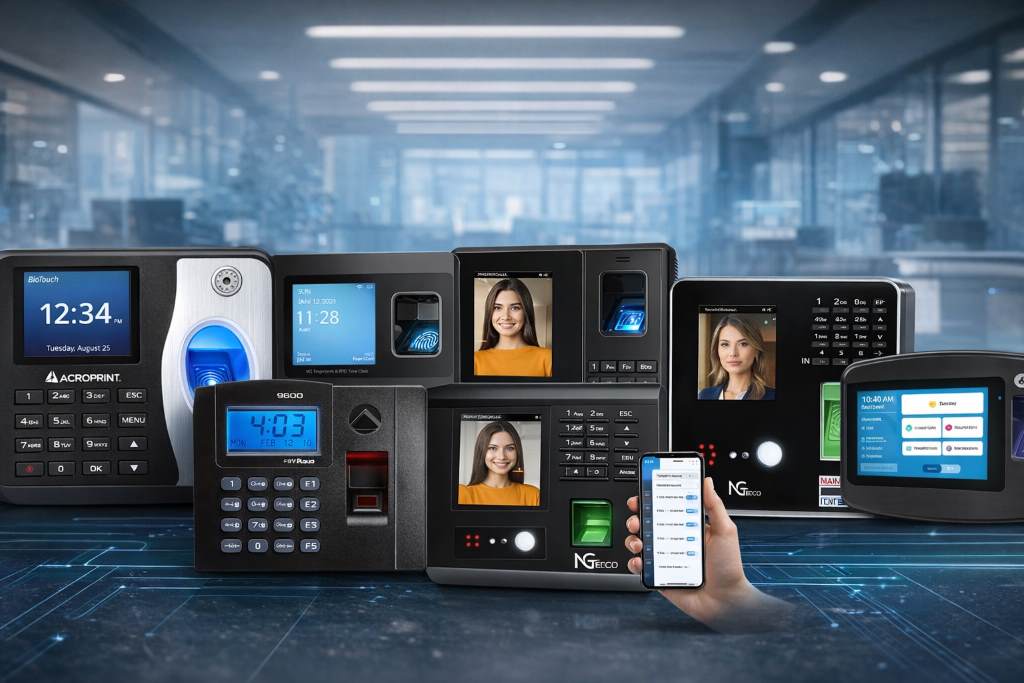
Biometric attendance machines reduce time theft, eliminate buddy punching, and simplify record keeping. But not every device works the same way in daily use. Some rely on cloud dashboards. Others operate fully offline. Some feel seamless. Others require patience.
Below, you will find a grounded review of the best biometric attendance machines available right now.
Top Picks of Biometric Attendance Machines of 2026 at a Glance
If you want to compare quickly, here are the top biometric attendance machine models covered in this guide:
- uAttend JR2000 Biometric Fingerprint, RFID, PIN Time Clock
- NGTeco APP Based Time Clock 4 in 1
- Tymelix App Based Time Clock
- HapAttend H3 Biometric Time Clock
- NGTeco Cloud Based Time Clock
- Acroprint BioTouch Biometric Time Clock
- ANVIZ CX2 Fingerprint Biometric Clock
- Pyramid TimeTrax Elite TTELITEEK
Best Leading Biometric Attendance Machines for Businesses of 2026
These systems represent different approaches to attendance tracking. Some favor flexibility. Others prioritize simplicity.
Let’s look at how biometric attendance machines actually perform in real workplaces.
uAttend JR2000 Biometric Fingerprint RFID PIN Time Clock
Cloud connected reliability for growing teams
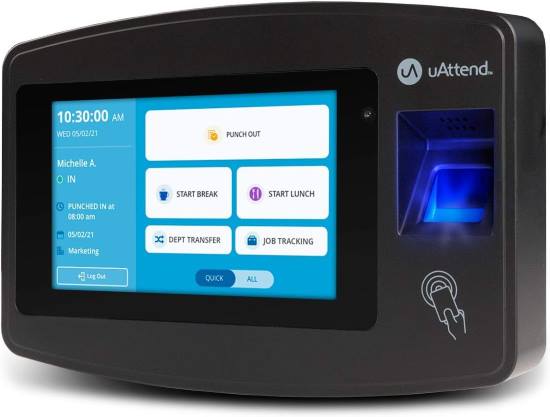
In daily use, the uAttend JR2000 feels stable and structured. Setup requires internet access and account creation, but once configured, the dashboard gives managers clear visibility across shifts.
Fingerprint recognition works consistently if employees enroll carefully. It suits offices with 10 to 50 employees who need remote payroll exports and scheduling oversight.
Maintenance mainly involves keeping the scanner clean and ensuring steady internet. If your connection drops often, reporting delays can frustrate you.
Not ideal for remote sites without reliable connectivity.
User Review
Daniel M., Operations Manager
We moved from paper timesheets to this system last year. Payroll processing now takes half the time. The fingerprint scanner occasionally misses if hands are dirty, but retraining staff fixed most issues.
Key Features
• Cloud dashboard access allows managers to monitor hours from anywhere, though it depends fully on internet stability.
• Multiple punch methods improve flexibility for teams uncomfortable with fingerprint use.
• Automated overtime tracking reduces payroll calculation errors.
• Real time reporting tools simplify compliance documentation.
• Employee self service portal reduces administrative back and forth.
Pros and Cons
| Pros | Cons |
| Strong reporting tools | Requires internet connection |
| Reliable fingerprint scans | Learning curve at setup |
| Good for mid size teams | Subscription required |
NGTeco APP Based Time Clock 4 in 1
Flexible multi method entry system
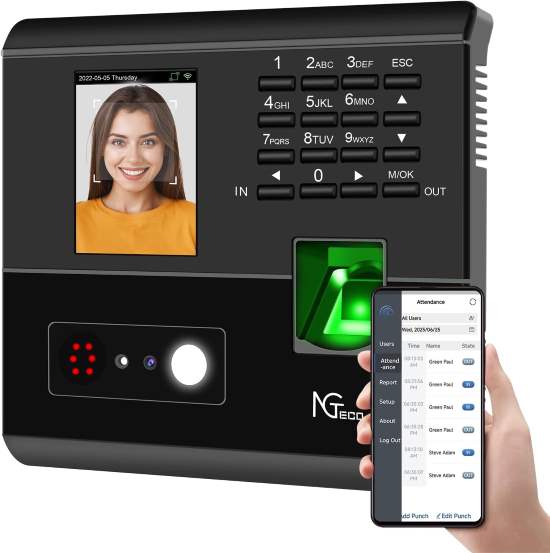
This model supports face recognition, fingerprint, RFID, and PIN entry. In practice, that flexibility reduces bottlenecks during shift changes.
Face recognition works best in consistent lighting. Warehouses with variable light may experience slower scans.
It suits small businesses transitioning from manual tracking who want app control without complex configuration.
Cleaning the lens regularly keeps facial scans accurate.
User Review
Sandra L., Retail Owner
The face scan option helped us during flu season since staff avoided touching the device. It works best near our front counter where lighting stays steady.
Key Features
• Four verification methods accommodate diverse employee preferences.
• App based management simplifies schedule edits remotely.
• Quick onboarding process reduces downtime during installation.
• Data export options support payroll integration.
• Compact footprint fits tight office spaces.
Pros and Cons
| Pros | Cons |
| Multiple entry options | Light affects face scan |
| Easy mobile access | Not ideal outdoors |
| Fast employee setup | App dependent |
Tymelix App Based Time Clock
Fast setup with automatic break tracking
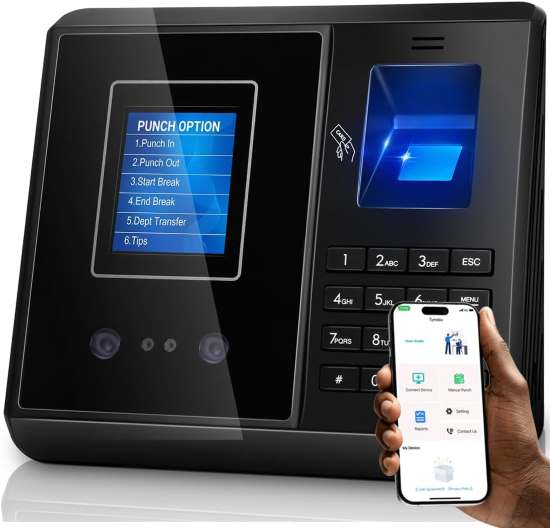
Tymelix focuses on simplicity. Setup takes minutes, and break tracking runs automatically once configured.
It works well for restaurants or service businesses with frequent shift changes. Managers appreciate the automatic overtime calculations.
The touchscreen feels responsive, though long term durability depends on careful handling.
Not suited for large industrial environments.
User Review
Mark T., Cafe Owner
I wanted something simple. This one required almost no technical skill. Auto break tracking solved our compliance headaches.
Key Features
• Automatic break detection reduces compliance mistakes.
• Overtime calculation tools save payroll review time.
• Clean interface design minimizes employee confusion.
• App control panel centralizes attendance oversight.
• Quick hardware activation avoids complex wiring.
Pros and Cons
| Pros | Cons |
| Very easy setup | Limited advanced controls |
| Accurate overtime logs | App reliance |
| Clean interface | Best for small teams |
HapAttend H3 Biometric Time Clock
Standalone simplicity without monthly software
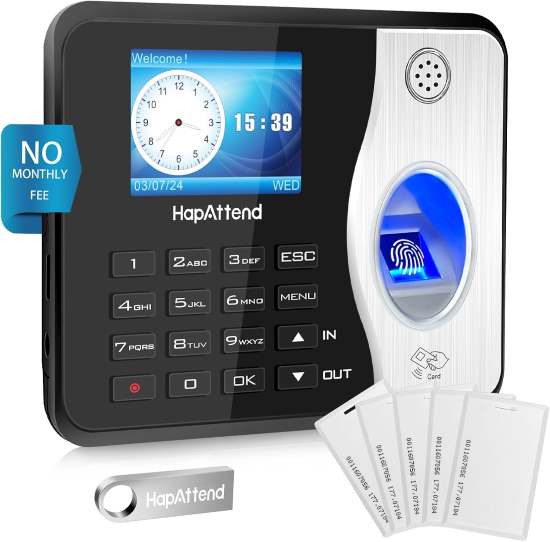
The HapAttend H3 runs independently without cloud subscriptions. That appeals to businesses that prefer one time installation.
Fingerprint scanning is responsive once users enroll correctly. Because it stores data locally, managers must manually export records.
Best suited for small offices or workshops with stable team sizes.
User Review
Luis P., Auto Shop Owner
We did not want recurring fees. This unit works offline and feels dependable. Exporting data requires a bit more effort, but we expected that.
Key Features
• No cloud dependency ensures operation during outages.
• Local data storage keeps records on site.
• Fingerprint and RFID support offers basic flexibility.
• Simple menu navigation reduces training time.
• Durable outer casing handles shop environments.
Pros and Cons
| Pros | Cons |
| No subscription needed | Manual data exports |
| Reliable offline use | Fewer reporting tools |
| Solid build quality | Limited remote access |
NGTeco Cloud Based Time Clock
Structured attendance for remote management
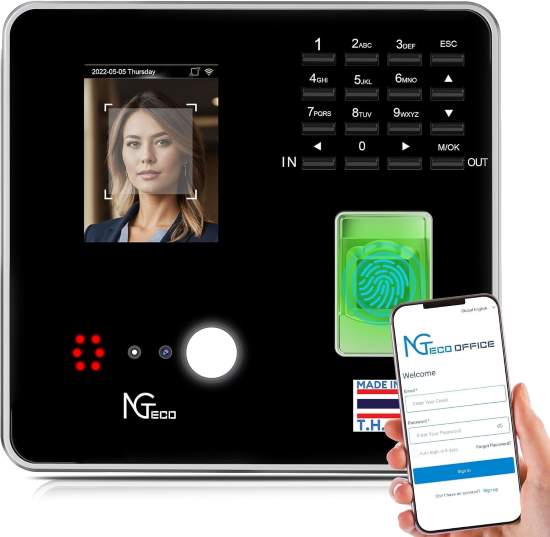
This version emphasizes centralized control. Managers can oversee multiple locations through one interface.
Fingerprint response feels steady in indoor environments. Cloud syncing keeps records current.
It suits franchises or multi site operations.
Requires consistent network access for best performance.
User Review
Alicia R., Franchise Manager
We operate three locations. Seeing attendance in one dashboard changed how we manage staffing gaps.
Key Features
• Centralized reporting system supports multi site oversight.
• Cloud backup protection prevents data loss.
• Fingerprint accuracy tools reduce duplicate entries.
• User role controls limit access by position.
• Automated timesheet summaries ease payroll prep.
Pros and Cons
| Pros | Cons |
| Multi location visibility | Needs internet |
| Clear management controls | Subscription model |
| Good reporting depth | Indoor use preferred |
Acroprint BioTouch Biometric Time Clock
Self contained precision tracking
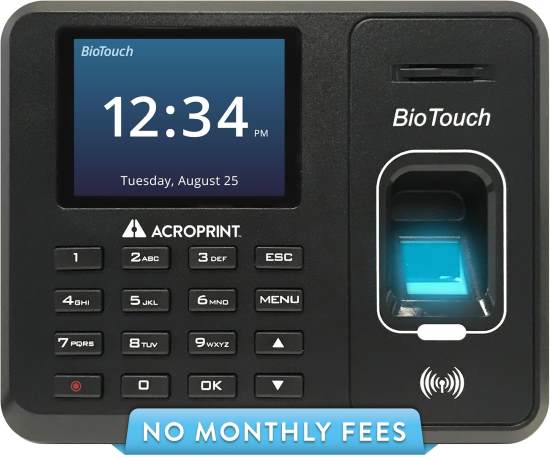
The Acroprint BioTouch feels industrial and structured. It operates without ongoing service contracts and stores data internally.
Fingerprint enrollment requires patience but performs reliably afterward.
Well suited for manufacturing floors and warehouses.
User Review
Henry W., Plant Supervisor
This device feels sturdy. It handles our shift volume well. Enrollment took time, but once done, scanning runs smoothly.
Key Features
• Standalone operation avoids network interruptions.
• Proximity card support adds entry flexibility.
• Rugged construction suits industrial settings.
• Clear LCD display simplifies daily punches.
• Internal data management supports compliance needs.
Pros and Cons
| Pros | Cons |
| Strong build quality | Initial setup effort |
| No recurring software | Manual reporting |
| Industrial ready design | Limited cloud access |
ANVIZ CX2 Fingerprint Biometric Clock
Compact and efficient attendance control
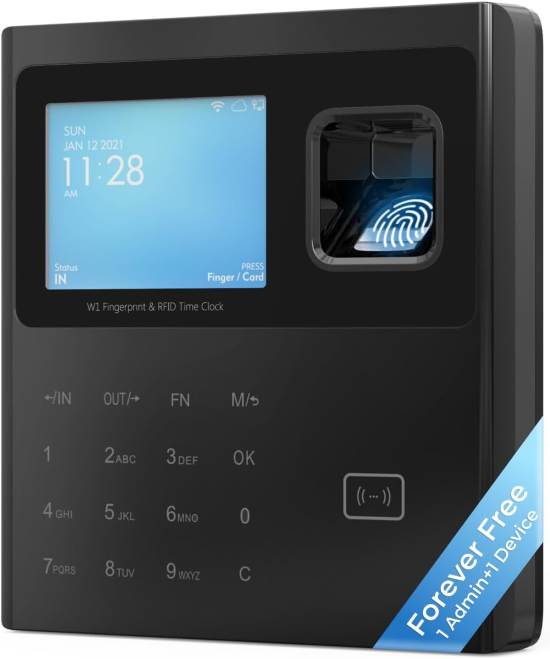
The ANVIZ CX2 focuses on reliable fingerprint recognition in a small frame.
It performs well in small offices with under 100 employees.
Maintenance involves routine cleaning of the sensor.
Not ideal for outdoor exposure.
User Review
Nina G., HR Coordinator
We needed something compact for our office lobby. This fits neatly and processes punches quickly.
Key Features
• Fast fingerprint matching reduces wait times.
• Compact body design saves wall space.
• USB data export simplifies payroll transfers.
• Simple employee enrollment reduces onboarding friction.
• Energy efficient operation lowers utility impact.
Pros and Cons
| Pros | Cons |
| Quick fingerprint response | Limited advanced analytics |
| Space saving design | Indoor use only |
| Easy export process | Basic interface |
Pyramid TimeTrax Elite TTELITEEK
Established biometric tracking system
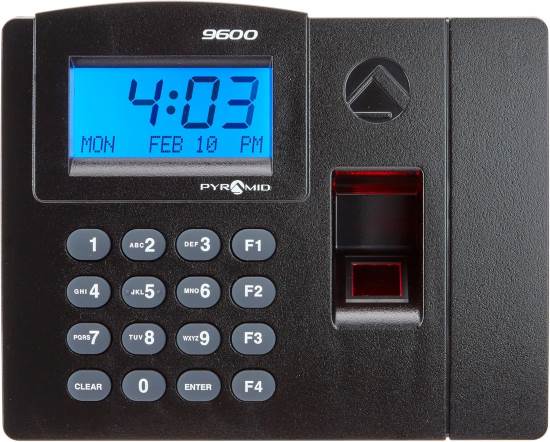
The Pyramid TimeTrax Elite has been on the market for years. It delivers consistent fingerprint scanning with structured reporting tools.
Setup requires careful configuration but rewards with dependable daily performance.
Suitable for offices that want traditional time clock structure.
User Review
Robert C., Office Administrator
We chose this because it felt proven. It took time to configure correctly, but after that, it runs without much oversight.
Key Features
• Automated payroll exports streamline accounting.
• Fingerprint verification security reduces time fraud.
• Custom reporting options support audits.
• Network connectivity tools enable centralized control.
• Expandable employee capacity grows with team size.
Pros and Cons
| Pros | Cons |
| Mature software system | Setup complexity |
| Reliable scanning accuracy | Dated interface |
| Strong reporting tools | Requires configuration time |
Buying Guide: How to Choose the Best Biometric Attendance Machine
Selecting the right system requires more than comparing features. Real world performance depends on environment, workforce habits, and administrative structure.
Core Performance Factors
Recognition speed affects shift transitions. Slow scans create lines and frustration. Accuracy also matters. Poor enrollment practices often cause scan failures, which users wrongly blame on hardware.
Evaluate matching speed under realistic conditions. Consider how many employees will clock in simultaneously.
Material Quality and Durability
Plastic housings may suit offices but struggle in warehouses. Dust, grease, and temperature swings shorten sensor lifespan.
Many buyers assume all devices withstand shop conditions. They do not.
Choose rugged casing for industrial settings.
Usability and Workflow
A clean interface reduces training time. Complex menu trees increase onboarding friction.
Managers often underestimate how quickly frustration spreads among staff when systems feel confusing.
Test navigation simplicity before full deployment.
Maintenance Demands
Fingerprint sensors require routine cleaning. Cloud systems require password management and network stability.
Buyers often overlook ongoing oversight time.
Assess who will maintain the system weekly.
Environmental Compatibility
Lighting affects facial recognition. Moisture affects fingerprint accuracy.
Buyers assume indoor conditions remain consistent, but entrances and warehouses fluctuate.
Match technology to environment.
Safety and Compliance
Attendance records must meet labor compliance standards. Export clarity matters during audits.
Some systems store data locally only. Others provide audit logs automatically.
Understand your regulatory obligations before choosing.
Common Buyer Mistakes
One frequent mistake involves assuming cloud systems automatically eliminate administrative effort. They reduce manual calculation but still require oversight.
Another involves choosing face recognition for poorly lit spaces. Lighting inconsistency reduces reliability.
Some buyers ignore future growth. They purchase units limited to small employee counts, then must replace them within a year.
Others skip proper employee enrollment training. Improper fingerprint setup causes repeated scan failures.
A final mistake involves ignoring data export compatibility. Payroll integration should align with your accounting workflow.
Discover Now:
Best Projector Stands of 2026 to Enhance Your Office Experience
The Best Projector Screens of 2026 for a Productive Office Environment
Best High Quality Office Projectors of 2026 for Stunning Presentations in Budget
How to Match Products to Specific Needs
Small offices with under 20 employees often benefit from standalone systems like HapAttend or Acroprint. These minimize recurring software oversight.
Multi location businesses should prioritize cloud dashboards such as uAttend or NGTeco Cloud models for centralized visibility.
Restaurants and retail shops with high shift turnover benefit from Tymelix due to automatic break handling.
Industrial environments demand rugged construction such as Acroprint or Pyramid systems.
Advanced managers who rely heavily on analytics should lean toward structured reporting platforms with export flexibility.
Align your choice with workflow complexity, staff size, and environment stability.
Conclusion
Biometric attendance machines reduce payroll errors and simplify workforce management, but no single system fits every business.
The best choice depends on your environment, team size, and reporting needs. Consider how employees interact with the device daily. Evaluate maintenance commitment honestly.
When chosen carefully, these systems become quiet operational tools rather than daily frustrations.
If you want to compare specifications more closely, revisit the product summaries above and match them to your workflow priorities.
FAQs
Are biometric time clocks accurate?
Yes, when employees enroll properly and sensors remain clean.
Do biometric systems work without internet?
Some standalone models operate fully offline.
Can biometric attendance improve payroll accuracy?
Yes, automated tracking reduces manual calculation errors.
Is facial recognition reliable in all environments?
No, lighting conditions strongly affect performance.
How often should fingerprint sensors be cleaned?
Clean weekly or more often in dusty workplaces.