
Key Takeaways
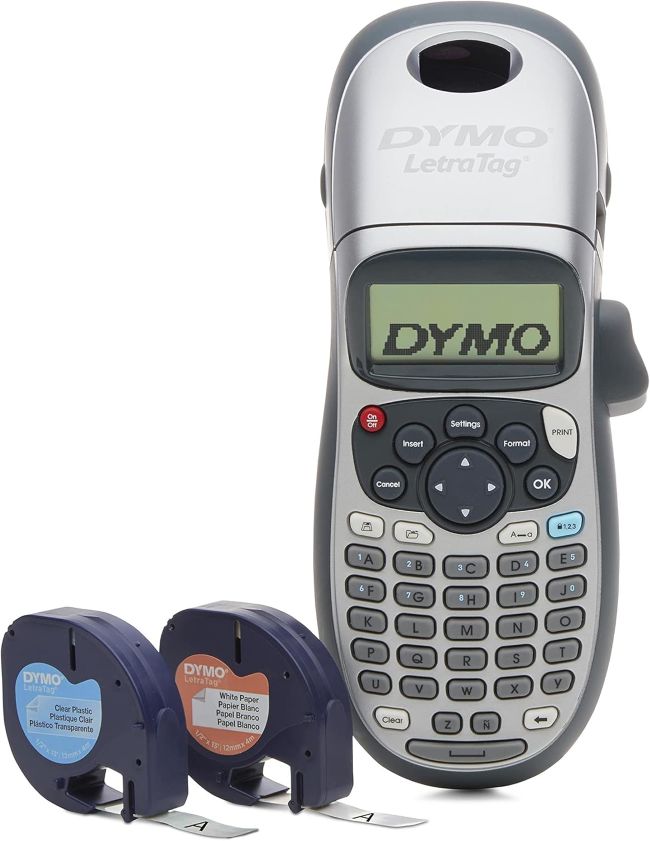
- A compact, handheld thermal label maker from DYMO’s long-running LetraTag line, designed for straightforward home and office organization without ink or toner.
- Prints on 12mm (1/2″) LetraTag tapes in multiple materials — paper, clear plastic, opaque plastic, and textile — giving users a choice of finish for every labeling job.
- Offers five font sizes, seven print styles, and eight box styles, plus a graphical LCD that shows font effects on screen so you know exactly what you are printing before you press print.
- Two-line printing, date stamping, a library of symbols, and an auto power-off function round out a feature set that punches above its entry-level price.
- Runs on four AA batteries or an optional AC adapter (both sold separately), and ships with two starter tape cassettes plus a mountable magnetic holder.
- Direct thermal printing means no ribbons, ink, or toner cartridges to buy or replace — the only ongoing cost is the tape itself.
A good label maker is one of those quietly transformative tools: you don’t realize how much clutter and confusion you were tolerating until everything around you suddenly has a clear, legible name. The DYMO LetraTag 100H Plus is aimed squarely at that moment. It is not a professional or industrial labeling system; it is a compact, affordable, handheld device meant for the home or small office where the goal is simple — turn drawers, shelves, files, bins, and cables from anonymous piles into an organized, labeled system.
This review examines what the LetraTag 100H Plus does well, where it cuts corners to hit its price point, and whether its combination of portability, tape variety, and no-ink thermal printing makes it a smart buy for someone who just wants to get organized. The focus is on real-world usability: how it feels to operate, how the labels perform, and how the total cost of ownership stacks up once you factor in the tape refills.
Product at a Glance
DYMO LetraTag 100H Plus
| Feature | Details |
|---|---|
| Brand | DYMO |
| Product type | Handheld thermal label maker |
| Model | LetraTag 100H Plus |
| Color | Silver |
| Print technology | Direct thermal (no ink, toner, or ribbon) |
| Tape width | 12mm (1/2″) |
| Tape materials | Paper, clear plastic, opaque plastic, textile |
| Display | 13-character graphical LCD |
| Font sizes | 5 |
| Print styles | 7 |
| Box/border styles | 8 |
| Max lines | 2 |
| Extra features | Date stamping, symbols, underline, bold |
| Power | 4 x AA batteries or optional AC adapter (both sold separately) |
| Auto power-off | Yes |
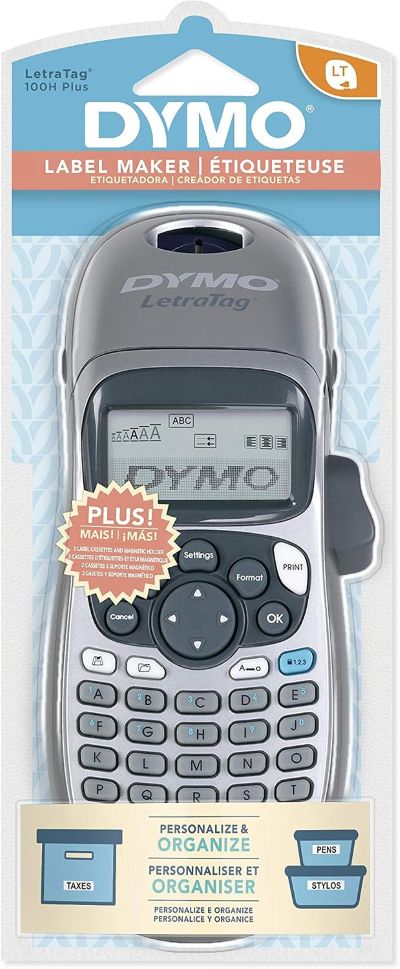
| In the box | Label maker, 2 starter tape cassettes, mountable magnetic holder, instruction manual, warranty card |
| Best for | Home and small office organization |
Detailed Review
Why This Product Stands Out
The LetraTag 100H Plus stands out by concentrating on the essentials that make a label maker genuinely useful in a home setting, and deliberately skipping the professional-grade complexity that would push the price up. It is small enough to operate with one hand, simple enough that a first-time user can produce a clean label within minutes of unboxing, and flexible enough to print on several different tape materials so the same device handles a filing cabinet (paper), a storage bin (opaque plastic), and a child’s clothing tag (textile).
That single-device, multi-material approach is the core differentiator. Many entry-level label makers lock you into one tape type. The LetraTag’s cassette system lets you swap between paper, clear, and plastic tapes in seconds, which means the same tool can serve a pantry organization project in the morning and a back-to-school labeling session in the afternoon.
A No-Ink Printing System
The second standout is the direct thermal print engine. Because the print head heats the tape to create the image, there is no ink cartridge, no toner, and no ribbon to buy, install, or dry out. The only consumable is the tape cassette itself. For a device that may sit unused for weeks between projects, the no-ink design removes the single most common failure mode of budget printers — a clogged or dried-out cartridge.
Key Specifications
- Print technology: Direct thermal
- Tape width: 12mm (1/2″)
- Tape types: Paper, clear plastic, opaque plastic, textile
- Display: 13-character graphical LCD showing on-screen font effects
- Font sizes: 5
- Print styles: 7 (including bold, italic, outline, shadow, vertical, mirror, and normal)
- Box/border styles: 8 (framing and background options)
- Lines per label: Up to 2
- Extras: Date stamp, symbol library, underline, text sizing
- Power: 4 x AA batteries (not included) or optional AC adapter (sold separately)
- Auto power-off: Yes, conserves battery life
- Included accessories: 2 starter cassettes (white paper and clear plastic), mountable magnetic holder, manual, warranty card
Design & Build Quality
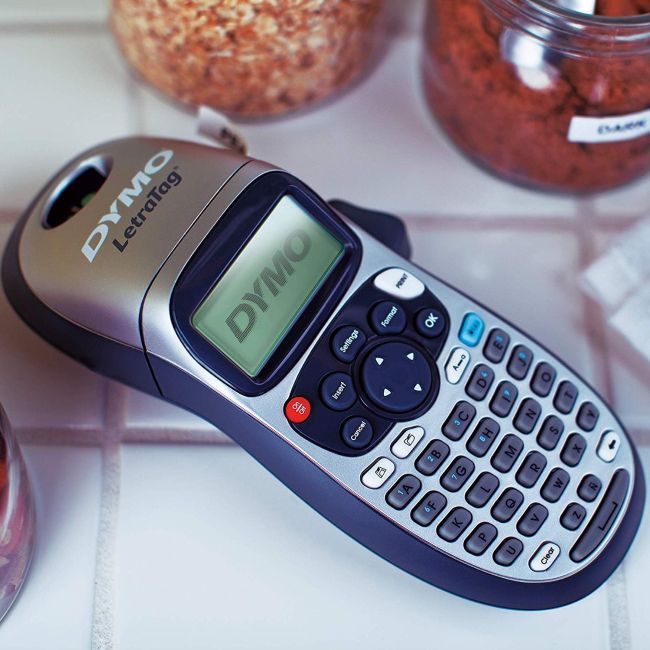
The LetraTag 100H Plus is designed to be picked up and used, not admired. Its silver plastic housing is compact and lightweight, sized for one-handed operation, and the button layout is arranged so the most-used keys fall naturally under the thumb. There is nothing premium about the materials, but the fit and finish are consistent and the cassette bay opens and closes cleanly.
The ABC Keyboard
The most debated design choice is the keyboard layout. DYMO uses an ABC alphabetical keyboard rather than a QWERTY layout. For users who type on a computer all day, the ABC layout feels unfamiliar at first and slows initial text entry. For occasional users — and especially for users who do not touch-type — the alphabetical layout is arguably more intuitive, since the letters are in a predictable A-Z order rather than the arbitrary QWERTY arrangement. It is a deliberate trade-off that suits the device’s home-and-casual-user audience.
The Display
The 13-character graphical LCD is functional rather than generous. It shows enough of your text and formatting choices to confirm what will print, which is the key job, but it is not a screen you will use to design elaborate labels. The graphical capability matters because it renders font effects on screen — bold, outline, shadow — so you see the styling before you commit tape, reducing waste from misprints.
Materials & Construction
The body is a silver-finished plastic shell that is light but adequately rigid for a handheld device. The cassette compartment is the most important mechanical element, and DYMO has kept it simple: a drop-in cassette that seats with a click and a print head that is accessible enough to clean if a jam occurs. The button membrane is responsive, and the power and navigation keys have a clear, positive action.
The included mountable magnetic holder is a nice touch for storage — it gives the label maker a home on a metal surface (fridge, filing cabinet, shelving) so it does not get buried in a drawer. A few buyers report the magnet detaching from the holder on first use, so it is worth treating that accessory gently.
Performance
In day-to-day use, the LetraTag 100H Plus does what a label maker should: it produces clean, legible labels reasonably quickly, with formatting that is easy to control. The thermal print quality is crisp for text at standard sizes, and the print speed is adequate for the kind of short, one-off labels most home users produce.
Print Quality and Readability
Labels print with crisp, dark text against the tape background. At normal font sizes the text is sharp and easy to read; at the smallest sizes legibility drops off, as you would expect on a 12mm tape. The range of five font sizes gives you control over how much information fits on a single label, and the two-line capability lets you stack a name and a date, or a category and a contents list, on one label.
Tape Handling
Tape cassettes load easily and swap quickly between materials. The easy-peel design on the tapes is meant to make backing removal simple, though some buyers report the backing can be stubborn and require a blade or fingernail to start. Tape jams are an occasional issue reported in reviews, but DYMO documents a clear cleaning procedure for the print head that resolves most cases. Overall, tape handling is good for the price, with the usual caveats of any thermal cassette system.
Comfort & Usability
The compact, one-hand-friendly shape is a genuine usability advantage. You can hold the device and type with the same hand, which is useful when you are standing in front of a shelf deciding what to label. The ABC keyboard, while controversial for fast typists, is fine for the short, simple labels this device is built for. The auto power-off function preserves battery life when you set it down mid-project, and the low-battery indicator gives fair warning before the device dies.
The biggest usability caveat is the battery-only default. Four AA batteries are not included, and the optional AC adapter is sold separately. For users who label in long sessions, the lack of an included power option is a mild annoyance; for users who label in short bursts, batteries are fine and the auto-off keeps them lasting.
Features Explained
Direct Thermal Printing
Thermal printing creates the label image by heating specially coated tape, so there is no ink, toner, or ribbon. The benefit is a single consumable (the tape) and no cartridge to dry out during storage. The trade-off is that thermal labels can fade over time in heat or sunlight, so plastic tapes are better than paper for labels that need to last.
Five Font Sizes and Seven Print Styles
The size and style options let you tailor labels to their use — small and plain for a cable, large and bold for a storage bin, boxed for a file folder. The on-screen graphical display previews the effect so you do not waste tape guessing.
Eight Box/Border Styles
Box and border styles frame the text, which improves readability on busy or patterned surfaces and gives labels a more finished, professional look. Eight options range from simple lines to full frames.
Two-Line Printing
Two-line capability lets you put more information on a single label — for example, a category on the first line and contents or a date on the second. This is a meaningful upgrade over single-line label makers for organizing storage and files.
Date Stamping
The built-in date function prints the current date on a label, useful for dating food containers, files, or project notes without typing the date manually.
Symbol Library
A library of symbols lets you add icons and special characters, which is handy for quick visual cues on labels — a star for priority, a folder icon for files, and so on.
Tape Variety (Paper, Clear, Opaque Plastic, Textile)
The same device handles temporary paper labels, durable plastic labels, discreet clear labels, and iron-on textile labels for clothing. This variety is what makes the LetraTag a genuine all-around home organizer rather than a one-trick device.
Auto Power-Off and Low-Battery Indicator
Auto power-off saves battery life when the device is left idle, and the low-battery indicator warns before power runs out, so you are not surprised by a dead label maker mid-project.
Real World Usage
In a typical home, the LetraTag 100H Plus finds work in nearly every room. Kitchens benefit from dated food-container and pantry labels. Home offices use it for file folders, binders, and cable identification. Closets and storage bins get labeled for seasonal rotation. Parents use the textile tape for children’s clothing and school supplies. Crafters use it for scrapbook and project labels.
The device is light enough to carry from room to room, and the magnetic holder means it can live on the fridge or a metal cabinet between uses. For a household that has been meaning to “get organized” for years, the LetraTag is the kind of tool that turns that intention into visible progress in a single afternoon.
Benefits
- Compact, one-handed operation suits on-the-spot labeling anywhere in the home
- Direct thermal printing means no ink, toner, or ribbon to buy or maintain
- Multiple tape materials (paper, clear, plastic, textile) cover nearly any home labeling job
- Five font sizes and seven print styles give genuine formatting flexibility
- On-screen graphical preview reduces wasted tape from misprints
- Two-line printing fits more information on a single label
- Date stamp and symbol library add useful options without extra cost
- Auto power-off conserves battery life
- Includes two starter tapes and a mountable magnetic holder
- Affordable entry price for a DYMO-branded label maker
Limitations
- ABC keyboard (not QWERTY) slows down fast touch-typists
- Batteries and AC adapter are not included — an extra purchase either way
- 13-character display is functional but small for designing longer labels
- Some buyers report tape backing is difficult to peel without a tool
- Occasional tape jams reported, requiring print-head cleaning
- Some users report labels (especially paper) can curl or peel off certain surfaces over time
- Thermal labels can fade with prolonged heat or sunlight exposure
- The included magnetic holder’s magnet has been reported to detach
- Locked into DYMO’s proprietary 12mm LetraTag tape cassettes
Who Should Buy It
The LetraTag 100H Plus is a smart buy for anyone who wants a simple, affordable, handheld label maker for home or small-office organization. It is ideal for parents labeling school supplies and clothing, home organizers tackling pantry and storage projects, and small-office users who need clean file and cable labels without investing in a professional system. If your labeling needs are short, occasional, and varied across materials, this device covers them well at a low total cost.
Who Should Avoid It
Power users who type quickly will find the ABC keyboard frustrating, and anyone who needs long, multi-line, or high-volume labeling will bump against the 13-character display and two-line limit. Professional or industrial users who need durable, weatherproof, or large-format labels should look at DYMO’s LabelManager line or Rhino industrial printers instead. And anyone who bristles at proprietary tape cassettes should factor the ongoing cost of LetraTag refills into the buying decision.
Key Features Table
| Feature | What It Means in Use |
|---|---|
| Direct thermal printing | No ink, toner, or ribbon — only the tape cassette is a consumable |
| 12mm LetraTag tape support | Standard tape width for clean, legible home and office labels |
| Paper, clear, opaque plastic, textile tapes | One device handles temporary, durable, discreet, and iron-on labels |
| 13-character graphical LCD | Previews font effects on screen to avoid wasted tape |
| 5 font sizes | Scale text to fit the label and the surface |
| 7 print styles | Bold, italic, outline, shadow, vertical, mirror, and normal |
| 8 box/border styles | Frame labels for better readability and a finished look |
| 2-line printing | Stack a name and date or category and contents on one label |
| Date stamping | Print the current date without typing it |
| Symbol library | Add icons and special characters for quick visual cues |
| Auto power-off | Saves battery life when the device sits idle |
| Low-battery indicator | Fair warning before power runs out |
| Magnetic mountable holder | Store the label maker on a fridge or cabinet, not in a drawer |
Pros & Cons
Pros
- Compact, one-handed, genuinely portable design
- No ink, toner, or ribbon to buy or maintain
- Handles four tape materials with one device
- Good formatting options — 5 font sizes, 7 styles, 8 borders
- On-screen preview prevents wasted tape
- Two-line printing and date stamp add real usefulness
- Affordable entry price for a brand-name label maker
- Auto power-off preserves battery life
Cons
- ABC keyboard frustrates fast touch-typists
- Batteries and AC adapter sold separately
- Small display limits designing of longer labels
- Tape backing can be hard to peel without a tool
- Occasional tape jams and reported adhesion issues on some surfaces
- Thermal labels can fade in heat or sunlight
- Locked into proprietary DYMO LetraTag tape cassettes
Setup & Usage Tips
- Buy batteries (or the AC adapter) at the same time. Four AA batteries are not included; pick them up so you can label the day you unbox it.
- Load the starter tapes to practice. The included white paper and clear plastic cassettes are perfect for getting comfortable with the print and peel process before you commit to a real project.
- Use the on-screen preview. Check the graphical display before pressing print — the preview shows font effects so you avoid wasting tape on a misformatted label.
- Match the tape to the surface. Use paper tape for temporary or indoor flat labels, opaque plastic for durable bin and container labels, clear plastic for discreet labels on glass or patterned surfaces, and textile tape for clothing and fabric.
- Clean and dry the surface first. Adhesion problems are almost always a surface issue — wipe the target area clean and dry before applying a label for the best stick.
- Peel the backing carefully. Use a fingernail or thin blade to start the peel at a corner; the easy-peel design works best once you lift an edge.
- Keep the print head clean. If a jam or faded print occurs, follow DYMO’s documented cleaning procedure for the print head rather than forcing tape through.
- Use the auto power-off. Let the device turn itself off when you walk away — it conserves batteries for the next session.
Care & Maintenance Tips
- Store the label maker in the magnetic holder. Keeping it on a fridge or cabinet prevents it from getting buried and damaged in a drawer.
- Remove batteries for long storage. If you will not use it for months, take the AA batteries out to prevent leaks that can corrode the contacts.
- Clean the print head periodically. A soft, dry cloth on the print head removes adhesive residue and keeps prints crisp; follow DYMO’s cleaning guide if jams recur.
- Keep spare tape cassettes on hand. Running out mid-project is the most common frustration; a spare paper and a spare plastic cassette cover most situations.
- Avoid heat and direct sunlight for stored labels. Thermal prints can fade with prolonged heat exposure, so store labeled items away from windows and heat sources.
- Handle the magnetic holder gently. The magnet has been reported to detach; press it firmly and avoid dropping the holder.
- Use authentic DYMO tapes. Third-party cassettes can jam or print poorly; the device is optimized for genuine LetraTag LT tapes.
What Real Buyers Appreciate
Buyers and reviewers consistently highlight several themes about the LetraTag 100H Plus:
- Easy and intuitive to use. Reviewers repeatedly call the device “user friendly” and note that first-time users can produce clean labels within minutes, even without reading the manual cover to cover.
- Great for home and office organization. Buyers use it for files, storage containers, pantry shelves, cables, school supplies, and clothing, and praise its versatility across rooms and tasks.
- Affordable for what it does. Multiple reviewers cite the price-to-feature ratio as a key reason to buy, especially given the no-ink thermal system.
- Plenty of font and design options. The five font sizes, seven print styles, and eight box styles get frequent praise for letting users customize labels without upgrading to a pricier model.
- Portable and easy to store. The compact size and magnetic holder are repeatedly called out as conveniences that keep the device accessible.
- Labels print quickly and crisply. Most buyers report clean, legible text that holds up over time, particularly on plastic tapes.
- Honest caveats noted. Some buyers report adhesion problems (labels curling off binders), difficulty peeling the tape backing, occasional tape jams, and the ABC keyboard as a frustration for touch-typists. A few report a unit that would not power on. These are fair, useful caveats rather than dealbreakers for most buyers.
Frequently Asked Questions
Does the DYMO LetraTag 100H Plus require ink or toner?
No. The LetraTag 100H Plus uses direct thermal printing, which means the print head heats the specially coated tape to create the image. There is no ink cartridge, toner, or ribbon to buy, install, or replace — the only consumable is the LetraTag tape cassette itself.
Are batteries included with the label maker?
No. The LetraTag 100H Plus requires four AA batteries, which are not included. An optional AC adapter is also available and sold separately. If you plan to label the day you receive it, pick up batteries or the adapter at the same time.
What types of tape does the LetraTag 100H Plus support?
It supports 12mm (1/2″) DYMO LetraTag LT tapes in four materials: paper (matte white, economical and temporary), clear plastic (discreet on glass and patterned surfaces), opaque plastic (durable, glossy white or colored), and textile (iron-on for clothing and fabric). You can swap cassettes between materials in seconds.
How many lines can a single label have?
The LetraTag 100H Plus can print up to two lines on a single label, which lets you combine a name and date, a category and contents, or a label and an instruction on one tape piece.
Is the keyboard QWERTY or alphabetical?
The keyboard uses an ABC alphabetical layout, not a QWERTY layout. This is a deliberate choice for the home and casual-user audience and is generally more intuitive for people who do not touch-type, but it can slow down users who are used to a computer keyboard.
How long do the printed labels last?
On plastic tapes, labels are durable and hold up well over time. On paper tapes, labels are more temporary and can be affected by moisture and abrasion. Because the printing is thermal, all labels can fade with prolonged exposure to heat or direct sunlight, so plastic tape stored away from heat sources is the best choice for long-term labels.
What comes in the box?
The package includes the LetraTag 100H Plus label maker, two starter tape cassettes (typically a white paper tape and a clear plastic tape), a mountable magnetic holder, an instruction manual, and a warranty card. Batteries and the AC adapter are sold separately.
Final Verdict
The DYMO LetraTag 100H Plus is a smart buy for exactly the audience it targets: people who want a simple, affordable, portable label maker to bring order to a home or small office. It does the fundamentals well — clean thermal printing, genuine formatting options, multiple tape materials, and a compact one-handed design — without charging for professional features its buyers will never use. The no-ink thermal system keeps ongoing costs to just the tape, and the included magnetic holder and starter tapes mean you can begin organizing almost immediately.
Its weaknesses are honest: the ABC keyboard will frustrate fast typists, batteries and the adapter are not included, the display is small, and adhesion can be finicky on certain surfaces. None of these are fatal for the home organizer who wants short, occasional, varied labels. If you’re comparing the Best Affordable Label Maker, the LetraTag 100H Plus delivers the right features at the right price for that type of user—and that makes it a genuinely smart buy.
Call To Action
If you are ready to turn a drawer full of mystery items into a clearly labeled system, the DYMO LetraTag 100H Plus is an affordable, no-ink, handheld label maker that handles paper, plastic, clear, and textile tapes in one compact device. Grab one with a pack of AA batteries, pick the tape material that suits your first project, and start labeling — an organized home is an afternoon away.