

Typing for long hours can take a toll on your hands, wrists, and even your posture. I still remember the first time I experienced wrist pain after a marathon coding session. The discomfort was so severe that I had to take a break for days. That’s when I realized my standard keyboard was the culprit. Switching to an ergonomic keyboard transformed my work experience. The pain disappeared, my productivity soared, and I could type for hours without fatigue. If you spend a significant amount of time at a keyboard, investing in an ergonomic design can be a game-changer for your comfort and health.
An ergonomic keyboard is designed to reduce strain and promote a more natural typing position. Unlike traditional keyboards, they often feature a split design, adjustable angles, and cushioned wrist rests. According to a study by Cornell University, ergonomic keyboards can reduce the risk of repetitive strain injuries by up to 50%. This makes them a worthwhile investment for anyone who types frequently, whether for work, gaming, or creative projects.
Why an Ergonomic Keyboard Is Essential for Long-Hour Typing
An ergonomic keyboard is not just a luxury—it’s a necessity for anyone who spends extended periods typing. Traditional keyboards force your hands and wrists into unnatural positions, leading to strain, discomfort, and even chronic conditions like carpal tunnel syndrome. Ergonomic keyboards, on the other hand, are designed to align with the natural posture of your hands, wrists, and arms, reducing the risk of injury and improving overall comfort.
Additionally, ergonomic keyboards often include features like split layouts, tented designs, and adjustable angles. These features encourage a more neutral wrist position, which can alleviate pressure on the median nerve and reduce the likelihood of developing repetitive strain injuries. According to the Occupational Safety and Health Administration (OSHA), repetitive motion injuries account for nearly 30% of all workplace injuries, many of which are related to poor keyboard design.
For those who work from home or spend long hours at a desk, an ergonomic keyboard can also improve posture. By promoting a more natural arm and wrist position, these keyboards help prevent slouching and encourage better alignment of the shoulders and spine. This can reduce the risk of developing back and neck pain, which are common issues for desk workers.
Key Features to Look for in an Ergonomic Keyboard
Not all ergonomic keyboards are created equal. To get the most out of your investment, it’s important to choose a model that aligns with your specific needs. Here are the key features to consider:
1. Split Design
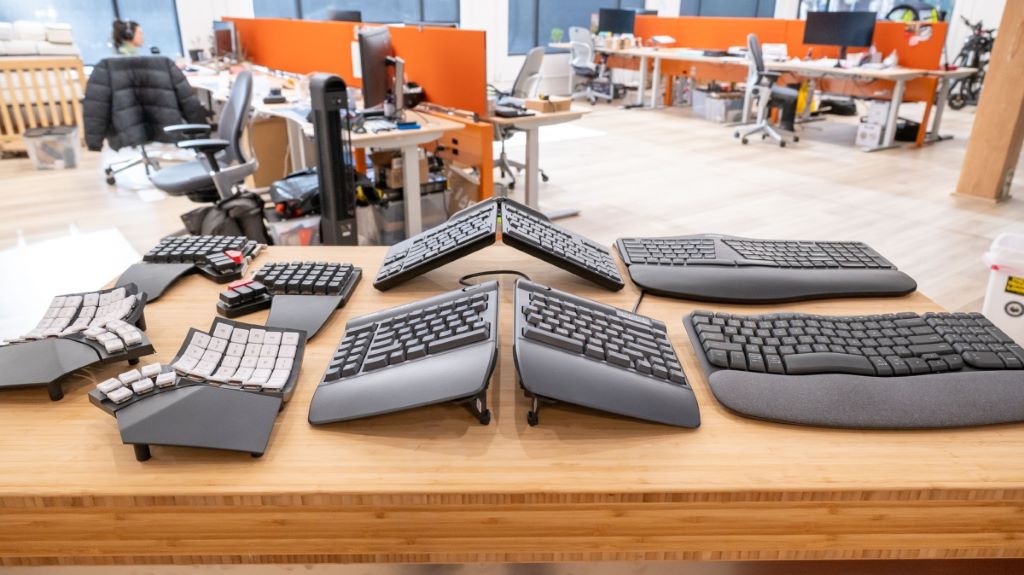
A split design is one of the most defining features of an ergonomic keyboard. This layout separates the keyboard into two or more sections, allowing you to position your hands and arms in a more natural, relaxed posture. Split keyboards reduce the need to reach across the keyboard, which can strain your shoulders and wrists.
There are different types of split designs, including:
- Fixed split: The keyboard is divided into two or more sections but remains a single unit.
- Adjustable split: The sections can be moved apart or angled independently for a customized fit.
- Fully modular: The keyboard can be completely separated into individual modules, allowing for maximum flexibility.
2. Tenting and Angling
Tenting refers to the vertical angle of the keyboard sections, while angling refers to the horizontal angle. These features allow you to position the keyboard in a way that aligns with the natural posture of your hands and wrists. Tenting can help reduce pronation (the inward rotation of the forearm), which is a common cause of wrist strain.
Some ergonomic keyboards come with adjustable tenting and angling, allowing you to find the perfect position for your needs. Others have a fixed design that’s already optimized for ergonomics. If you’re new to ergonomic keyboards, a model with adjustable features may be the best choice, as it allows you to experiment and find what works best for you.
3. Wrist Rest
A wrist rest provides support for your wrists while typing, reducing the strain on your tendons and nerves. Look for a keyboard with a cushioned wrist rest made from soft, supportive materials like memory foam or gel. The wrist rest should be wide enough to support your entire wrist and forearm, and it should allow your hands to float above the keys rather than resting on the surface.
Additionally, consider the height of the wrist rest. It should be thick enough to keep your wrists in a neutral position but not so thick that it causes your hands to bend upward. A good wrist rest can make a significant difference in your comfort, especially during long typing sessions.
4. Key Switch Type
The type of key switches used in an ergonomic keyboard can impact your typing experience. Mechanical switches are a popular choice for ergonomic keyboards because they offer tactile feedback and require less force to press. This can reduce finger fatigue and improve typing speed and accuracy.
There are different types of mechanical switches, including:
- Linear switches: Smooth and consistent, with no tactile bump or audible click.
- Tactile switches: Provide a noticeable bump when pressed, offering feedback without a loud click.
- Clicky switches: Produce an audible click when pressed, in addition to a tactile bump.
If you’re new to mechanical keyboards, a tactile switch may be the best choice, as it offers a balance between feedback and noise. However, if you prefer a quieter typing experience, a linear switch may be more suitable.
5. Adjustable Height and Tilt
An ergonomic keyboard should allow you to adjust the height and tilt to find the most comfortable position for your hands and wrists. Look for a model with adjustable legs or a tilt mechanism that lets you customize the angle of the keyboard. This can help you maintain a neutral wrist position and reduce strain.
Additionally, consider the height of the keyboard in relation to your desk and chair. Your elbows should be at a 90-degree angle, and your forearms should be parallel to the floor. If your keyboard is too high or too low, it can cause unnecessary strain on your wrists and shoulders.
6. Compact or Full-Sized Layout
Ergonomic keyboards come in a variety of layouts, from compact tenkeyless designs to full-sized models with dedicated function keys. The right layout for you depends on your specific needs and preferences. A compact keyboard can save desk space and encourage a more natural arm position, while a full-sized keyboard may offer more functionality and convenience.
Additionally, consider the placement of the keys. Some ergonomic keyboards feature a curved or staggered layout that aligns with the natural position of your fingers. This can reduce the need to stretch or twist your hands while typing, further improving comfort and efficiency.
How to Transition to an Ergonomic Keyboard
Switching to an ergonomic keyboard can feel strange at first, especially if you’ve been using a traditional keyboard for years. However, with a little patience and practice, you can make the transition smoothly and start enjoying the benefits of improved comfort and productivity. Here’s how to get started:
1. Start Slowly
If you’re new to ergonomic keyboards, it’s a good idea to start slowly. Begin by using the keyboard for short periods, such as an hour or two a day, and gradually increase the time as you become more comfortable. This will give your hands and wrists time to adjust to the new layout and posture.
Additionally, consider using the ergonomic keyboard alongside your traditional keyboard at first. This can help you ease into the transition without feeling overwhelmed or frustrated.
2. Adjust Your Workspace
An ergonomic keyboard is just one part of a comfortable workspace. To get the most out of your new keyboard, make sure your entire workstation is set up ergonomically. This includes:
- Adjusting your chair so that your feet are flat on the floor and your knees are at a 90-degree angle.
- Positioning your monitor at eye level to reduce strain on your neck and shoulders.
- Using a desk that allows your elbows to rest at a 90-degree angle and your forearms to be parallel to the floor.
Additionally, consider using an ergonomic mouse to complement your keyboard. This can further reduce strain and improve comfort during long work sessions.
3. Practice Proper Typing Technique
Even with an ergonomic keyboard, it’s important to practice proper typing technique to avoid strain and injury. Here are some tips to keep in mind:
- Keep your wrists straight and neutral, avoiding any bending or twisting.
- Use all your fingers to type, rather than relying on just a few.
- Keep your hands and fingers close to the home row, minimizing the need to stretch or reach for keys.
- Take regular breaks to stretch your hands, wrists, and fingers.
Additionally, consider using typing exercises or games to help you get used to the new layout and improve your speed and accuracy.
4. Customize Your Keyboard Settings
Many ergonomic keyboards come with customizable settings that allow you to adjust the layout, key sensitivity, and other features to suit your needs. Take the time to explore these settings and find the configuration that works best for you.
For example, you may want to remap certain keys to make them more accessible or adjust the sensitivity of the keys to reduce the force required to press them. Some keyboards also allow you to create custom macros or shortcuts, which can further improve your productivity.
5. Be Patient and Persistent
Transitioning to an ergonomic keyboard can take time, and it’s normal to feel frustrated or uncomfortable at first. However, with patience and persistence, you’ll likely find that the benefits far outweigh the initial challenges. Give yourself time to adjust, and don’t be discouraged if it takes a few weeks to feel completely comfortable.
Additionally, keep in mind that the long-term benefits of using an ergonomic keyboard—such as reduced strain, improved comfort, and a lower risk of injury—are well worth the effort.
Common Mistakes to Avoid When Using an Ergonomic Keyboard
Even with the best intentions, it’s easy to make mistakes when transitioning to an ergonomic keyboard. Here are some common pitfalls to avoid:
1. Choosing the Wrong Size or Layout
Not all ergonomic keyboards are the same, and choosing the wrong size or layout can lead to discomfort and frustration. For example, a compact keyboard may save desk space but lack the functionality you need. On the other hand, a full-sized keyboard may offer more features but take up too much space.
Before buying an ergonomic keyboard, consider your specific needs and preferences. Think about the types of tasks you’ll be using the keyboard for, as well as the amount of desk space you have available.
2. Ignoring Your Posture
An ergonomic keyboard can help improve your posture, but it’s not a magic solution. If you slouch, hunch over, or position your hands and wrists incorrectly, you may still experience strain and discomfort. It’s important to practice good posture and ergonomics throughout your entire workspace.
Additionally, make sure your keyboard is positioned correctly. It should be close enough to your body that you don’t have to reach for it, and it should be at a height that allows your elbows to rest at a 90-degree angle.
3. Skipping the Wrist Rest
A wrist rest is an essential feature of many ergonomic keyboards, but it’s often overlooked or misused. Some people rest their wrists on the wrist rest while typing, which can actually increase strain and pressure on the tendons and nerves. Instead, the wrist rest should be used to support your palms during breaks or when you’re not actively typing.
Additionally, make sure the wrist rest is the right height and firmness for your needs. It should be thick enough to keep your wrists in a neutral position but not so thick that it causes your hands to bend upward.
4. Not Taking Breaks
Even with an ergonomic keyboard, it’s important to take regular breaks to stretch and rest your hands, wrists, and fingers. Prolonged typing, even with proper ergonomics, can still lead to fatigue and strain. Aim to take a short break every 30 to 60 minutes to stretch, walk around, or simply rest your hands.
Additionally, consider using software or apps that remind you to take breaks and practice good ergonomics. These tools can help you develop healthy habits and reduce the risk of injury.
5. Overlooking Key Switch Type
The type of key switches used in an ergonomic keyboard can have a significant impact on your typing experience. If you choose a keyboard with switches that require too much force or don’t provide enough feedback, you may experience fatigue or discomfort. It’s important to choose a keyboard with switches that suit your typing style and preferences.
If you’re unsure which type of switch is right for you, consider trying out a few different options before making a purchase. Many keyboard manufacturers offer switch testers or sample packs that allow you to test different types of switches before committing to a full keyboard.
Benefits of Using an Ergonomic Keyboard
Using an ergonomic keyboard offers a wide range of benefits, from improved comfort to increased productivity. Here are some of the most notable advantages:
1. Reduced Strain and Discomfort
One of the primary benefits of an ergonomic keyboard is the reduction of strain and discomfort. By promoting a more natural typing position, these keyboards help alleviate pressure on your hands, wrists, and arms, reducing the risk of developing repetitive strain injuries like carpal tunnel syndrome.
Additionally, ergonomic keyboards can help prevent other common issues like tendonitis, tenosynovitis, and thoracic outlet syndrome. These conditions are often caused by poor posture and repetitive motions, which an ergonomic keyboard can help mitigate.
2. Improved Posture
An ergonomic keyboard encourages better posture by aligning your hands, wrists, and arms in a more natural position. This can help prevent slouching and reduce strain on your shoulders, neck, and back. Over time, improved posture can lead to less fatigue and discomfort, as well as a reduced risk of developing chronic pain.
Additionally, many ergonomic keyboards are designed to be used with a negative tilt, which means the front of the keyboard is lower than the back. This can help keep your wrists in a more neutral position and reduce the risk of developing wrist extension, a common cause of strain and injury.
3. Increased Productivity
By reducing strain and discomfort, an ergonomic keyboard can help you work more efficiently and productively. When you’re not distracted by pain or fatigue, you can focus better on your tasks and get more done in less time. Additionally, many ergonomic keyboards are designed to improve typing speed and accuracy, further boosting your productivity.
For example, split and tented keyboards can reduce the distance your hands need to travel while typing, allowing you to type faster and with less effort. Mechanical switches can also improve typing speed and accuracy by providing tactile feedback and reducing the force required to press the keys.
4. Enhanced Comfort
An ergonomic keyboard is designed with comfort in mind. Features like split layouts, tented designs, and cushioned wrist rests all work together to create a more comfortable typing experience. This can make a significant difference, especially during long work sessions.
Additionally, many ergonomic keyboards are made from high-quality materials that feel good to the touch and reduce fatigue. For example, some keyboards feature soft-touch coatings or textured keycaps that provide a more comfortable and secure grip.
5. Versatility and Customization
Ergonomic keyboards often come with a range of customizable features that allow you to tailor the keyboard to your specific needs. For example, you may be able to adjust the split, tenting, or angling of the keyboard, as well as the height and tilt. Some keyboards also allow you to remap keys, create custom macros, or adjust the sensitivity of the keys.
This versatility can help you find the perfect configuration for your typing style and preferences, further improving your comfort and productivity. Additionally, many ergonomic keyboards are compatible with a wide range of devices and operating systems, making them a versatile choice for any workspace.
The Future of Ergonomic Keyboards: Trends to Watch
Ergonomic keyboards are evolving rapidly, with new technologies and features emerging all the time. Here are some trends to watch in the coming years:
1. Wireless and Bluetooth Connectivity
Wireless and Bluetooth connectivity are becoming increasingly common in ergonomic keyboards. These features allow you to use the keyboard with a wide range of devices, from desktops and laptops to tablets and smartphones. Wireless keyboards also eliminate the clutter of cables, creating a cleaner and more organized workspace.
Additionally, some wireless ergonomic keyboards come with advanced features like multi-device pairing, which allows you to switch between devices with the touch of a button. This can be a huge convenience for those who work with multiple devices.
2. Adjustable and Modular Designs
Adjustable and modular designs are becoming more popular in ergonomic keyboards. These features allow you to customize the layout, split, tenting, and other aspects of the keyboard to suit your specific needs. Modular keyboards, in particular, offer maximum flexibility, as they can be completely disassembled and reassembled in different configurations.
Additionally, some ergonomic keyboards come with adjustable palm rests, key switches, and other features that allow you to fine-tune the keyboard to your preferences. This can help you find the perfect configuration for your typing style and comfort.
3. Advanced Materials and Build Quality
Advancements in materials and build quality are making ergonomic keyboards more durable, comfortable, and aesthetically pleasing. For example, some keyboards now feature aluminum or magnesium frames, which provide a sturdy and lightweight base. Others use high-quality plastics or rubberized coatings to improve grip and reduce fatigue.
Additionally, expect to see more ergonomic keyboards with advanced features like RGB backlighting, customizable keycaps, and sound-dampening materials. These features can enhance the typing experience and make the keyboard more versatile and enjoyable to use.
4. Integration with Ergonomic Software
Some ergonomic keyboards now come with companion software that allows you to customize and optimize your typing experience. For example, you may be able to adjust the key sensitivity, create custom macros, or remap keys to suit your preferences. Some software also includes features like typing analytics, which can help you identify areas for improvement and track your progress over time.
Additionally, expect to see more integration with ergonomic apps and tools, such as break reminders, posture coaches, and stretching guides. These tools can help you develop healthy habits and reduce the risk of injury.
5. Sustainability and Eco-Friendly Designs
As environmental concerns grow, more manufacturers are turning to sustainable and eco-friendly materials for their ergonomic keyboards. Expect to see more options made from recycled or biodegradable materials, as well as keyboards that are designed for easy disassembly and recycling.
Additionally, some companies are focusing on reducing the carbon footprint of their products by using energy-efficient manufacturing processes and minimizing packaging waste. This trend is likely to continue as consumers demand more environmentally responsible products.
Conclusion
An ergonomic keyboard is a powerful tool for improving comfort, productivity, and overall well-being. By choosing the right model, transitioning gradually, and practicing proper typing technique, you can enjoy the benefits of reduced strain, improved posture, and increased efficiency. Whether you’re a writer, programmer, gamer, or office worker, an ergonomic keyboard can transform the way you work and help you stay healthy and comfortable.
Remember, the best ergonomic keyboard is the one that fits your specific needs and preferences. Take your time, do your research, and don’t be afraid to experiment with different features and layouts. With the right keyboard, you can say goodbye to discomfort and hello to a more enjoyable and productive typing experience.
Have you tried an ergonomic keyboard? Share your experiences or recommendations in the comments below! If you found this article helpful, don’t forget to share it with your friends and colleagues. Here’s to happier, healthier typing!
FAQs
What is an ergonomic keyboard?
An ergonomic keyboard is designed to reduce strain and promote a more natural typing position. It often features a split layout, adjustable angles, and cushioned wrist rests to align with the natural posture of your hands, wrists, and arms.
How do I choose the right ergonomic keyboard for me?
Consider factors like split design, tenting and angling, wrist rest, key switch type, and adjustable height. Think about your specific needs, such as the type of tasks you’ll be doing and the amount of desk space you have available.
Are ergonomic keyboards only for people with wrist pain?
No, ergonomic keyboards are beneficial for anyone who types frequently, even if they don’t currently experience discomfort. They can help prevent strain and injury, improve posture, and increase productivity for all users.
How long does it take to adjust to an ergonomic keyboard?
The adjustment period varies from person to person, but it typically takes a few days to a few weeks to get used to an ergonomic keyboard. Starting slowly and practicing proper typing technique can help speed up the process.
Can I use an ergonomic keyboard for gaming?
Yes, many ergonomic keyboards are suitable for gaming. Look for models with mechanical switches, customizable keys, and a comfortable layout. Some ergonomic keyboards are specifically designed for gaming and offer features like RGB backlighting and programmable macros.