
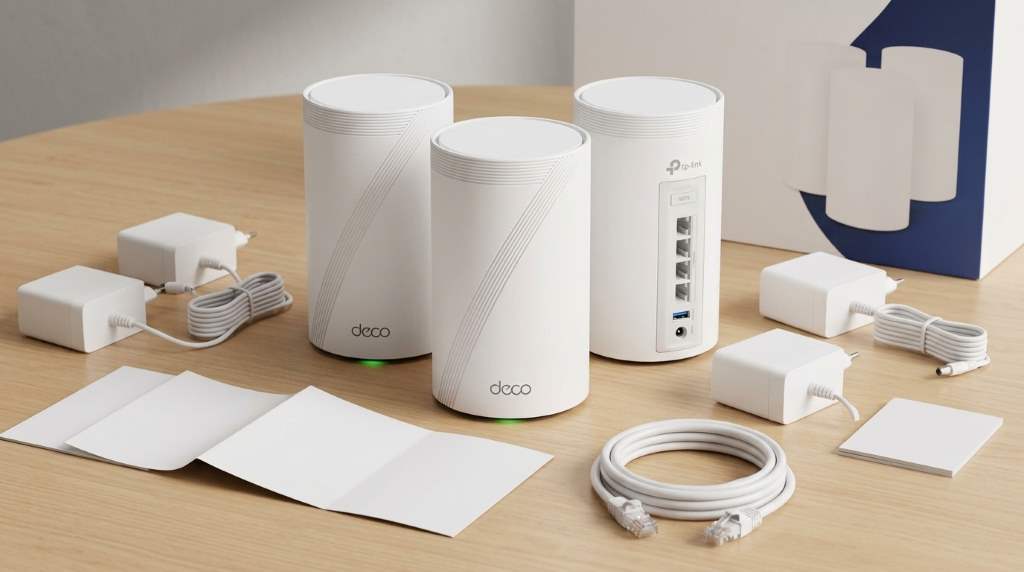
The TP Link Deco 7 Pro BE63 Wifi 7 Mesh System package includes Deco BE63 units, power adapters, one Ethernet cable, and a Quick Installation Guide. Depending on the pack, you receive one, two, or three mesh units, while the three-pack targets up to 7,200 square feet.
For a closer look at the TP Link Deco 7 Pro BE63 Wifi 7 Mesh System, checking the box contents matters before installation. The BE63 supports tri-band Wi-Fi 7 with combined wireless speeds reaching 10 Gbps.
What Comes Inside the Deco BE63 Package?
TP-Link keeps the Deco BE63 package straightforward, focusing on the hardware needed for immediate setup. However, the exact quantity of several components depends on whether you choose one, two, or three units.
Every retail configuration includes the essential networking hardware, power equipment, and basic documentation. You do not need to purchase separate power supplies or an Ethernet cable for initial setup.
| Package | Deco BE63 Units | Power Adapters | Ethernet Cables | Quick Guide |
|---|---|---|---|---|
| 1-Pack | 1 | 1 | 1 | 1 |
| 2-Pack | 2 | 2 | 1 | 1 |
| 3-Pack | 3 | 3 | 1 | 1 |
The Main Hardware You Actually Receive
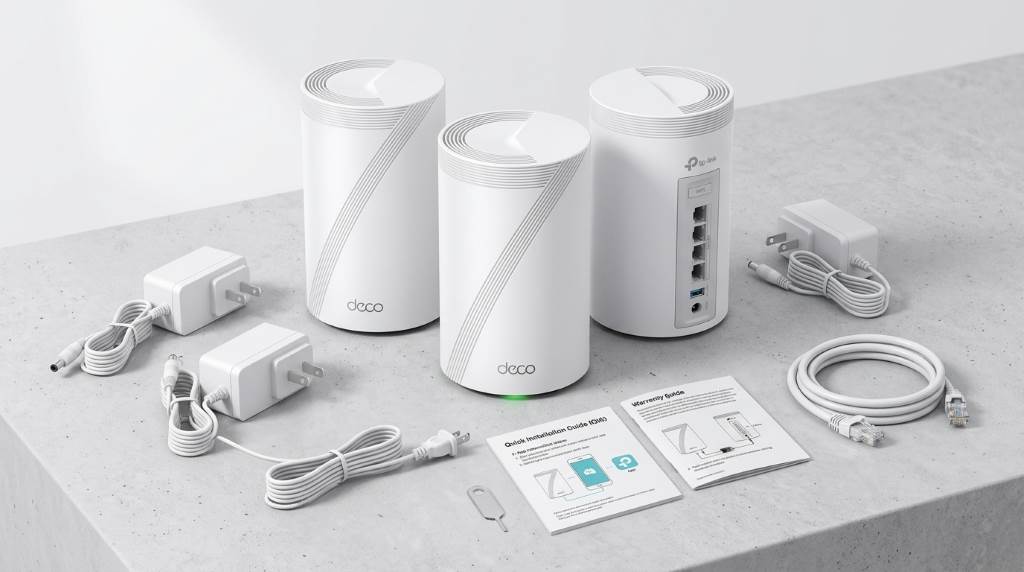
The Deco BE63 units form the core of the entire mesh network. Each unit can operate as the primary router or as an additional mesh node.
Therefore, buying a two-pack gives you two identical BE63 units rather than one router and one specialized extender. That approach simplifies placement, replacement, expansion, and network management.
Deco BE63 Mesh Units
Each BE63 uses a compact tower design that fits naturally on desks, shelves, and open furniture. The cylindrical enclosure also avoids the large external antennas found on many conventional routers.
More importantly, each unit provides tri-band Wi-Fi 7 across 2.4GHz, 5GHz, and 6GHz frequencies. This combination gives compatible devices access to newer high-bandwidth wireless capabilities.
The system also supports Multi-Link Operation, 320MHz channels, and 4K-QAM. Consequently, compatible clients can achieve higher throughput and improved responsiveness under suitable network conditions.
Power Adapters
Each included Deco unit receives its own power adapter. Therefore, a three-pack includes three adapters, while a two-pack includes two.
Keep every adapter with its corresponding Deco unit during installation or relocation. Losing one adapter can prevent a mesh node from operating, even when the networking hardware remains functional.
RJ45 Ethernet Cable
The package includes one RJ45 Ethernet cable for connecting a Deco unit with your modem or existing network equipment. This cable handles the initial wired connection between your internet source and the primary Deco.
However, one included cable does not mean the system supports only one wired device. Each BE63 provides four 2.5Gbps Ethernet ports with automatic WAN and LAN detection.
Quick Installation Guide
TP-Link also includes a Quick Installation Guide for the initial setup process. The guide helps users understand the basic connection sequence before configuring the network through the Deco app.
Still, most configuration happens through the Deco mobile application rather than through the printed guide. That app handles network creation, node management, wireless settings, and various security controls.
What Is Not Included in the Box?
Understanding exclusions prevents unnecessary confusion during installation. The package does not include additional Ethernet cables for every wired device in your home.
You also should not expect wall mounts, ceiling mounts, network switches, or additional storage devices. Likewise, compatible Wi-Fi 7 client devices remain separate purchases.
This distinction matters because mesh hardware can create the impression that every networking accessory comes bundled. In practice, TP-Link supplies the essentials for establishing the mesh system and connecting its primary node.
- Additional Ethernet cables
- Ethernet switches
- Wall or ceiling mounting hardware
- Compatible Wi-Fi 7 client devices
- External USB storage
- Separate modem or ONT hardware
Does the Pack Size Change What You Get?
Yes, the pack size mainly changes the number of Deco units and power adapters. The included Ethernet cable remains one cable across the one-pack, two-pack, and three-pack configurations.
That difference becomes important when planning wired backhaul or connecting several devices immediately. If you need multiple wired connections, budget for additional Ethernet cables before installation.
What Comes With the 1-Pack?
The one-pack includes one Deco BE63, one power adapter, one RJ45 Ethernet cable, and one Quick Installation Guide. This configuration works well when you need one router or want to extend an existing compatible Deco network.
However, a single unit does not provide the same whole-home mesh coverage as a multi-unit package. It makes more sense for smaller spaces or targeted coverage improvements.
What Comes With the 2-Pack?
The two-pack includes two Deco BE63 units, two power adapters, one Ethernet cable, and one Quick Installation Guide. This configuration creates the basic multi-node mesh arrangement many households expect.
Typically, one unit connects to your modem while the second unit extends coverage elsewhere. You can also connect the nodes using Ethernet when your home supports wired backhaul.
What Comes With the 3-Pack?
The three-pack contains three Deco BE63 units, three power adapters, one Ethernet cable, and one Quick Installation Guide. TP-Link rates this configuration for coverage reaching up to 7,200 square feet.
Actual coverage depends on walls, building materials, interference, device placement, and client capabilities. Therefore, treat the advertised coverage figure as a planning reference rather than a guaranteed result.
Why the Included Hardware Matters for Wi-Fi 7
The BE63 package looks simple because much of its sophistication sits inside each Deco unit. Each node combines tri-band wireless networking with modern Wi-Fi 7 features.
For example, 320MHz channels can provide wider wireless channels than older 160MHz Wi-Fi configurations. Meanwhile, Multi-Link Operation can allow compatible devices to use multiple wireless links more efficiently.
However, those benefits require compatible client hardware and favorable wireless conditions. An older Wi-Fi 5 or Wi-Fi 6 device cannot suddenly achieve Wi-Fi 7 performance.
The Ports Make the BE63 Package More Versatile
The included Deco units provide four 2.5Gbps Ethernet ports per node. Each port can automatically detect whether it serves WAN or LAN duties.
This arrangement gives the BE63 considerable flexibility for multi-gig internet connections and wired devices. You can connect computers, gaming systems, televisions, switches, or network storage without buying a separate adapter.
Each unit also includes a USB port for supported storage and networking functions. Consequently, the hardware offers more connectivity options than a basic wireless-only mesh extender.
When Should You Use Ethernet Backhaul?
Ethernet backhaul makes particular sense when your home already has network cabling. Instead of sending node-to-node traffic wirelessly, the Deco units can communicate through a wired connection.
This approach can preserve more wireless capacity for phones, laptops, televisions, and smart-home devices. It can also improve consistency when wireless conditions become congested.
What You Need Before Starting Installation
The included accessories cover the basic hardware requirements, but your home still needs several existing components. Most importantly, you need an active internet connection and compatible modem or gateway equipment.
You should also prepare a smartphone or tablet for the Deco app. Finally, identify suitable locations where the Deco nodes can receive stable power and maintain useful wireless communication.
- Active broadband internet service
- Working modem or compatible gateway
- Smartphone or tablet for setup
- Available electrical outlets
- Additional Ethernet cables if needed
- Suitable locations for mesh nodes
How to Check Your Box Before Installation
Before connecting anything, verify the number of Deco units against your purchased package. Next, count the power adapters and confirm that the Ethernet cable and Quick Installation Guide are present.
Then inspect every Deco unit for visible shipping damage. If anything appears damaged or missing, stop installation and contact the retailer or manufacturer before using the system.
- Confirm the correct number of Deco BE63 units.
- Match each unit with a power adapter.
- Locate the included RJ45 Ethernet cable.
- Find the Quick Installation Guide.
- Inspect the units and cables for damage.
- Download the Deco app before beginning configuration.
Common Mistakes to Avoid After Unboxing
One common mistake involves placing every mesh node too far from the primary unit. A mesh node needs a usable connection to the network before it can extend coverage effectively.
Another mistake involves hiding a Deco unit inside cabinets or behind large objects. Open placement usually gives the wireless signals a better path through the surrounding space.
Additionally, users sometimes expect every connected device to receive multi-gigabit wireless speeds. Your internet plan, client hardware, channel conditions, distance, and network traffic all influence actual performance.
Is Everything Needed for Setup Included?
For basic setup, yes, the package includes the essential physical accessories. You receive the Deco hardware, required power adapters, one Ethernet cable, and printed setup guidance.
However, you may need extra Ethernet cables for wired devices or Ethernet backhaul. You also need an existing internet service and modem or gateway because the Deco system does not replace that service.
Deco BE63 Package Contents at a Glance
| Item | Included? | Purpose |
|---|---|---|
| Deco BE63 units | Yes | Creates the Wi-Fi mesh network |
| Power adapters | Yes | Powers each Deco unit |
| RJ45 Ethernet cable | Yes | Connects the primary Deco to your modem |
| Quick Installation Guide | Yes | Provides basic setup instructions |
| Extra Ethernet cables | No | Needed for additional wired connections |
| Modem | No | Provides the incoming internet connection |
| Wall mounting hardware | No | Not required for standard tabletop installation |
Who Should Choose the Deco BE63?
The BE63 suits households that want Wi-Fi 7 without moving into premium quad-band mesh pricing. Its combination of tri-band wireless and multiple 2.5Gbps ports provides strong flexibility.
It also makes sense for homes with several demanding devices and growing multi-gig internet requirements. Furthermore, the Deco platform offers a practical path for expanding coverage later.
Still, buyers with extensive wired networks may prefer systems offering faster Ethernet ports. Similarly, users without Wi-Fi 6E or Wi-Fi 7 clients may see fewer immediate benefits.
Final Verdict
The TP-Link Deco BE63 package includes the essential hardware for building a modern Wi-Fi 7 mesh network. Your chosen pack determines the number of Deco units and power adapters, while every configuration includes one Ethernet cable and a Quick Installation Guide.
Before buying, choose the pack according to your home’s size, layout, and backhaul requirements. Then check your existing modem, Ethernet cabling, and client devices to ensure the BE63 fits your network.
If you want a capable Wi-Fi 7 mesh system with straightforward hardware and flexible 2.5Gbps connectivity, the BE63 deserves consideration. Check the package size carefully, verify every included component, and plan node placement before starting setup.
Frequently Asked Questions
Does the Deco BE63 include an Ethernet cable?
Yes, every BE63 package includes one RJ45 Ethernet cable for connecting the primary unit to your network.
How many power adapters come with the BE63?
You receive one power adapter for each Deco BE63 unit included in your selected package.
Does the three-pack include three Ethernet cables?
No, the three-pack includes three Deco units and adapters but only one RJ45 Ethernet cable.
Can I buy one Deco BE63 unit?
Yes, TP-Link offers a one-pack configuration containing one Deco BE63 and its required accessories.
Does the BE63 package include a modem?
No, you must provide a compatible modem or gateway with an active internet connection.