
Key Takeaways
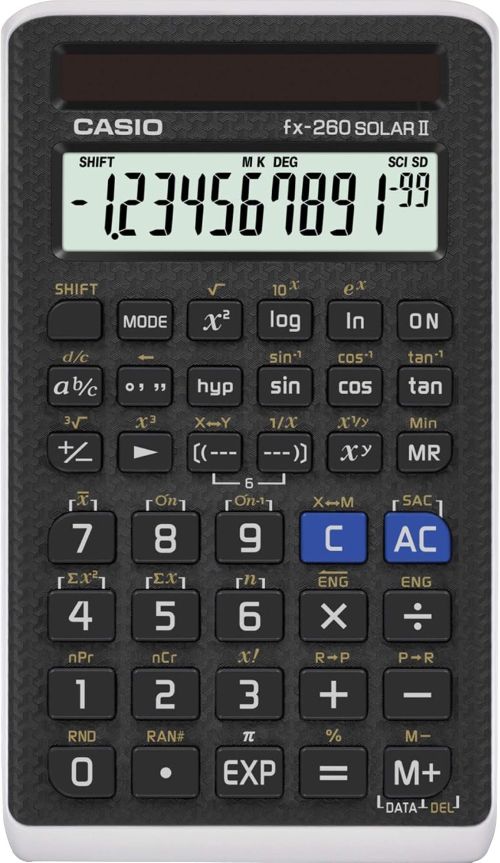
- The Casio fx-260 Solar II is Casio’s smallest scientific calculator, offering a compact and lightweight design ideal for students on the go.
- A large 10-digit display handles hundreds of math functions despite the small footprint.
- Solar Plus technology with battery backup ensures reliable power in any lighting condition.
- The calculator covers Pre-Algebra through Trigonometry, making it ideal for middle and high school coursework.
- Advanced functions include trigonometric operations, permutations, combinations, and factorials for comprehensive math support.
Scientific calculators come in many configurations, but some students just need a straightforward, portable tool that covers the fundamentals. Advanced models with multi-line displays and textbook rendering add value for complex coursework, but they also add bulk and cost that basic math students do not need. A student taking pre-algebra or geometry does not need a four-line display to solve for x or convert fractions to decimals. They need a reliable tool that fits in a pocket and handles the core functions without overwhelming them with options.
The Casio fx-260 Solar II targets this need with a compact design, 10-digit display, and solar power built for middle and high school coursework. For students who need a reliable, portable calculator that does the math without the bulk, that simplicity deserves attention.
Product at a Glance
Casio fx-260 Solar II Scientific Calculator
| Feature | Details |
|---|---|
| Product Name | Casio fx-260 Solar II Scientific Calculator |
| Brand | Casio |
| Color | Black |
| Calculator Type | Engineering/Scientific |
| Display | 10-digit, single-line |
| Screen Size | 2.25 inches |
| Power Source | Solar Plus with battery backup |
| Key Functions | Fractions, trigonometry, permutations, combinations, factorials |
| Target Classes | Pre-Algebra through Trigonometry |
| Design | Compact and lightweight |
Detailed Review
Why This Product Stands Out
Most scientific calculators have grown larger and more complex over the years. They added multi-line displays, textbook-style fraction rendering, and pull-down menus to justify higher price points. Those features add value for advanced classes, but they also add bulk that makes the calculator harder to carry. The fx-260 Solar II keeps the design compact. That simplicity matters because a student who carries a calculator between classes, study halls, and home needs a tool that fits in a pocket without adding weight. The compact size makes it Casio’s smallest scientific calculator, which sets it apart from larger models that dominate backpack space.
The Solar Plus technology sets this calculator apart from basic solar-only models. Standard solar calculators die in dim lighting, which leaves a student without a tool during a timed exam. The fx-260 Solar II uses energy-efficient solar power with a battery backup that keeps the calculator running in any lighting condition. That reliability matters because exam rooms often have poor lighting or windowless testing centers where solar cells cannot generate enough power. A calculator that dies mid-exam costs points that affect grades and admissions.

Key Specifications
| Specification | Value |
|---|---|
| Brand | Casio |
| Color | Black |
| Type | Engineering/Scientific |
| Display | 10-digit, single-line |
| Screen Size | 2.25 inches |
| Power | Solar Plus with battery backup |
| Functions | Hundreds of math functions |
| Target Classes | Pre-Algebra, Algebra I and II, Geometry, Trigonometry, Physics |
| Key Features | Fraction key, trig functions, permutations, combinations, factorials |
| Design | Compact and lightweight |
Design & Build Quality
Casio built the fx-260 Solar II for daily classroom abuse. The hard plastic shell survives drops from desk height that crack cheaper calculators. Students toss calculators into backpacks alongside textbooks, water bottles, and lunch boxes. A flimsy housing cracks under that pressure within a semester. The fx-260 Solar II holds up to the daily wear that student life demands. The black finish hides scuffs and marks that show clearly on lighter-colored models.
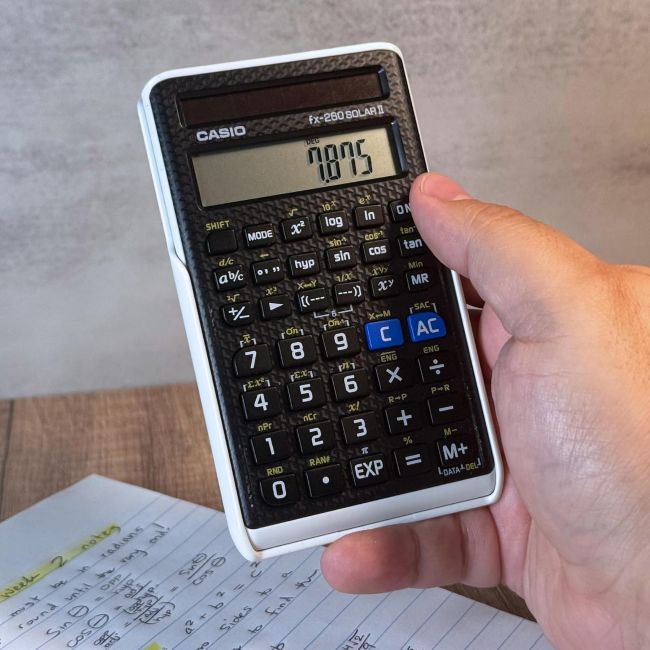
The compact and lightweight design makes this calculator easy to carry. That portability matters because students move between classes, study halls, and home throughout the day. A heavy or bulky calculator discourages regular use. The compact size ensures the calculator is always available when needed, whether tucked in a pocket, a small bag, or a desk drawer.
Materials & Construction
The hard plastic housing resists the impacts and pressure that backpack life delivers. The keypad uses a rubber membrane that protects the internal electronics from dust and spills. Spills happen in classrooms and study halls. A calculator without a sealed keypad lets liquid reach the circuit board, which causes permanent failure. The sealed membrane design keeps the electronics dry and functional through the accidents that student life produces.
The 2.25-inch screen uses LCD technology that remains readable in both bright and dim conditions and draws minimal power, which extends battery life. The 10-digit display provides enough space for entries and results without crowding. That readability matters because squinting at a tiny screen causes eye strain during long study sessions. Despite the compact size, the large 10-digit display handles hundreds of math functions without truncating the results.
Performance
Performance for a scientific calculator comes down to function coverage and accuracy. The fx-260 Solar II delivers on both. The fundamental functions cover arithmetic, fractions, and percentages. The advanced functions cover trigonometric and inverse trig operations, permutations, combinations, and factorials. That range covers the requirements of Pre-Algebra, Algebra I and II, Geometry, Trigonometry, Physics, and general math courses. One calculator handles every middle and high school class without requiring a second device.
The fraction support deserves specific attention. Many calculators convert fractions to decimals, which loses precision and complicates work for students learning fraction operations. The fx-260 Solar II includes a fraction key for easy input of rational numbers and mixed forms. That native handling matters because algebra and geometry require exact fraction answers rather than rounded decimal approximations. A calculator that handles fractions natively saves students from manual reduction errors and keeps the focus on the math concept rather than the computation.
Comfort / Usability
Usability determines whether a calculator helps or hinders learning. The fx-260 Solar II scores well here. The compact size makes it easy to hold and operate with one hand, which matters during long study sessions where fatigue sets in. The large 10-digit display is easy to read despite the small overall size of the calculator. That balance matters because a compact calculator with a tiny screen forces students to squint, which causes eye strain and increases input errors.
The decimal settings add genuine usability value. Students choose their decimal settings for consistent results and easier grading or reporting. That flexibility matters because different classes and problems require different precision levels. A calculator that locks you into one decimal setting forces you to convert results manually, which wastes time and increases errors. The decimal settings let you match the calculator to the problem at hand.
Features Explained
Compact and Lightweight Design
Casio’s Smallest Scientific Calculator
The fx-260 Solar II is Casio’s smallest scientific calculator. That compact size matters because students need a portable tool that fits in a pocket or small bag. A heavy or bulky calculator discourages regular use. The lightweight design ensures the calculator is always available when needed, whether in class, study hall, or at home.
Large 10-Digit Display
Readable Results Despite Compact Size
The large 10-digit display handles hundreds of math functions without truncating results. That readability matters because a compact calculator with a tiny screen forces students to squint, which causes eye strain and increases input errors. The 10-digit display provides enough space for entries and results without crowding, despite the small overall size of the calculator.
Solar Plus Technology with Battery Backup
Reliable Power in Any Lighting
The Solar Plus technology uses energy-efficient solar power with a battery backup. That reliability matters because exam rooms often have poor lighting or windowless testing centers where solar cells cannot generate enough power. A solar-only calculator dies mid-exam, which leaves a student without a tool during a timed test. The battery backup ensures the calculator works in every lighting condition a student encounters.
Fraction Key Support
Exact Answers Without Decimal Loss
The fraction key allows easy input of rational numbers and mixed forms. That native handling matters because algebra and geometry require exact fraction answers rather than rounded decimal approximations. A calculator that handles fractions natively saves students from manual reduction errors and keeps the focus on the math concept rather than the computation.
Advanced Math Functions
Trigonometry, Permutations, Combinations, and Factorials
The calculator performs trigonometric and inverse trig operations, permutations, combinations, and factorials. That coverage matters because Pre-Algebra, Algebra I and II, Geometry, Trigonometry, and Physics all require these functions. A calculator without these functions limits students to manual computation, which is slow and error-prone. Built-in advanced functions let students solve problems efficiently and focus on the concepts.
Decimal Settings
Consistent Results for Easier Grading
Students choose their decimal settings for consistent results and easier grading or reporting. That flexibility matters because different classes and problems require different precision levels. A calculator that locks you into one decimal setting forces you to convert results manually, which wastes time and increases errors. The decimal settings let you match the calculator to the problem at hand.
Ideal for Middle and High School
Full Curriculum Coverage
The calculator is perfect for students in middle school through high school taking Pre-Algebra, Algebra I or II, Geometry, Trigonometry, Physics, or general math courses. That coverage matters because one calculator handles every class without requiring a second device. A student can use the same calculator from Pre-Algebra through Trigonometry without switching tools, which builds familiarity and reduces errors that come from switching between different calculator models and layouts.
Real World Usage
Consider a middle school student taking a pre-algebra test. They need to solve for x in a simple equation, convert a fraction to a decimal, and compute a percentage. The fx-260 Solar II handles these tasks with straightforward key presses. The fraction key allows easy input of rational numbers. The 10-digit display shows the entry and result clearly. The compact size fits easily on a desk alongside the test paper. The Solar Plus technology ensures the calculator works even in a dimly lit classroom.
Now picture a high school student taking a physics exam. They need to perform a trigonometric calculation and compute a factorial. The fx-260 Solar II handles these tasks with straightforward key presses. The trigonometric and inverse trig operations cover the requirements of physics coursework. The decimal settings let them match the precision level the problem requires. The battery backup ensures the calculator works throughout the exam, even in a windowless testing center.
Benefits
- Compact and lightweight design fits in a pocket or small bag for easy portability.
- Large 10-digit display handles hundreds of math functions without truncating results.
- Solar Plus technology with battery backup ensures reliable power in any lighting.
- Fraction key allows easy input of rational numbers and mixed forms.
- Advanced functions cover trigonometry, permutations, combinations, and factorials.
- Decimal settings provide consistent results for easier grading and reporting.
- Hard plastic housing survives daily backpack abuse.
- Standard key layout matches classroom instruction for easy learning.
- Covers Pre-Algebra through Trigonometry without requiring a second calculator.
- Affordable price fits student budgets.
Limitations
- Single-line display is limited compared to multi-line models that show calculation history.
- No natural textbook display for complex expressions with stacked fractions.
- No graphing capability for calculus or advanced math classes that require function plotting.
- No computer connectivity for data transfer or software updates.
- Battery compartment requires a small screwdriver to open, which complicates replacement.
- No rechargeable battery option, which means ongoing battery replacement costs.
- Limited memory functions compared to more advanced scientific calculators.
- Advanced functions require navigating shift keys, which adds a learning curve.
Who Should Buy It?
The fx-260 Solar II suits students who need a straightforward, reliable calculator for middle and high school coursework. Anyone taking Pre-Algebra, Algebra I or II, Geometry, Trigonometry, Physics, or general math will find the function coverage complete. Students who value portability will appreciate the compact and lightweight design. If you want one affordable calculator that covers the fundamental math and science functions without unnecessary features, this model delivers that balance.
Who Should Avoid It?
Skip this calculator if you need a multi-line display for tracking multi-step problems. Anyone who wants a natural textbook display for complex expressions should look at the Casio fx-300ES Plus or TI-30XS MultiView. Students who need graphing capability for calculus or advanced math classes that require function plotting should consider a graphing calculator. Users who need computer connectivity for data transfer or programming should consider a higher-end calculator. Students who prefer a rechargeable calculator should explore premium alternatives.
Key Features Table
| Feature | Benefit |
|---|---|
| Compact and lightweight | Easy portability for students on the go |
| Large 10-digit display | Readable results despite compact size |
| Solar Plus with battery backup | Reliable power in any lighting |
| Fraction key | Exact answers without decimal loss |
| Advanced math functions | Trigonometry, permutations, combinations, factorials |
| Decimal settings | Consistent results for easier grading |
| Hard plastic housing | Backpack-ready durability |
| Full curriculum coverage | Pre-Algebra through Trigonometry |
Pros & Cons
| Pros | Cons |
|---|---|
| Compact and lightweight | Single-line display limited |
| Large 10-digit display | No natural textbook display |
| Solar Plus with battery backup | No graphing capability |
| Fraction key support | No computer connectivity |
| Advanced math functions | Battery replacement requires screwdriver |
| Decimal settings | No rechargeable battery option |
| Durable hard plastic housing | Limited memory functions |
| Affordable price | Advanced functions require shift keys |
| Standard teacher-compatible layout |
Cleaning Tips
Wipe the calculator exterior with a soft, dry cloth to remove fingerprints and dust. For stubborn dirt, use a slightly damp cloth with mild soap. Avoid spraying liquid directly on the calculator, which can seep into the keypad membrane and damage the electronics. Clean around the keys with a soft brush to remove dust and debris that accumulate between the buttons. Never use alcohol or harsh solvents that can degrade the plastic housing or the LCD screen.
Maintenance Tips
Check the battery annually before the school year starts. A weak battery causes the display to fade or the calculator to shut off unexpectedly during low-light conditions. Replace the battery with the correct size specified in the battery compartment. Keep the solar panel clean by wiping it gently with a soft cloth, as dust and fingerprints reduce the panel’s ability to generate power. Store the calculator in a cool, dry location away from direct sunlight and extreme heat to protect the plastic housing and LCD screen.
Troubleshooting Tips
When the display fades or goes blank, the battery may be weak. Replace it to restore normal operation. Should the calculator work in bright light but shut off in dim conditions, the solar panel may be functioning while the battery needs replacement. If the display shows garbled characters, remove and reinstall the battery to reset the calculator. When the keys feel sticky or unresponsive, use a soft brush to clear debris around the key edges. If the calculator powers on but produces incorrect answers, verify that you are using the correct calculation mode. Press the MODE key to check the degrees or radians setting and decimal format required for your calculation.
What Real Buyers Appreciate
Buyers consistently praise the compact size as the standout feature. Many describe it as the perfect calculator for students who need a portable tool without the bulk of larger models. Students highlight the fraction key for pre-algebra and geometry work. Parents appreciate the affordable price point compared to graphing calculators and larger scientific models. The Solar Plus technology earns frequent mention from students who used the calculator in dim exam rooms. Teachers consistently recommend the fx-260 Solar II because the standard Casio layout matches classroom instruction. Overall sentiment centers on strong value, with most buyers feeling they received a reliable, portable calculator at a reasonable price.
Frequently Asked Questions
Is the fx-260 Solar II approved for standardized tests?
The fx-260 Solar II is generally approved for use on SAT, ACT, and AP exams. However, always check the latest standardized testing policies before bringing any calculator to an exam. Using an approved calculator eliminates the risk of showing up to the test with a banned device.
Does the calculator have a multi-line display?
No. The fx-260 Solar II uses a single-line 10-digit display. That display shows the current entry and result. If you need a multi-line display for tracking multi-step problems, consider the Casio fx-300ES Plus or TI-30XS MultiView.
Does the calculator handle fractions natively?
Yes. The calculator includes a fraction key for easy input of rational numbers and mixed forms. That native handling matters because algebra and geometry require exact fraction answers rather than rounded decimal approximations.
Does the calculator have graphing capability?
No. The fx-260 Solar II is a scientific calculator, not a graphing calculator. It cannot plot functions or display graphs. For calculus or advanced math classes that require graphing, consider a graphing calculator like the TI-84 Plus.
How does the Solar Plus technology work?
The calculator uses energy-efficient solar power with a battery backup. The solar panel powers the calculator in bright conditions, and the battery takes over when light is insufficient. That reliability ensures the calculator works in every lighting condition, including windowless exam rooms where solar-only calculators fail.
What classes is the calculator ideal for?
The calculator is perfect for students in middle school through high school taking Pre-Algebra, Algebra I or II, Geometry, Trigonometry, Physics, or general math courses. That coverage means one calculator handles every class without requiring a second device.
What battery does the calculator use?
The calculator uses a small button-cell battery as backup to the solar panel. The exact battery size is specified in the battery compartment. Replace the battery annually before the school year starts to ensure reliable performance during exams.
Is the calculator durable enough for student use?
Yes. The hard plastic shell survives drops from desk height and the pressure of backpack life. The sealed keypad membrane protects the internal electronics from dust and spills. The fx-260 Solar II holds up to the daily wear that student life demands.
Final Verdict
The Casio fx-260 Solar II earns its place by delivering essential functions in a compact, portable package. If you need a calculator for finance or business coursework, the Affordable Texas Instruments BA II Plus Financial Calculator is another option worth exploring for more specialized financial calculations. The compact size, 10-digit display, and Solar Plus technology address the three needs of students who want a portable and reliable calculator. Portability, readability, and power reliability each get dedicated solutions in one affordable device.
The limitations are honest. The calculator lacks a multi-line display, natural textbook rendering, and graphing capability that advanced classes may require. For any student who needs a reliable, portable calculator for fundamental middle and high school math, these trade-offs feel reasonable. The fx-260 Solar II delivers genuine value through simplicity and portability that justify its position as a standard classroom calculator.
Call To Action
If your student needs a compact, affordable calculator that handles fractions, trigonometry, and advanced functions with reliable solar power, the Casio fx-260 Solar II is a smart investment. Check current pricing and availability today, and give them a portable tool that fits in any pocket.