
Key Takeaways
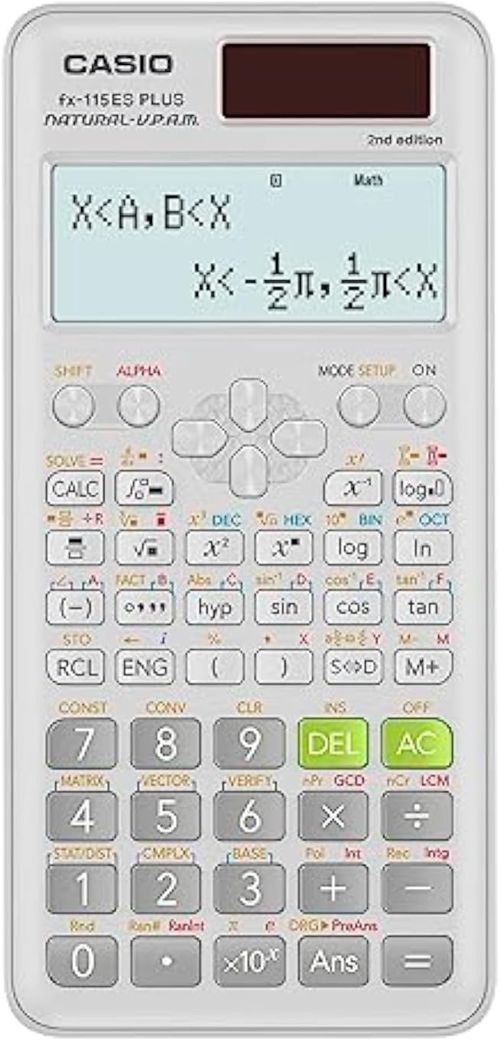
- The Casio fx-115ES Plus 2nd Edition packs over 280 functions into a compact scientific calculator.
- Casio’s natural textbook display shows fractions, roots, and symbols exactly as your textbook writes them.
- A 16-digit four-line LCD screen lets you view multiple calculations without scrolling.
- This calculator handles complex numbers, base conversions, statistics, and engineering notation.
- Casio designed this model for high school and college students in math, science, engineering, and statistics.
Students need a reliable calculator that keeps up with tough coursework. Cheap models lack the functions for calculus or statistics. Overpriced graphing calculators face bans in many exam halls. You need a tool that balances power, compliance, and affordability.
The Casio fx-115ES Plus Scientific Calculator promises exactly that. This 2nd Edition upgrade refines an already popular formula. Casio packed it with over 280 functions while keeping the interface intuitive.
Choosing the wrong calculator wastes money and costs points on exams. Weak models force you to compute complex expressions by hand. Clunky interfaces slow you down during timed tests. This review breaks down whether this white powerhouse truly stands out from the crowd.
Product at a Glance
Casio fx-115ES Plus 2nd Edition Advanced Scientific Calculator
| Feature | Specification |
|---|---|
| Product Name | Casio fx-115ES Plus 2nd Edition Advanced Scientific Calculator |
| Functions | 280+ |
| Display | Natural textbook display |
| Screen | 16-digit, 4-line LCD |
| Screen Size | 6.5 centimeters |
| Power Source | Battery powered |
| Color | White |
| Calculator Type | Engineering/Scientific |
| Ideal For | Math, science, engineering, statistics |
| Compliance | Approved for most standardized tests |
Detailed Review
Why This Product Stands Out
Casio built its reputation on calculators that last. The fx-115ES Plus 2nd Edition continues that legacy. This model bridges the gap between basic scientific calculators and banned graphing models.
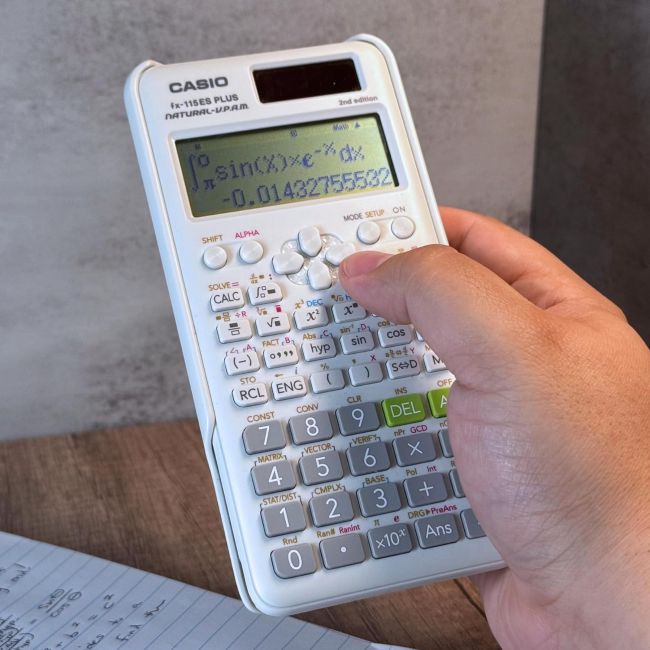
The natural textbook display sets this calculator apart from linear-entry competitors. It shows square roots with the traditional radical symbol. It stacks fractions vertically. You read the screen exactly as you read your textbook. This feature reduces transcription errors and speeds up problem solving.
Key Specifications
| Specification | Detail |
|---|---|
| Display Type | 16-digit, 4-line natural textbook display |
| Screen Size | 6.5 cm |
| Total Functions | 280+ |
| Power | Battery powered |
| Color | White |
| Entry System | Natural display with math notation |
| Key Features | Complex numbers, base conversions, statistics, engineering notation |
| Ideal Courses | Math, science, engineering, statistics |
| Test Approval | Approved for most standardized exams |
Design & Build Quality
This calculator features a slim white chassis. The body measures roughly the size of a standard scientific model. It slips easily into pockets, pencil cases, and backpack compartments.
The keys use a crisp, responsive mechanism. Each press registers with a distinct tactile feel. This matters during timed exams when fumbled keystrokes cost valuable points. The keypad arranges functions logically, with color-coded secondary operations printed above each key.
Materials & Construction
Casio uses high-impact plastic for the housing. This material survives drops from desk height without cracking. The screen cover resists scratches from keys, coins, and pens that share space in a backpack.
The construction prioritizes longevity over flashiness. You will not find touchscreens or rechargeable batteries here. Instead, you get a tool built to survive years of academic use and standardized testing.
Performance
Speed determines whether a calculator helps or hinders you during exams. The Casio fx-115ES Plus Scientific Calculator processes complex calculations quickly. Statistical functions evaluate data sets without lag. Base conversions switch between decimal, binary, octal, and hexadecimal instantly.
The four-line display shows your current calculation alongside previous results. You scroll up to review past entries without retyping. This feature saves precious minutes during tests. You verify your work without losing your place in a multi-step problem.
Comfort / Usability
The slim profile fits comfortably in one hand. You operate the keypad with your thumb while holding the device. The weight distributes evenly, preventing hand fatigue during long homework sessions.
The natural display system deserves special attention. It renders fractions as stacked numerators and denominators. Exponents appear as superscripts. Square root symbols extend over the entire radicand. This notation matches textbook formatting exactly. You spend less time mentally translating between calculator syntax and written math.
Features Explained
Natural Textbook Display
This screen technology shows mathematical expressions exactly as your textbook writes them. Fractions look like fractions. Integrals display with the proper symbol and limits. This visual fidelity reduces transcription errors. You understand your input at a glance instead of deciphering linear syntax.
16-Digit Four-Line LCD
The screen displays up to four lines of calculations simultaneously. You can see your original input, an intermediate result, and your final answer all at once. This matters because complex problems require cross-referencing. You catch input errors before they ruin your solution.
280+ Functions
This calculator handles arithmetic, algebra, trigonometry, calculus, statistics, and engineering calculations. It performs complex number operations, vector calculations, and base conversions. This breadth supports coursework from high school algebra through introductory college engineering.
Complex Number Support
You can enter and manipulate complex numbers in rectangular or polar form. The calculator handles arithmetic, powers, and roots of complex values. This feature matters for electrical engineering students and advanced physics coursework.
Base Conversions
The device converts between decimal, binary, octal, and hexadecimal systems instantly. Computer science students and digital logic learners appreciate this convenience. You avoid manual conversion tables and reduce the risk of simple arithmetic errors.
Statistics Mode
The calculator computes mean, standard deviation, regression analysis, and probability distributions. You enter data sets and the device returns results quickly. This mode supports high school statistics and introductory college data analysis courses.
Engineering Notation
The calculator displays results in engineering notation, which uses exponents in multiples of three. This format aligns with standard engineering prefixes like kilo, mega, and giga. You read results faster and communicate values more clearly.
Solar Plus Battery Power
The dual power system uses solar energy for normal operation and a backup battery for low-light conditions. You never lose power during a critical exam. The battery ensures functionality in dim lecture halls or nighttime study sessions.
Table Function
You can generate numeric tables for functions. Enter an expression and the calculator builds a table of values across a specified domain. This feature helps you visualize function behavior and identify patterns without graphing.
Equation Solver
The built-in solver handles polynomial equations and systems of linear equations. You enter coefficients and the calculator returns roots or solutions. This feature saves time on homework and verifies manual work.
Real World Usage
Picture yourself in a college statistics exam. The professor banned graphing calculators. You pull out the Casio fx-115ES Plus Scientific Calculator and compute the standard deviation of a data set. The four-line display shows your data entry and the result simultaneously. You verify your work and move to the next problem.
Later, in your electrical engineering lab, you convert a decimal resistance value to binary for a digital circuit assignment. The base conversion function returns the result instantly. You finish the lab report without hunting through conversion tables.
During a calculus homework session, you evaluate a definite integral numerically. The calculator returns the approximation quickly. You confirm your manual calculation using integration by parts. The confidence saves you from second-guessing your work.
Benefits
- Natural textbook display reduces syntax confusion and input errors
- Four-line screen lets you review multiple calculations at once
- Over 280 functions support math, science, engineering, and statistics
- Complex number support aids electrical engineering and physics students
- Base conversions streamline computer science and digital logic work
- Statistics mode handles data analysis without manual computation
- Dual solar and battery power ensures reliability in any lighting
- Approved for most standardized tests where graphing models face bans
- Durable construction survives years of academic use
- Lightweight design fits comfortably in pockets and pencil cases
Limitations
- The non-graphing design prevents plotting functions visually
- The screen lacks backlighting, which complicates use in very dim rooms
- No computer algebra system for symbolic manipulation
- Matrix operations are more limited than dedicated graphing calculators
- The learning curve for advanced functions steeper than basic models
- Battery replacement requires a small screwdriver
- The white color shows dirt and scuff marks more readily than darker models
Who Should Buy It?
The Casio fx-115ES Plus Scientific Calculator suits high school and college students in STEM fields. It works perfectly for algebra, trigonometry, statistics, introductory calculus, and engineering courses. Anyone facing graphing calculator restrictions on exams benefits most. Professionals needing quick numeric calculations in the field also appreciate the portability.
Who Should Avoid It?
Students who require graphing capabilities for visual function analysis should invest in a graphing model. Those needing symbolic algebra manipulation should explore computer algebra systems. Users wanting rechargeable batteries, color screens, or touch interfaces should look at newer alternatives.
Key Features Table
| Feature | Why It Matters |
|---|---|
| Natural textbook display | Shows expressions exactly as textbooks write them, reducing input mistakes |
| 16-digit four-line LCD | Lets you review multiple calculations simultaneously for faster error checking |
| 280+ functions | Covers arithmetic through advanced engineering and statistics coursework |
| Complex number support | Handles rectangular and polar forms for physics and electrical engineering |
| Base conversions | Eliminates manual conversion tables for computer science and digital logic |
| Statistics mode | Computes mean, deviation, and regression without manual formulas |
| Dual solar and battery power | Ensures reliability in bright sunlight and dim exam rooms |
| Table function | Generates numeric value tables for function analysis without graphing |
| Equation solver | Finds roots and solutions instantly, saving time on homework and exams |
Pros & Cons Table
| Pros | Cons |
|---|---|
| Natural textbook display | No graphing or plotting capabilities |
| Four-line screen for multi-line review | Screen lacks backlight |
| Over 280 advanced functions | No symbolic computer algebra |
| Approved for most exams | Matrix operations more limited than graphing models |
| Dual solar and battery power | Steeper learning curve than basic calculators |
| Lightweight and portable | White color shows scuffs easily |
| Durable, long-lasting construction |
Cleaning Tips
Wipe the calculator body with a slightly damp microfiber cloth. Avoid harsh chemicals that could damage the screen or keypad labels. Clean between keys using compressed air to remove dust and pencil shavings. Never submerge the device in water.
Maintenance Tips
Replace the battery when the screen dims or calculations slow. Store the calculator in a protective case to prevent screen scratches. Avoid exposing the device to extreme heat, such as inside a closed car during summer. Remove the battery if you plan to store the unit for several months.
Troubleshooting Tips
Screen goes blank: Replace the battery with a fresh cell. Verify the battery installs with correct polarity. Move the calculator to a brighter area to activate the solar panel.
Keys stick or fail to register: Remove the battery and gently shake the calculator to dislodge debris. Clean around the key edges with compressed air.
Display shows strange characters: Reset the calculator to default settings. Press the reset button or remove and reinstall the battery.
Results seem incorrect: Check that the calculator sits in the correct mode. Degrees versus radians cause wildly different trigonometric results. Verify you entered the expression correctly.
Solar panel fails to power the unit: Clean the solar panel with a soft cloth. Ensure you work in adequate lighting. The battery backup should activate in dim conditions.
What Real Buyers Appreciate
Students frequently mention the natural textbook display as a standout feature. Many note the four-line screen makes checking work significantly easier. Users appreciate that the calculator handles complex numbers and base conversions without requiring a banned graphing model. Several mention the statistics mode saves time on data-heavy assignments. Common feedback highlights the durable construction that survives heavy academic use. Some buyers caution that mastering all 280 functions takes practice. Most agree the device justifies its place in any STEM student’s backpack.
Frequently Asked Questions
What makes the Casio fx-115ES Plus different from basic scientific calculators?
The Casio fx-115ES Plus Scientific Calculator adds advanced functions like natural textbook display, complex number support, base conversions, statistics mode, and equation solving. Basic scientific calculators handle arithmetic and trigonometry only. This model bridges the gap between basic scientific and full graphing calculators.
Can I use the Casio fx-115ES Plus on standardized tests?
Yes. The non-graphing design complies with most exam policies that ban graphing calculators. The College Board permits this model on SAT and ACT exams. Always verify specific test policies before exam day.
What does the natural textbook display show?
The natural display renders fractions as stacked numerators and denominators. It shows square roots with the traditional radical symbol. Exponents appear as superscripts. You read the screen exactly as you read your textbook.
How many lines does the display show?
The 16-digit four-line LCD shows up to four lines of calculations simultaneously. You can scroll through previous entries and results. This feature lets you review your work without retyping expressions.
What courses does this calculator support?
The Casio fx-115ES Plus Scientific Calculator handles math, science, engineering, and statistics. It supports algebra, trigonometry, calculus, physics, electrical engineering, and computer science coursework.
Does this calculator have a solar panel?
Yes. The dual power system uses solar energy for normal operation and a backup battery for low-light conditions. The battery ensures functionality in dim lecture halls or nighttime study sessions.
Can this calculator solve equations?
Yes. The built-in solver handles polynomial equations and systems of linear equations. You enter coefficients and the calculator returns roots or variable values. It performs numeric solving rather than symbolic algebra.
Is the Casio fx-115ES Plus good for engineering students?
Yes. The calculator supports complex numbers, engineering notation, base conversions, and vector operations. These functions cover the computational needs of most undergraduate engineering courses. Advanced graduate work may require more powerful tools.
What type of battery does this calculator use?
The Casio fx-115ES Plus Scientific Calculator runs on a single button cell battery. Casio typically includes one battery in the package. Replacement requires a small screwdriver to open the battery compartment.
How durable is this calculator?
Casio uses high-impact plastic for the housing. The screen cover resists scratches. The keys tolerate millions of presses. Most users report years of reliable academic use with proper care.
Final Verdict
The Casio fx-115ES Plus Scientific Calculator delivers genuine value for students and professionals who need advanced computational power without graphing capabilities. If you’re also comparing calculators for business or finance coursework, the Affordable Texas Instruments BA II Plus Financial Calculator is another practical option worth exploring. The natural textbook display transforms how you read and verify work. The four-line screen eliminates the scrolling burden, while the 280+ functions support serious STEM coursework from high school through early college.
This calculator will not replace a graphing model for visual learners. It will not handle symbolic algebra or programming. The screen lacks a backlight. The white color shows scuffs.
For exam-restricted environments and serious academic workloads, this device hits the sweet spot. It combines the computational depth of advanced scientific models with the compliance of basic units. That combination makes the Casio fx-115ES Plus truly stand out.
Call To Action
Ready to upgrade your problem-solving toolkit? Grab the Casio fx-115ES Plus Scientific Calculator today. Verify it meets your course or exam requirements. Master the natural textbook display and four-line screen. Give yourself the computational edge that turns complex problems into solved equations.