
Key Takeaways
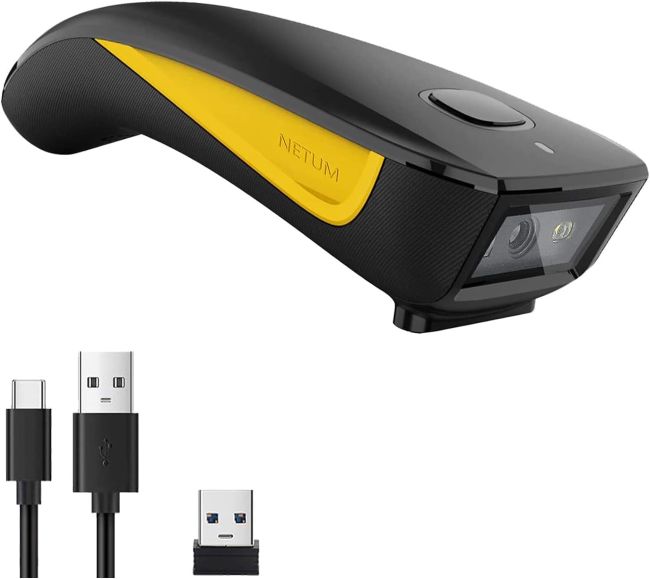
- The NETUM C750 is a pocket-sized 2D area-imaging barcode scanner that reads both 1D barcodes and 2D codes (QR, PDF417, Data Matrix, MicroQR) from paper and from screens — a genuine step up from 1D-only laser scanners at a similar price point.
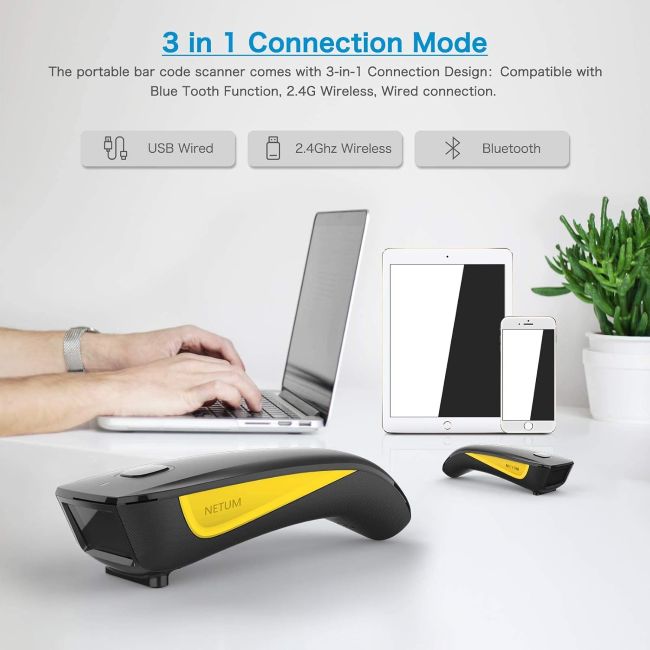
- It uses a 3-in-1 connectivity design: Bluetooth, 2.4GHz wireless (via USB dongle), and USB wired, so it pairs with iOS, Android, and Windows phones and tablets as well as standard PCs and laptops — far broader device support than a 2.4GHz-only scanner.
- An advanced CMOS global-shutter sensor (640×480) captures barcodes from monitors, smartphones, and tablets, which a laser scanner cannot do, and it reads poor-quality, damaged, and low-contrast codes with a decode error rate under 1 in 5 million.
- Two upload modes — Instant Upload and Storage Mode — cover real-time and offline batch scanning, with internal storage holding up to 100,000 barcodes for inventory work away from any host device.
- Weighing under 3 ounces, the C750 is genuinely portable, with a physical power switch to save energy, soft-touch plastics, an oversized trigger, and a white LED aimer that make one-handed scanning easy.
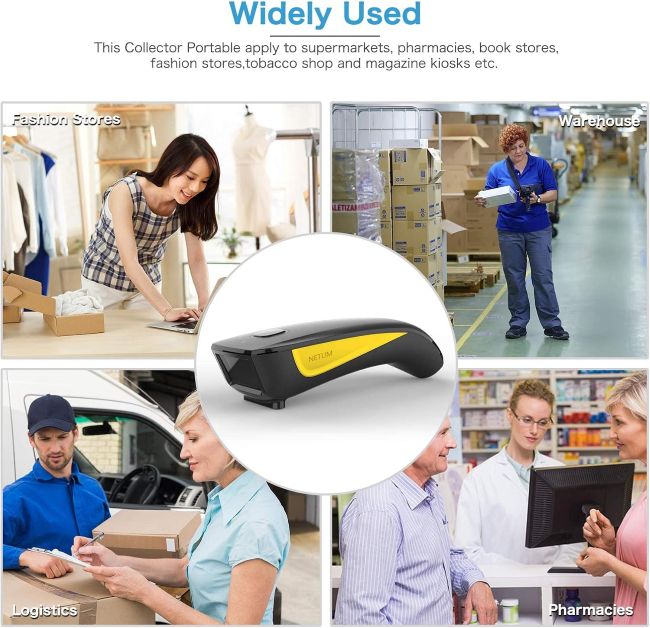
- It is compatible with most POS systems and apps that accept keyboard input, and is aimed at mobile POS, inventory management, backroom/stockroom, and field sales use.
- Buyer feedback is positive on versatility, portability, and the triple-connection design, with the main caveats being the small size requiring careful handling and some configuration needed for certain Bluetooth pairings.
Introduction
Not every scanning job happens at a fixed checkout counter with a bulky wired scanner bolted to the counter. A growing share of barcode work happens on the move — at a pop-up market stall running off a tablet, in a stockroom walking the aisles with a phone, or in the field scanning customer documents on a mobile device. That mobile, multi-device reality is exactly the niche the NETUM C750 targets.
It is a pocket-sized 2D area-imaging scanner that offers three ways to connect — Bluetooth, 2.4GHz wireless, and USB wired — and reads both 1D and 2D barcodes from paper and from screens, all in a body that weighs under three ounces. NETUM positions it as a versatile tool for mobile POS, inventory management, backroom and stockroom work, and field sales, and the spec sheet reads that way: a CMOS global-shutter imager, up to 100,000 barcodes of offline storage, and compatibility with iOS, Android, and Windows.
The question is whether a scanner this small can genuinely replace a full-size handheld in real work, or whether the pocket form factor comes at too high a cost in ergonomics, battery life, or durability. This review pulls together the manufacturer’s specifications, the feature set, and genuine buyer feedback to help you decide whether the NETUM C750 is worth its price for your situation, or whether a larger or more specialized scanner would serve you better.
Product at a Glance
NETUM Mini Barcode Scanner
| Specification | Details |
|---|---|
| Scanner type | 2D area-imaging (CMOS global shutter) |
| Sensor | 640×480 CMOS imager |
| Illumination | White LED; red LED aimer |
| Barcode support | 1D (UPC, EAN, Code 39, Code 128, etc.) and 2D (QR, PDF417, Data Matrix, MicroQR) |
| Reads from | Paper, monitors, smartphones, tablets |
| Minimum resolution | 1D ≥ 4 mil; 2D ≥ 5 mil |
| Decode error rate | < 1 in 5 million |
| Connectivity | 3-in-1: Bluetooth, 2.4GHz wireless (USB dongle), USB wired |
| Host compatibility | iOS, Android, Windows phones/tablets; PC and laptop |
| Upload modes | Instant Upload, Storage Mode (up to 100,000 barcodes offline) |
| Weight | Under 3 ounces |
| Power | Rechargeable battery; physical power switch; wired mode charges while scanning |
| Build | Soft-touch plastics, oversized trigger, white LED aimer |
| Setup | Plug and play; pairs via Bluetooth or USB receiver |
| Target use | Mobile POS, inventory, stockroom, field sales, general data entry |
Detailed Review
Why This Product Stands Out
The mini scanner market is crowded with pocket-sized devices, so standing out requires more than being small. The C750 differentiates itself on three points: a genuine 3-in-1 connectivity design that covers Bluetooth, 2.4GHz wireless, and USB wired in one device, a 2D CMOS area-imaging engine that reads both 1D and 2D codes from paper and from screens, and a pocket form factor that weighs under three ounces yet still offers up to 100,000 barcodes of offline storage. Together these turn mobile scanning from a phone-camera compromise into a proper dedicated-scanner experience that travels anywhere and connects to almost anything.
Buyer feedback reinforces that the scanner earns its place in real work settings. Reviewers describe the triple connectivity as “a game-changer,” note that it “significantly improved my workflow, saving me countless hours of tedious work” compared to manual entry, and appreciate that a single device handles iOS, Android, and PC without buying separate scanners. That combination of 2D capability, broad device support, and genuine portability is exactly what makes it feel like a step above single-connection mini scanners while staying well below the price of a full-size industrial imager.
Key Specifications
The scanning engine is a 2D area-imaging module built around a CMOS global-shutter sensor with 640×480 resolution, illuminated by a white LED and aimed with a red LED. That imager design is the key difference from a laser scanner: it captures an image of the barcode rather than sweeping a laser line, which means it can read 2D codes like QR, PDF417, Data Matrix, and MicroQR as well as all common 1D symbologies, and it can read barcodes displayed on a monitor, smartphone, or tablet — something a laser scanner fundamentally cannot do. The minimum resolution is rated at 4 mil for 1D and 5 mil for 2D, which covers standard printed labels comfortably, and the decode error rate is specified at under 1 in 5 million, indicating reliable performance across varied barcode conditions.
Connectivity is the headline feature: a 3-in-1 design supporting Bluetooth, 2.4GHz wireless via the included USB dongle, and USB wired via the included cable. The Bluetooth mode pairs with iOS, Android, and Windows phones and tablets, the 2.4GHz dongle mode connects to any PC or laptop with a USB port, and the wired mode both transfers data and charges the scanner simultaneously. That breadth of connection options is what makes the C750 genuinely versatile across device ecosystems where most scanners lock you into one.
Design & Build Quality
Pocket Form Factor
The defining design choice is the size. Weighing under three ounces, the C750 fits in a palm or a pocket, which is the whole point for mobile and field use. The contoured shape is designed to sit comfortably in the hand, the soft-touch plastics give grip without being sticky, and the oversized trigger button provides tactile feedback so you know when a scan registers. A white LED aimer shows where the imager is reading, which matters more with a 2D imager than a laser because the capture area is wider. A physical power switch — a feature many mini scanners omit — lets you fully power down to save battery and prevent accidental scans in a bag or pocket.
Build Impressions
The housing is a lightweight plastic shell of the type standard for pocket scanners, with the imager, battery, and Bluetooth/2.4GHz radio inside. Construction is functional rather than premium, but the soft-touch finish and oversized trigger make it feel considered rather than cheap. There is no ruggedized drop cover or IP rating mentioned, which reflects the intended mobile-office and retail use rather than warehouse-floor abuse. NETUM notes that the scanner is quality-tested before shipping, so a few scuffs from testing may be present — a normal and harmless detail.
Materials & Construction
The scanner body is a plastic housing with the CMOS imager and decoding board inside, finished with soft-touch plastics on the grip surfaces for comfort. The package includes a USB cable for wired mode and charging, and a USB dongle for 2.4GHz wireless mode. The materials are standard for this price tier — nothing feels over-engineered, but nothing feels flimsy in a way that would worry a careful mobile user. The oversized trigger is the standout material and ergonomic choice because it directly addresses the small-scanner problem of fiddly buttons, and the physical power switch is a practical touch that extends battery life between charges.
Performance
Scanning Speed and Accuracy
Loaded with a clear barcode, the C750 performs the way buyers describe: the imager locks on quickly, the beep confirms the read, and the data lands in whatever field has focus on the host device. The CMOS engine reads poor-quality, damaged, and low-contrast codes — the kind of faded shipping labels and smudged product tags that defeat cheaper scanners — and the sub-1-in-5-million decode error rate indicates consistent reliability across varied conditions. The ability to read barcodes from screens is a genuine advantage for modern work, where many barcodes now live on a phone display, a shipping confirmation email, or a tablet POS screen rather than on paper.
Connectivity in Practice
The 3-in-1 connectivity is the feature that defines the C750’s value. Bluetooth mode pairs with iOS and Android phones and tablets as well as Windows Mobile devices, giving true mobile scanning without a dongle. The 2.4GHz dongle mode connects to any PC or laptop with a USB port and behaves like a keyboard, typing barcode data into any application that accepts input. Wired mode both transfers data and charges simultaneously, so you’re never caught with a dead scanner mid-shift. The breadth of options means a single scanner follows you across devices and workflows, which is more than most mini scanners offer.
Battery Life and Offline Storage
The rechargeable battery is designed for a full day of typical mobile scanning, and the physical power switch lets you conserve it between sessions. The standout power-related feature is Storage Mode: the C750 can batch-scan up to 100,000 barcodes into its internal memory when you’re away from any host device, then upload them all at once when you reconnect. That capacity is substantial for a pocket scanner and makes it genuinely useful for inventory walks and field data collection where no computer or phone is in range.
Comfort & Usability
Day-to-day usability is one of the scanner’s genuine strengths. The three connection methods mean you’re never searching for the right cable or a compatible device — whatever you’re holding, the C750 can talk to it. The data behaves like keyboard input, so it integrates with any app that accepts typing: POS software, inventory apps, spreadsheets, web forms, and note-taking apps on phones and tablets. The oversized trigger is easy to find by feel, the white LED aimer shows the capture area clearly, and the pocket size means it’s always with you rather than tethered to a desk. The physical power switch is a small but meaningful touch for preventing accidental scans in a bag. The main usability caveat is size: the small body is perfect for pocket carry but less comfortable for long, high-volume scanning sessions than a full-size handheld, and there’s no drop cover or IP rating for rough environments.
Features Explained
2D CMOS Area Imaging
The CMOS global-shutter imager captures both 1D and 2D barcodes as an image and decodes them, which means it reads QR, PDF417, Data Matrix, and MicroQR alongside standard linear barcodes. Crucially, it reads barcodes from screens — monitors, phones, tablets — which a laser scanner cannot, making it suited to modern mobile and digital workflows.
3-in-1 Connectivity
Bluetooth pairs with iOS, Android, and Windows phones and tablets. The 2.4GHz USB dongle connects to PCs and laptops. USB wired mode transfers data and charges at the same time. One scanner, three connection paths, virtually any host device — this is the C750’s defining advantage over single-connection mini scanners.
Screen Barcode Reading
Because the imager captures an image rather than sweeping a laser, it reads barcodes displayed on screens. That covers digital coupons, mobile tickets, email-attached shipping labels, on-screen QR codes, and tablet POS displays — a real-world capability that a laser scanner simply lacks.
Storage Mode (100,000 Barcodes)
Internal offline storage holds up to 100,000 barcodes, letting you batch-scan in the field or a stockroom away from any host device and upload later. That capacity is generous for a pocket scanner and turns the C750 from a simple reader into a portable data-collection tool.
Physical Power Switch
A dedicated power switch fully turns the scanner off, conserving battery between uses and preventing accidental scans when the scanner rides in a pocket or bag. It’s a small feature that many mini scanners omit, and it directly addresses a common pocket-scanner annoyance.
Oversized Trigger and LED Aimer
The oversized trigger is easy to operate by feel in one hand, and the white LED aimer clearly shows the imager’s capture area, which matters more with a 2D imager than a laser line. Together they make accurate one-handed scanning straightforward despite the small body.
Real World Usage
In a typical mobile scenario — scanning product barcodes at a pop-up stall, logging inventory on a phone in a stockroom, or capturing customer QR codes in the field — the C750 behaves exactly as advertised. You pair it over Bluetooth with a phone or tablet, or plug the dongle into a laptop, and the data lands in your app as if typed. The pocket size means it’s always with you, the 2D engine handles QR codes and screen barcodes without complaint, and the storage mode lets you walk a stockroom or a field site batch-scanning into memory before returning to upload.
Where it shows its limits is in sustained high-volume scanning: the small body is perfect for intermittent mobile use but less ergonomic than a full-size handheld for hours of continuous work, and there’s no ruggedized drop cover or IP rating for a busy warehouse floor. For the mixed reality of mobile POS, field sales, and light inventory work, the imager handles it reliably, and buyers consistently report that the triple connectivity and 2D capability are what make it genuinely useful.
Benefits
- Genuine 2D area imaging that reads 1D and 2D barcodes from paper and from screens.
- 3-in-1 connectivity (Bluetooth, 2.4GHz, USB wired) covers virtually any host device.
- Pairs with iOS, Android, and Windows phones and tablets, not just PCs.
- Pocket-sized and under 3 ounces for genuine mobile carry.
- Up to 100,000 barcodes of offline storage for batch field work.
- Reads poor-quality, damaged, and low-contrast codes reliably.
- Physical power switch conserves battery and prevents accidental scans.
- Oversized trigger and LED aimer make one-handed scanning easy.
- Wired mode charges while scanning, so you’re never caught out.
- Keyboard-style input works with virtually any app that accepts typing.
Limitations
- Small body is less ergonomic than a full-size handheld for long, high-volume sessions.
- No drop cover or IP rating mentioned — not built for rough warehouse floors.
- Some Bluetooth pairings may need configuration for certain host apps.
- Pocket size means a small trigger area that may not suit very large hands.
- Battery life, while adequate for a day, is shorter than full-size scanners.
- No dedicated charging cradle included (available separately).
- Build is functional rather than premium; long-term durability under heavy use is unproven.
Who Should Buy It
The C750 is a strong fit for mobile workers, small-business owners, pop-up vendors, field sales staff, and anyone who needs to scan 1D and 2D barcodes on the move across phones, tablets, and laptops. If your scanning happens in short bursts across multiple devices rather than hours at a fixed station, the 3-in-1 connectivity, 2D imaging, and pocket size cover virtually everything you’ll encounter. It’s also a sensible choice for anyone who needs to read QR codes or screen-displayed barcodes, which a laser scanner cannot do, and who values offline batch storage for inventory walks away from a host.
Who Should Avoid It
If your scanning is hours of continuous high-volume work at a fixed station, a full-size handheld with a proper grip and a stand will be more comfortable and faster than a pocket scanner. If you work on a rough warehouse floor where drops, dust, and moisture are routine, the lack of a ruggedized build and an IP rating makes this the wrong pick — look for an industrial-rated scanner instead. And if you only ever scan 1D barcodes on paper at a single PC, a cheaper wired 1D laser scanner will do the job for less money.
Key Features Table
| Feature | What It Means for You |
|---|---|
| 2D CMOS imager | Reads 1D and 2D barcodes (QR, PDF417, Data Matrix) |
| Screen reading | Captures barcodes from monitors, phones, and tablets |
| 640×480 sensor | High-resolution imaging for fine and damaged barcodes |
| Bluetooth | Pairs with iOS, Android, and Windows phones/tablets |
| 2.4GHz wireless | Cable-free connection to PCs and laptops via USB dongle |
| USB wired mode | Data transfer and charging at the same time |
| 3-in-1 connectivity | One scanner, virtually any host device |
| Instant + Storage modes | Real-time entry or batch scanning up to 100,000 barcodes |
| < 1 in 5M error rate | Reliable decoding across varied barcode conditions |
| Under 3 oz weight | Genuinely pocket-portable for mobile work |
| Physical power switch | Conserves battery; prevents accidental scans |
| Oversized trigger | Easy one-handed operation by feel |
| White LED aimer | Clearly shows the imager’s capture area |
| Keyboard-style input | Works with any app that accepts typing |
| Soft-touch plastics | Comfortable grip in a small body |
Pros & Cons
Pros
- Genuine 2D imaging that reads 1D and 2D codes from paper and screens.
- 3-in-1 connectivity covers Bluetooth, 2.4GHz, and USB in one device.
- Pairs with iOS, Android, and Windows phones and tablets, not just PCs.
- Pocket-sized and under 3 ounces for true mobile carry.
- Up to 100,000 barcodes of offline storage for batch field work.
- Reads poor-quality, damaged, and low-contrast codes reliably.
- Physical power switch and oversized trigger are thoughtful touches.
- Wired mode charges while scanning.
Cons
- Small body is less ergonomic for long, high-volume scanning sessions.
- No drop cover or IP rating for rough warehouse environments.
- Some Bluetooth pairings may need configuration for certain apps.
- Battery life is adequate for a day but shorter than full-size scanners.
- Dedicated charging cradle is a separate purchase.
- Build is functional rather than premium; long-term durability unproven under heavy use.
Setup & Usage Tips
- Charge fully before first use. A full charge ensures the battery calibrates and you get the rated runtime on day one.
- Choose the right connection for your device. Bluetooth for phones and tablets, the 2.4GHz dongle for PCs and laptops, USB wired for charging-and-scanning at a desk.
- Pair Bluetooth with the host off first, then on. A clean pairing sequence avoids the partial-pair issues some buyers hit with certain apps.
- Test with a known barcode. A quick test confirms the scanner is transmitting and the host field is receiving before real work.
- Use Storage Mode for out-of-range work. Batch-scan into the scanner’s memory while walking a stockroom or field site, then upload all at once when back in range.
- Use the physical power switch. Turn the scanner fully off when stowing it to conserve battery and prevent accidental scans in a bag.
- Aim with the LED, not by feel. The white LED aimer shows the imager’s capture area; use it rather than guessing, especially for 2D codes.
- Keep the imager window clean. Dust and fingerprints on the window degrade read accuracy; a soft dry wipe keeps it clear.
- Confirm app compatibility. The scanner works as a keyboard, so any app that accepts typing will receive the data — but verify that your specific POS or inventory app handles keyboard input the way you expect.
Care & Maintenance Tips
- Keep the imager window clean. Dust, fingerprints, and grime on the window degrade read accuracy; a soft dry wipe keeps it clear.
- Charge regularly, not just when dead. Lithium batteries last longer with top-up charging than with full discharge cycles, so plug it in at the end of a session.
- Use the physical power switch when storing. Turning the scanner fully off prevents accidental scans and extends the time between charges.
- Store out of direct sunlight and extreme heat. The imager, battery, and plastic housing degrade with prolonged heat and UV exposure.
- Avoid drops onto hard surfaces. There’s no ruggedized drop cover, so treat the scanner as a mobile electronic device rather than a warehouse tool.
- Keep the USB cable handy. Wired mode both charges and scans, so a cable nearby means you’re never caught with a dead scanner mid-task.
- Update the host app if pairing issues arise. Some Bluetooth pairing problems are resolved by updating the receiving app rather than the scanner.
What Real Buyers Appreciate
- Triple connectivity. Reviewers describe the 3-in-1 Bluetooth/2.4GHz/USB design as “a game-changer” for working across phones, tablets, and PCs without swapping scanners.
- Workflow improvement. Buyers report the scanner “significantly improved my workflow, saving me countless hours of tedious work” compared to manual data entry.
- 2D and screen barcode reading. The ability to read QR codes and barcodes from phone and tablet screens is repeatedly noted as a key advantage over laser scanners.
- Genuine portability. The under-3-ounce pocket size means the scanner is always with you rather than left at a desk.
- Offline storage. The up-to-100,000-barcode storage mode is valued for inventory walks and field collection away from a host device.
- Reliable decoding. The low decode error rate and ability to read poor-quality codes give buyers confidence in varied real-world conditions.
- Broad app compatibility. Keyboard-style input means the scanner works with most POS and inventory apps that accept typing.
A note on the caveats: the small body is perfect for pocket carry but less comfortable for long high-volume sessions than a full-size handheld, and there’s no drop cover or IP rating for rough warehouse environments. A few buyers note that some Bluetooth pairings need configuration for certain host apps, and that the build is functional rather than premium, so long-term durability under heavy daily use is less certain than with an industrial scanner. These are reasonable trade-offs for the size and price, but worth weighing if your work is punishing or continuous.
Frequently Asked Questions
Does it read 2D barcodes like QR codes?
Yes. The C750 uses a 2D CMOS area-imaging engine that reads QR, PDF417, Data Matrix, and MicroQR codes alongside all common 1D barcodes. A laser scanner cannot do this, which is the C750’s key advantage for modern mobile and digital workflows.
Can it scan barcodes from a phone or tablet screen?
Yes. Because the imager captures an image rather than sweeping a laser, it reads barcodes displayed on monitors, smartphones, and tablets. This covers digital coupons, mobile tickets, email shipping labels, on-screen QR codes, and tablet POS displays.
How does the 3-in-1 connectivity work?
The scanner supports three connection methods: Bluetooth for pairing with iOS, Android, and Windows phones and tablets; a 2.4GHz USB dongle for PCs and laptops; and a USB cable for wired data transfer and charging. You choose the method that suits your device.
What devices is it compatible with?
iOS, Android, and Windows phones and tablets via Bluetooth; PCs and laptops via the 2.4GHz dongle or USB cable. The scanner behaves like a keyboard, typing barcode data into any app that accepts input.
How much offline storage does it have?
Up to 100,000 barcodes in Storage Mode. You can batch-scan in the field or a stockroom away from any host device, then upload all the data at once when you reconnect — a generous capacity for a pocket scanner.
How long does the battery last?
The rechargeable battery is designed for a full day of typical mobile scanning, and the physical power switch lets you conserve it between sessions. Wired mode charges while scanning, so you’re never caught with a dead scanner at a desk.
Does it read damaged or poor-quality barcodes?
Yes. The CMOS engine is rated to read poor-quality, damaged, and low-contrast barcodes, with a decode error rate under 1 in 5 million, so faded shipping labels and smudged tags are handled reliably.
Is it durable enough for warehouse use?
The C750 is built for mobile, retail, and field use rather than a rough warehouse floor. There’s no drop cover or IP rating mentioned, so it should be treated as a mobile electronic device rather than an industrial scanner.
Do I need to install drivers or software?
No. It’s plug and play. The scanner behaves like a keyboard, so it works with any app that accepts typing — POS software, inventory apps, spreadsheets, web forms, and note-taking apps — without driver installation.
Is a charging cradle included?
No. The C750 charges via the included USB cable, which also handles wired data transfer. A dedicated charging cradle is available separately for users who want dock-and-charge convenience.
Final Verdict
The NETUM C750 is an honest, well-featured pocket scanner that earns its place by combining genuine 2D area imaging, 3-in-1 connectivity across Bluetooth, 2.4GHz, and USB, and a sub-3-ounce body that travels anywhere. The ability to read 1D and 2D barcodes from both paper and screens, the up-to-100,000-barcode offline storage, the physical power switch, and the keyboard-style input that works with virtually any app add up to a genuinely versatile tool that bridges phones, tablets, and PCs without buying multiple scanners. For mobile workers, pop-up vendors, field sales staff, and small-business owners doing short-burst scanning across multiple devices, it is worth the price.
Where it shows its limits is in ergonomics and ruggedness: the small body is perfect for pocket carry but less comfortable than a full-size handheld for hours of continuous high-volume work, and there’s no drop cover or IP rating for rough warehouse environments. If you’re comparing workplace technology, our guide to Best Leading Biometric Attendance Machines for Businesses offers another useful resource for businesses evaluating practical tools for managing employees and daily operations. Treat the C750 as a capable mobile scanner for intermittent, multi-device use rather than an industrial workhorse, pair it carefully with your apps, and the C750 delivers reliable 2D scanning across virtually any host at a fair price. That balance of 2D capability, triple connectivity, and genuine portability is exactly what makes it worth the price for its intended audience.
Call To Action
If your scanning is mobile and multi-device — QR codes and barcodes on phones, tablets, and laptops, in short bursts across POS, inventory, and field work — the NETUM C750 is a sound choice that pairs 2D imaging with 3-in-1 connectivity in a pocket-sized body. Check the current price on Amazon, confirm you want the 2D-C750 (yellow or other color) and whether you’d like the optional charging cradle, and keep the USB cable handy so you can charge-and-scan from day one. If your work is hours of continuous high-volume scanning on a rough warehouse floor, step up to a full-size ruggedized scanner instead.