
Key Takeaways
- The WoneNice Laser Barcode Scanner is a budget-friendly, plug-and-play USB wired handheld scanner that reads all standard 1D linear barcodes — not 2D QR codes or screen-displayed codes.
- It delivers a fast 200 scans per second with up to 30% improved scanning accuracy, plus an LED indicator and buzzer for instant read confirmation.
- It’s compatible with Windows, Mac, and Linux and works like a keyboard emulator inside Word, Excel, Novell, QuickBooks, and most common POS/inventory software.
- A 2-meter (6 ft) straight USB cable keeps you tethered to the workstation, and the housing is rated for a 1.5 m drop on concrete with FCC and CE approvals.
- It supports a rich set of 300 configurable options — prefix/suffix strings, termination strings, and beep on/off — for tailoring output to your workflow.
- Its honest limitations: no 2D/QR scanning, no screen scanning, struggles with low-contrast color combinations (e.g., silver-on-black), and not fully compatible with Square POS.
A reliable barcode scanner can make everyday checkout, inventory, and data-entry tasks faster and more convenient. The WoneNice USB Laser Barcode Scanner is a wired handheld reader designed to provide straightforward plug-and-play 1D barcode scanning without the complexity of a wireless setup. Its compact form and USB connectivity may appeal to small businesses, retail counters, warehouses, and home users who need a simple scanning solution. But how well does it perform in real-world use, and are there any compatibility or usability limitations to consider? In this review, we’ll examine its design, scanning performance, connectivity, ease of use, and overall value to help you decide whether the WoneNice Laser Barcode Scanner is worth buying.
Product at a Glance
WoneNice USB Laser Barcode Scanner
| Specification | Detail |
|---|---|
| Product | WoneNice USB Laser Barcode Scanner |
| Type | Wired handheld 1D laser barcode scanner |
| Color | Black |
| Dimensions | 3.6 × 2.6 × 6.1 inches |
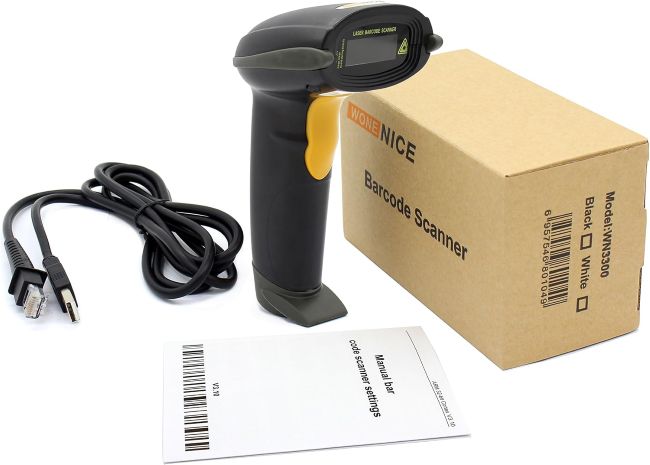
| Cable | 2 m (≈6 ft) straight USB cable |
| Connection | USB (plug and play, no drivers) |
| Scanning speed | 200 scans per second |
| Accuracy | Up to 30% improved scanning accuracy |
| Indicators | LED + buzzer |
| Symbologies | Code11, Code39, Code93, Code32, Code128, Codabar, UPC-A/E, EAN-8/13, ISBN/ISSN, JAN, EAN/UPC Add-on 2/5, MSI/Plessey, Telepen, China Postal, Interleaved/Industrial/Matrix 2 of 5 |
| Config options | 300 (prefix, suffix, termination, beep on/off) |
| OS compatibility | Windows, Mac, Linux |
| Software | Word, Excel, Novell, QuickBooks, common POS/ERP |
| Drop rating | 1.5 m on concrete |
| Approvals | FCC, CE |
| Best for | Retail, warehouse, library, bookstore, pharmacy, shipping, POS |
Detailed Review
Design and Build Quality
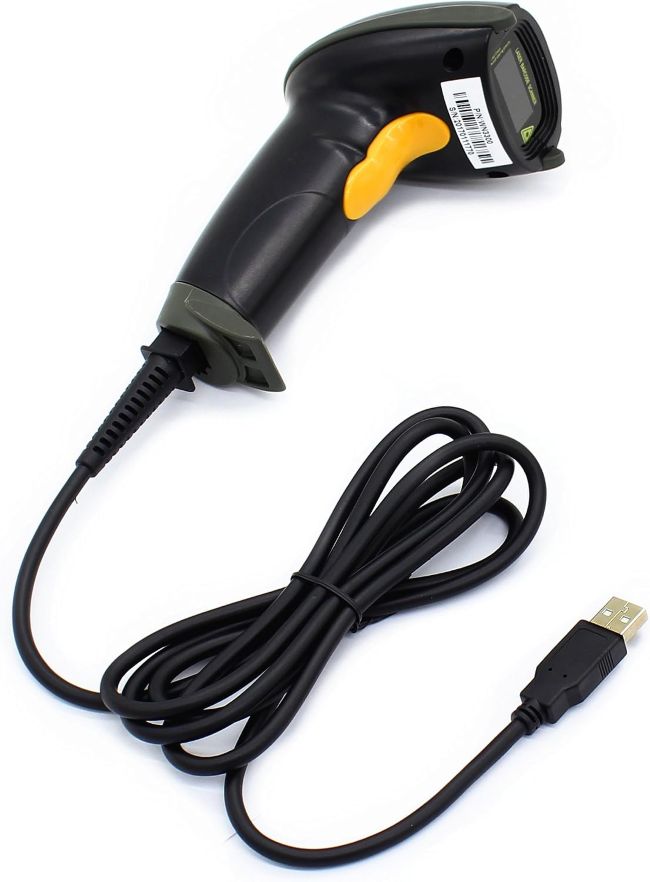
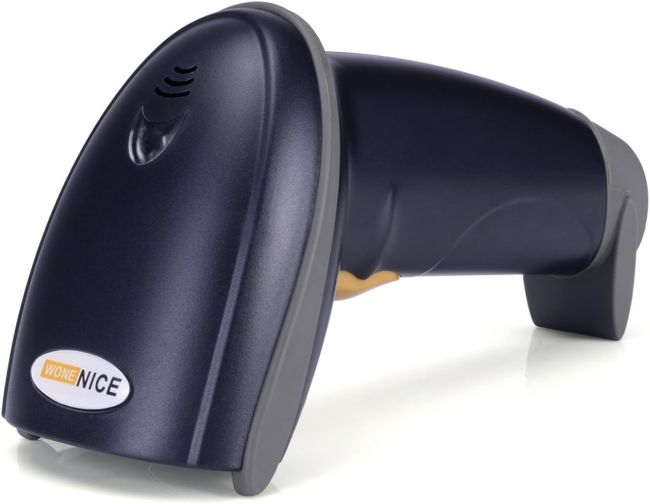
The WoneNice USB Laser Barcode Scanner has the classic handheld “gun” silhouette — a contoured pistol-grip handle with a trigger and a scanning head that emits a visible red laser line. At 3.6 × 2.6 × 6.1 inches, it’s compact enough for one-handed use and light enough for extended checkout or inventory sessions without fatigue. The black housing is plain but practical, with a matte finish that hides smudges.
Build quality exceeds what the low price might suggest. The casing can withstand a 1.5 m (about 5 ft) drop onto concrete, giving it the durability needed for everyday warehouse and retail use. It also carries FCC and CE regulatory approvals. While it does not qualify as a ruggedized industrial scanner, it should handle the bumps and occasional drops that commonly occur at checkout counters, packing benches, and other back-office workstations.
Laser Scanning Performance
This is a laser scanner, not an imager, which has two important implications. First, it reads 1D linear barcodes extremely fast — up to 200 scans per second with up to 30% improved accuracy — making light work of high-volume checkout or inventory scans. Second, it cannot read 2D barcodes (QR, DataMatrix, PDF417, Maxicode) or barcodes displayed on a screen (phone, monitor, tablet). If your workflow involves digital loyalty cards, mobile coupons, or QR codes, this is the wrong tool.
Performance is strongest on high-contrast, black-on-white printed labels. Reviewers note it can be picky with low-contrast color combinations — for example, silver-on-black asset labels on PCs can take 6–12 attempts to register. For standard retail UPC/EAN labels and printed shipping barcodes, it’s fast and reliable.
Connectivity and Compatibility
Setup is genuinely plug-and-play. Connect the USB cable to an available port, and the scanner works as a keyboard emulator, entering scanned codes directly into the active field. You don’t need to install drivers, and the scanner works with Windows, Mac, and Linux. It can enter scanned data into Word, Excel, Novell, QuickBooks, and most POS or ERP software just like a keyboard.
A few compatibility caveats are worth flagging before buying:
- USB-C-only MacBooks (2016+) require a USB-C to USB adapter.
- USB Virtual COM Port (serial) mode only works on Windows 7/8/10/XP — not macOS.
- It is not fully compatible with Square POS, which uses custom scanners and restricts third-party hardware.
- It works only with devices that have a USB port — not directly with smartphones, tablets, or iPads (an OTG adapter is needed for those).
- It is not Bluetooth/wireless — the “USB” designation means wired only.
Configurability
A standout at this price is the depth of configuration. The scanner supports 300 configurable options accessible by scanning programming barcodes in the manual: you can add prefix and suffix strings, set termination strings (e.g., Tab or Enter after each scan), and turn the beep on or off. This makes it adaptable to inventory systems that expect a specific format, or to quiet environments (like a library) where an audible beep is undesirable.
Indicators and Ergonomics
Each successful read is confirmed by both an LED indicator and an audible buzzer, giving clear dual feedback in noisy environments. The trigger has a comfortable travel distance, and the grip shape supports prolonged use. The 2-meter cable gives enough reach to scan items on a counter or nearby shelf without moving the scanner base, though it does tether you to the workstation — a deliberate trade-off for reliability and zero-battery operation.
Key Features Table
| Feature | Benefit |
|---|---|
| 1D laser scanning, 200 scans/sec | Fast, reliable reads of standard linear barcodes |
| Plug-and-play USB, no drivers | Instant setup on Windows, Mac, Linux |
| Keyboard emulation | Works inside Word, Excel, QuickBooks, POS, ERP |
| 2 m (6 ft) straight cable | Enough reach for counter and shelf scanning |
| 300 configurable options | Prefix/suffix, termination, beep on/off |
| LED + buzzer indicators | Clear dual feedback on every successful read |
| 1.5 m drop rating on concrete | Survives real-world retail/warehouse drops |
| FCC & CE approvals | Meets basic safety/emissions standards |
| Broad 1D symbology support | UPC, EAN, Code39/93/128, Codabar, ISBN, more |
| Up to 30% improved accuracy | Better first-pass read rate than basic scanners |
| Battery-free wired operation | No charging, no battery degradation |
Pros & Cons Table
| Pros | Cons |
|---|---|
| Very affordable for a laser scanner | 1D only — no 2D/QR/DataMatrix scanning |
| Plug and play, no drivers needed | Cannot scan barcodes from screens/phones |
| Fast 200 scans/sec with strong accuracy | Struggles with low-contrast color labels |
| Works on Windows, Mac, Linux | Not fully compatible with Square POS |
| 300 configurable options | Tethered by a 2 m cable — no wireless freedom |
| LED + buzzer feedback | Serial/COM mode Windows-only, not macOS |
| 1.5 m drop durability, FCC/CE rated | No battery-free convenience trade-off = cable management |
| Drops into any text field (keyboard emulation) | Not for smartphones/tablets without OTG adapter |
| Quiet-mode (beep off) option | Plastic housing, not ruggedized for heavy industry |
Care Tips
- Wipe the scan window regularly with a soft, dry microfiber cloth — dust and fingerprints on the lens are the most common cause of missed reads.
- Keep the cable strain-relief intact; avoid yanking or pinching the USB cable at the scanner base, where the connector is most vulnerable.
- Store trigger-down or in a drawer when not in use to protect the scan window from scratches and the laser optics from dust.
- Avoid exposing the scanner to direct sunlight for long periods, which can heat the housing and degrade the laser optics over time.
- Keep away from liquids — the housing is not rated as waterproof, so spills at the checkout counter should be dried immediately.
- Use the included programming barcodes to configure rather than pressing unknown combinations, which can desynchronize the scanner.
Maintenance Tips
- Inspect the USB connector periodically for bent pins or corrosion; a loose port on the host PC can cause intermittent scanning failures.
- Clean the scan window with isopropyl alcohol on a cotton swab if smudges persist after dry wiping.
- Test the trigger mechanism if scanning becomes inconsistent — a sticky trigger can cause partial actuations.
- Re-apply configuration barcodes after any reset to restore your preferred prefix/suffix and beep settings.
- Check the cable for kinks or fraying every few months in high-use environments; replace promptly if damaged to avoid read interruptions.
- Update or re-print your programming barcode sheet so configuration remains accessible if the manual is lost.
- Verify symbology support before adopting new barcode types in your system — this scanner only handles 1D linear codes.
Troubleshooting Tips
- Scanner won’t read at all: Confirm the USB cable is firmly seated at both ends; try a different USB port; on USB-C MacBooks use a USB-C to USB adapter.
- Reads but no characters appear: Ensure a text field has focus (click into Excel/Word/POS first); the scanner emulates a keyboard and needs an active input target.
- Won’t scan a specific barcode: Verify it’s a 1D linear code (not a QR/2D code) and is printed, not on a screen; adjust scan distance and angle so the red laser fully covers the barcode.
- Struggles with colored labels: Scan black-on-white labels first; for low-contrast labels (silver-on-black), try multiple angles or replace the label with a high-contrast reprint.
- Beep is too loud/quiet: Scan the programming barcode to turn the beep on/off or adjust volume if supported by your firmware.
- Adds unwanted characters: Re-scan the configuration barcodes to reset prefix/suffix strings to default.
- Not working with Square POS: This is a known limitation — Square restricts third-party scanners; use a Square-approved scanner instead.
- Serial/COM mode not working on Mac: This mode is Windows-only; on Mac use the default keyboard-emulation (HID) mode.
What Real Buyers Appreciate
- Value for money — repeatedly called out as a great inexpensive scanner that punches above its price.
- True plug-and-play — works the moment it’s plugged in, with no driver headaches.
- Fast, accurate scanning on standard black-on-white printed labels.
- Seamless integration into Excel, Word, QuickBooks, and common inventory/POS software.
- Solid build that survives typical counter and warehouse drops.
- Configurable beep and output strings, appreciated by users customizing it for specific software.
- Comfortable ergonomics for extended scanning sessions.
Common complaints align with the cons: it can’t scan from screens or QR codes, it’s picky with low-contrast colored labels, and it’s not compatible with Square POS. For buyers who understand these limitations up front, satisfaction is high.
Frequently Asked Questions
1. What should you know before buying the WoneNice Laser Barcode Scanner?
The most important things to know are that it scans 1D linear barcodes only, so it cannot read QR or other 2D codes. It also cannot scan barcodes displayed on screens such as phones, monitors, or tablets. The scanner connects through a 2 m USB cable, so it does not offer wireless operation. Compatibility with Square POS is also limited, and newer MacBooks may require a USB-C-to-USB adapter. Overall, it is a fast, affordable, plug-and-play option for retail, warehouse, library, and office environments that primarily scan printed black-and-white 1D labels.
2. Does the WoneNice scanner read QR codes?
No. It’s a 1D laser scanner and cannot read any 2D barcode, including QR, DataMatrix, PDF417, or Maxicode.
3. Can it scan barcodes from a phone screen or computer monitor?
No. Laser scanners cannot reliably read barcodes from screens — it’s designed for printed labels only.
4. Is it plug and play?
Yes. Plug the USB cable into a free port and it works immediately as a keyboard emulator with no drivers needed.
5. What operating systems are compatible?
Windows, Mac, and Linux. It works inside Word, Excel, Novell, QuickBooks, and most common POS/ERP software.
6. How fast does it scan?
Up to 200 scans per second, with up to 30% improved scanning accuracy over basic scanners.
Final Verdict
The WoneNice USB Laser Barcode Scanner is a smart, low-cost choice for anyone who needs fast, reliable scanning of printed 1D barcodes in a retail, warehouse, library, pharmacy, or office setting. Its plug-and-play USB connection, 200-scans-per-second speed, 300 configurable options, keyboard emulation, and solid 1.5 m drop durability deliver genuine value well above its price tier. If you’re also equipping a business with workplace technology, our guide to Best Leading Biometric Attendance Machines for Businesses offers another useful resource for comparing employee attendance solutions. Its limitations are clear and worth understanding before buying: no 2D/QR scanning, no screen scanning, occasional struggles with low-contrast colored labels, no wireless option, and Square POS incompatibility. If your workflow revolves around standard printed UPC/EAN/Code128 labels and you want a no-fuss, battery-free, drop-in scanner, the WoneNice is an excellent buy. If you need QR codes, mobile/screen scanning, or Square integration, look elsewhere.
Call To Action
Ready to add fast, plug-and-play 1D scanning to your checkout or inventory workflow? Check the latest price and listing for the WoneNice USB Laser Barcode Scanner, and before buying, confirm that your barcodes use printed 1D linear formats rather than QR or other 2D codes. You’ll also need a free USB port or a USB-C adapter for newer MacBooks, and you should verify compatibility with your POS software if you use Square. If those requirements fit your setup, this scanner offers a cost-effective way to upgrade scanning for a small business, retail counter, or back-office operation.