

Many professionals in the USA spend over eight hours daily sitting at a desk. According to occupational health studies, nearly 80% of adults experience back pain at some point during their working lives. Therefore, learning how to adjust office chairs properly can significantly improve comfort and productivity. Understanding proper ergonomics and selecting suitable office chairs back support solutions helps reduce physical strain and supports long-term spinal health.
Proper chair adjustment involves more than simply raising or lowering the seat. Instead, every component should work together to support your body naturally. This guide explains practical techniques that help create a comfortable and healthy workspace. Moreover, these methods apply to most modern office chairs available in the USA.
Why Proper Office Chair Adjustment Matters
Your office chair directly affects your posture, comfort, and productivity. Poor chair settings can increase pressure on your spine and muscles. Consequently, discomfort may develop after prolonged sitting sessions. Proper adjustments help maintain healthy body alignment throughout the workday.
Research from workplace ergonomics organizations indicates that proper seating adjustments reduce musculoskeletal complaints significantly. Additionally, comfortable employees often demonstrate improved concentration and efficiency. Therefore, investing time in chair adjustments provides substantial long-term benefits.
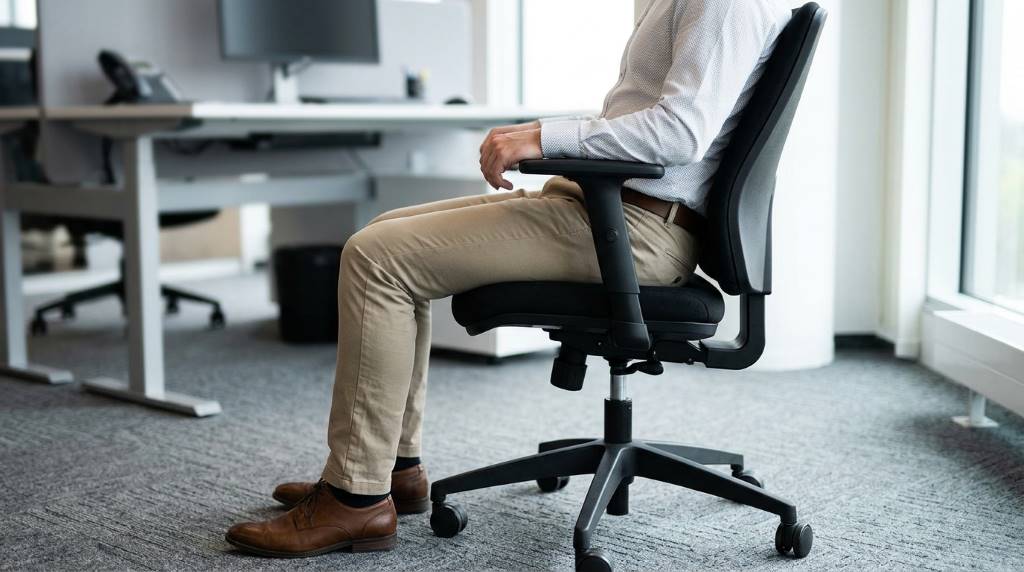
Understand the Key Parts of an Office Chair
Before making adjustments, identify the primary components of your office chair. Each section supports a different area of your body. Understanding these features helps you create a customized ergonomic setup.
- Seat height adjustment
- Seat depth adjustment
- Backrest height
- Lumbar support
- Armrests
- Headrest
- Backrest recline tension
- Tilt lock mechanism
Not every chair includes all these features. However, most ergonomic office chairs provide several adjustment options. Therefore, review your chair’s controls before beginning.
Adjust the Seat Height Correctly
Position Your Feet Flat on the Floor
Seat height creates the foundation of ergonomic sitting posture. Begin by standing in front of your chair and adjusting the seat to approximately knee height. Then sit down and evaluate your position carefully.
Your feet should rest flat on the floor without strain. Additionally, your knees should form roughly a ninety-degree angle. This position promotes healthy circulation and reduces lower back pressure.
Avoid Excessive Pressure Under Your Legs
If your chair sits too high, pressure builds beneath your thighs. Conversely, chairs positioned too low can strain your hips and spine. Therefore, adjust gradually until your legs feel fully supported.
Set the Seat Depth Properly
Seat depth affects circulation and lower back support. Sit fully against the backrest while keeping your spine upright. Next, check the distance between the seat edge and the back of your knees.
Ideally, maintain a gap of two to three fingers. This spacing prevents pressure on blood vessels and nerves. Consequently, you can sit comfortably for longer periods.
If your chair includes adjustable seat depth, slide the seat forward or backward as needed. Otherwise, consider using a lumbar cushion to improve positioning.
Adjust Lumbar Support for Your Lower Back
Locate the Natural Curve of Your Spine
Lumbar support remains one of the most important ergonomic features. The human spine naturally curves inward near the lower back. Therefore, proper support helps maintain healthy spinal alignment.
Sit fully against the backrest and identify your lower back curve. Then move the lumbar support until it fills that space comfortably. The support should feel firm but not excessive.
Fine Tune the Pressure Level
Many premium office chairs allow lumbar depth adjustment. Start with moderate pressure and adjust gradually. Excessive force can create discomfort instead of relief.
Proper lumbar support reduces muscle fatigue throughout the day. Additionally, it encourages better sitting habits over time.
Position the Backrest Angle
Many people mistakenly sit completely upright throughout the day. However, ergonomic research suggests slight reclining reduces spinal pressure. Therefore, adjust your backrest angle between 100 and 110 degrees.
This position distributes body weight more evenly across the chair. Consequently, your lower back experiences less compression. Furthermore, slight reclining improves overall comfort during extended work sessions.
Adjust Armrests Correctly
Support Your Arms Naturally
Proper armrest positioning reduces strain on the shoulders and neck. First, relax your shoulders completely. Then adjust the armrests until your elbows rest comfortably near ninety degrees.
Your shoulders should remain relaxed rather than elevated. Additionally, your forearms should receive gentle support without excessive pressure.
Prevent Shoulder and Wrist Fatigue
Armrests positioned too high create shoulder tension. Meanwhile, armrests positioned too low encourage slouching. Therefore, make small adjustments until your posture feels natural.
Adjust the Headrest If Available
Not all office chairs include headrests. However, when available, proper adjustment improves neck support significantly. Position the headrest so it gently supports the back of your head.
During upright work activities, your head should remain balanced naturally. Additionally, the headrest becomes particularly useful during brief reclining breaks.
Set Recline Tension and Tilt Features
Modern ergonomic chairs often include tension controls and tilt mechanisms. These features allow movement while maintaining proper support. Therefore, learning to use them correctly improves overall comfort.
Adjust the recline tension according to your body weight. You should lean back smoothly without excessive resistance. Similarly, the chair should not recline too easily.
Consider using dynamic sitting throughout the day. Small movements help reduce muscle stiffness and improve circulation.
Align Your Chair With Your Desk Setup
Even perfectly adjusted chairs cannot compensate for poor desk positioning. Therefore, evaluate your entire workstation carefully. Proper alignment reduces unnecessary strain.
- Keep monitors at eye level
- Place keyboards near elbow height
- Position mice close to your body
- Maintain relaxed shoulders
- Keep wrists neutral
When your workstation functions as a unified system, your body experiences less fatigue. Consequently, productivity often improves.
Common Office Chair Adjustment Mistakes
Many workers unknowingly create discomfort through improper adjustments. Fortunately, correcting these mistakes often provides immediate relief.
- Sitting too far forward
- Ignoring lumbar support
- Locking the backrest completely upright
- Positioning armrests too high
- Allowing feet to dangle
- Maintaining static posture all day
Regularly reassessing your chair settings helps maintain optimal comfort. Additionally, physical needs may change over time.
Create Healthy Sitting Habits
Even perfectly adjusted office chairs cannot eliminate all sitting-related risks. Therefore, movement remains essential throughout the workday. Experts generally recommend standing or walking periodically.
Stretch your shoulders, neck, and lower back regularly. Additionally, consider alternating between sitting and standing when possible. These habits support long-term musculoskeletal health.
Hydration, movement, and posture awareness work together with proper chair adjustments. Consequently, your workspace becomes significantly healthier.
Conclusion
Learning how to adjust office chairs for back support can dramatically improve workplace comfort and health. Proper seat height, lumbar support, armrest positioning, and recline settings all contribute to better posture. Additionally, maintaining healthy movement habits enhances these ergonomic benefits.
Evaluate your current office chair today and apply these adjustments carefully. Small changes can produce significant improvements in comfort, productivity, and long-term spinal health.
Frequently Asked Questions
How high should my office chair be?
Your feet should rest flat on the floor with knees at approximately ninety degrees.
What is the best recline angle for office chairs?
A recline angle between 100 and 110 degrees typically provides optimal support.
Should lumbar support feel firm?
Yes, lumbar support should feel supportive without creating discomfort.
How often should I adjust my sitting position?
You should change positions or move at least every thirty to sixty minutes.
Can an office chair completely prevent back pain?
No, but proper adjustments can significantly reduce strain and discomfort.