

Picture this. You rush to the mailroom. Deadlines loom. Your postage meter hums along. Then, screech. A paper jam stops everything. Envelopes pile up. Productivity crashes. Sound familiar?
A paper jam in a postage meter happens when envelopes or labels stick inside the machine. It blocks the feed path. Your mailing system freezes. You lose precious minutes.
These jams hit hard in busy offices. According to the U.S. Environmental Protection Agency, offices generate over 21 million tons of paper waste yearly. Much of that stems from printing and mailing errors like jams. The Minnesota Pollution Control Agency notes that 30% of print jobs never get picked up, often due to such glitches. In mailing, jams add to that chaos.
This guide walks you through fixes. You learn causes, steps, and prevention. No tech jargon. Just practical tips. You get back to work fast. Let’s unjam your day.
What Is a Postage Meter and Why Do Paper Jams Happen?
Postage meters print exact postage on envelopes or tapes. They weigh items. They apply rates. Businesses rent them from USPS-approved providers. Models like Pitney Bowes or Quadient handle hundreds of pieces daily.
Paper jams disrupt this flow. Envelopes snag in feeders, rollers, or printers. The machine beeps. Lights flash. Mail backs up.
Common causes include:
- Wrong paper or envelope type: Thick stock or wrinkled flaps catch on rollers.
- Overloaded trays: Too many items strain the feed mechanism.
- Dust and debris: Paper particles build up inside, like sand in gears.
- Worn parts: Rollers lose grip over time from heavy use.
- Moisture issues: Humid air curls envelopes, causing misfeeds.
In one office case, a team switched to cheap recycled envelopes. Jams tripled monthly. They wasted hours weekly. High-quality stock fixed it. Real talk: Small choices matter big.
USPS guidelines stress clean operation. Faulty feeds void postage accuracy. Stay sharp to avoid refunds or delays.
Step-by-Step Guide: How to Clear a Paper Jam in Your Postage Meter
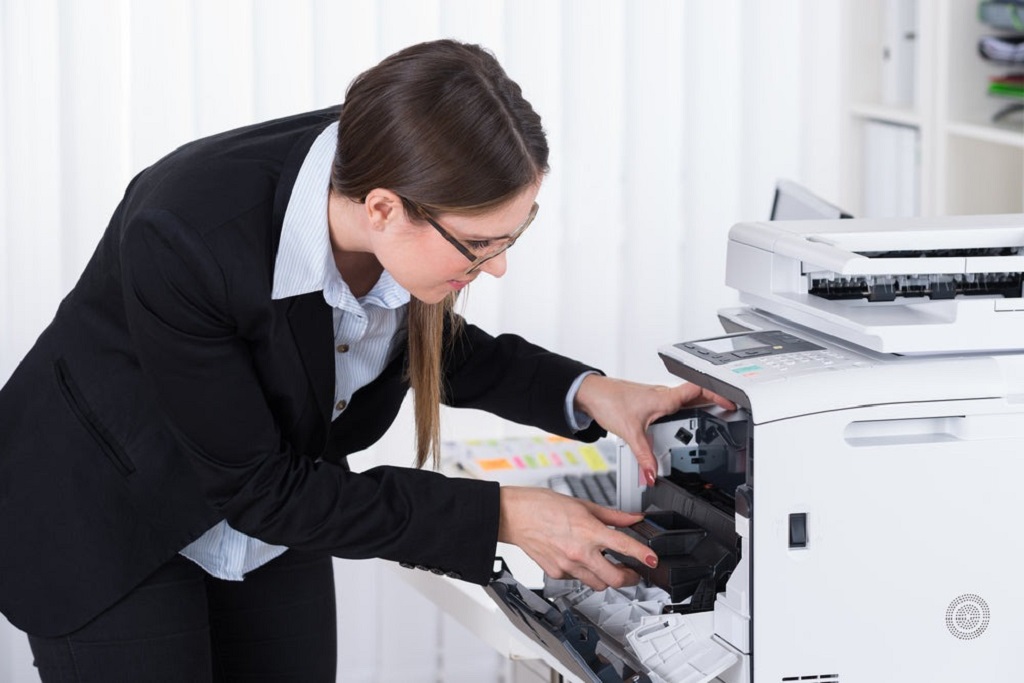
Act calm. Rushing worsens damage. Follow these steps. They work for most models, like SendPro or FP Mailing systems. Always check your manual for specifics.
Step 1: Power Down Safely
Turn off the machine. Unplug it from the wall. Wait 30 seconds. This resets sensors. It prevents shocks or further snags.
Why? Live power can spark if you touch internals. A Pitney Bowes tip: Cool-down avoids heat-warped parts.
Step 2: Locate the Jam
Check the display. It shows jam spots: feeder, transport, or output. Open panels gently.
- Feeder area: Top or side tray. Pull stuck envelopes straight out.
- Transport path: Middle rollers. Look for tears.
- Output stacker: Back catcher. Clear piles here.
Use a flashlight. Spot tiny shreds. They hide.
Pro tip: For Quadient IX-3, lift the front lever. It drops the deck for easy access.
Step 3: Remove the Jammed Material
Grip edges firmly. Pull slowly in the feed direction. Never yank sideways. Twist if needed, but gentle.
- Tear off bits. Use tweezers for scraps.
- Inspect for damage. Bent flaps? Set aside.
In a busy law firm, staff once forced a pull. It scratched rollers. Repairs took days. Patience pays.
Step 4: Clean the Affected Areas
Wipe rollers with a lint-free cloth. Dampen with water, not alcohol. Dry fully.
- Vacuum dust from trays. Use compressed air for crevices.
- Check seals. Moisturizers gum up if dirty.
USPS advises monthly wipes. It cuts jams by 50%, per vendor stats.
Step 5: Reassemble and Test
Close panels. Plug in. Power on. Run a self-test if available.
Print a test envelope. Weigh a light item. Watch the feed. Smooth? Good. Repeat if errors persist.
If stuck, note error codes. Call your provider. They remote-diagnose.
This process takes 5-10 minutes. You save hours versus downtime.
Advanced Troubleshooting for Stubborn Jams
Sometimes, basic clears fail. Dive deeper.
Check Error Codes
Displays show codes like “Clear Paper Jam” on SendPro. Google your model + code. Pitney Bowes lists fixes online.
Inspect Rollers and Sensors
Rollers slip? Clean or replace via provider. Sensors detect paper. Dust blinds them.
A retail chain fixed chronic jams by quarterly sensor swabs. Output rose 20%.
Update Software and Rates
Outdated firmware causes misfeeds. Connect to internet. Run updates.
USPS mandates IMI tech by 2024 end. Old meters decertify. Migrate early.
Handle Phantom Jams
Machine says jam, but none shows? Reset via menu. Or unplug 5 minutes.
In humid offices, static sparks fakes. Ground mats help.
If all fails, log transactions. USPS refunds faulty ops.
Preventing Paper Jams: Best Practices for Your Office Mailroom
Fixes matter. Prevention wins. Cut jams 70% with habits.
Choose the Right Supplies
- Use 20-24 lb envelopes. Avoid recycled if dusty.
- Fan stacks. Releases static.
- Store flat, dry. Humidity curls.
Boise Paper guarantees jam-free with Polaris line.
Load Properly
- Fill trays to guides. No overstuff.
- Align edges. Straighten flaps.
- Mix sizes? Use bypass feeder.
Offices that fan paper see 40% fewer misfeeds.
Maintain Regularly
- Wipe weekly. Rollers and trays.
- Schedule pro service. Every 6 months.
- Track usage. High volume? Upgrade.
FP Mailing speeds hit 140 LPM jam-free with care.
Train Your Team
Hold quick sessions. Demo loads. Share tips.
One clinic cut jams by teaching “one type per tray.” Mail flow smoothed.
Monitor Environment
Keep room 65-75°F. Low humidity. Dust-free.
AC vents near? Relocate. Saves rollers.
These steps boost efficiency. Your meter lasts longer.
Real-World Examples: Offices That Conquered Jams
Take ABC Logistics. Jams halted 100-piece runs. Cause: Cheap labels. Switch to quality? Zero issues in months. Saved 2 hours daily.
Or TechStart Inc. Dust clogged sensors. Monthly cleans fixed it. Productivity jumped 15%.
USPS case: A firm ignored updates. Rates mismatched, caused feeds. Compliance saved them fines.
Your office can mirror these wins. Start small. See big gains.
When to Call in the Pros
DIY covers most. But persistent jams signal deeper woes.
- Rollers worn? Pros replace.
- Error loops? Firmware fix.
- Postage faults? USPS audit.
Providers like Pitney Bowes offer remote support. Quick and free under lease.
Don’t delay. Downtime costs more.
https://www.loffler.com/hubfs/Blog%20Images/Compressed%20Paper%20Jam.jpg
Conclusion
Paper jams in postage meters steal time. You now know causes. master clears. prevent repeats.
Key takeaways: Power down first. Pull gentle. Clean often. Use right supplies.
Act now. Check your machine today. Load fresh stack. Run a test.
Your mailroom runs smooth. Productivity soars. Ready to unjam?
Related Topics: Office Gadgets And Equipment for Modern Workplaces
FAQs
What causes the most paper jams in office postage meters?
Wrong envelope types top the list. Dust buildup follows. Overloading trays seals it.
How long does it take to fix a simple jam?
Five to ten minutes. Follow steps. Stay patient.
Can I prevent jams with daily habits?
Yes. Fan paper. Clean trays. Store dry. Simple wins big.
What if my postage meter shows a jam but none exists?
Phantom issue. Unplug five minutes. Reset sensors.
Do USPS rules affect jam fixes?
They stress accuracy. Clean ops avoid refunds. Update tech timely.