

Key Takeaways
- The iPepul scientific calculator features a stylish pink exterior designed to match the aesthetic preferences of young students.
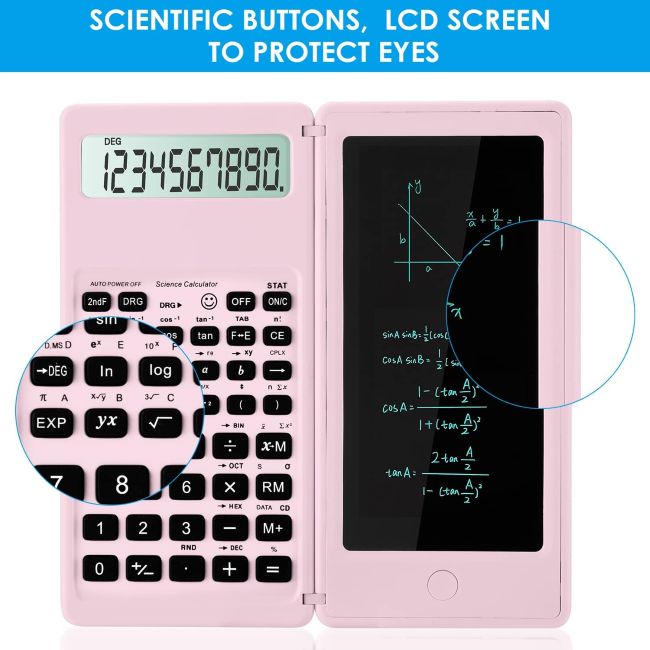
- A built-in notepad and pen function lets users write notes alongside calculations for a paperless learning experience.
- Multiple functions cover algebra, trigonometry, and calculus for middle school through university coursework.
- Lightweight and portable design fits in bags, pockets, or wallets for convenient use anywhere.
- The calculator serves as an ideal school supply gift for students, teachers, and business professionals.
Scientific calculators often come in plain, utilitarian designs that feel impersonal in a classroom setting. Standard black and gray models look identical in a pile of devices on a classroom counter. Students who want a calculator that reflects their personality settle for tools that feel generic. Beyond aesthetics, many calculators lack the integrated tools that help students track their work alongside their calculations.
The iPepul scientific calculator targets this gap with a pink kawaii design, a built-in notepad, and multi-functional coverage from algebra through calculus. For students who want a calculator that combines style, function, and note-taking in one portable device, that combination deserves attention.
Product at a Glance
iPepul Scientific Calculator
| Feature | Details |
|---|---|
| Product Name | iPepul Scientific Calculator |
| Brand | iPepul |
| Color | Pink |
| Calculator Type | Engineering/Scientific |
| Screen Size | 2.5 inches |
| Power Source | 2 nonstandard batteries (included) |
| Key Feature | Built-in notepad and pen |
| Design | Kawaii pink exterior |
| Target Users | Students, teachers, business professionals |
| Functions | Algebra, trigonometry, calculus |
Detailed Review
Why This Product Stands Out
Most scientific calculators focus purely on computation and ignore the learning process that surrounds the math. Students write notes, sketch diagrams, and track intermediate steps on separate paper, which creates a disconnect between the calculation and the reasoning. The iPepul calculator solves this by integrating a notepad and pen directly into the device. That integration matters because it lets students write notes alongside their calculations without switching between a calculator and a notebook. A paperless design saves paper resources and improves learning efficiency by keeping everything in one place.
The pink kawaii exterior sets this calculator apart from standard black and gray models. That design matters because students who want a calculator that reflects their personality feel more connected to their tools. A calculator that feels personal encourages regular use, which builds familiarity and improves learning outcomes. The stylish pink exterior brings a brand new visual experience that matches the aesthetic needs of young people.

Key Specifications
| Specification | Value |
|---|---|
| Brand | iPepul |
| Color | Pink |
| Type | Engineering/Scientific |
| Screen Size | 2.5 inches |
| Power Source | 2 nonstandard batteries (included) |
| Design | Kawaii pink exterior |
| Notepad | Built-in with pen function |
| Functions | Algebra, trigonometry, calculus |
| Target Users | Students, teachers, professionals |
| Portability | Lightweight, fits in bag or pocket |
Design & Build Quality
iPepul built this calculator for students who carry their tools everywhere. The lightweight materials and compact design make it easy to carry in a bag, pocket, or wallet. That portability matters because students move between classes, study halls, and home throughout the day. A heavy or bulky calculator discourages regular use. The lightweight design ensures the calculator is always available when needed.
The pink exterior creates a distinctive look that stands out in a classroom setting. That distinction matters because students often struggle to identify their calculator in a pile of identical black and gray models on a classroom counter. The pink color prevents mix-ups and ensures the calculator returns to its owner at the end of class.
Materials & Construction
The calculator uses lightweight materials that prioritize portability over ruggedness. That trade-off matters because the calculator feels light in the hand and bag, which encourages regular use. However, lightweight materials may not survive the same level of backpack abuse that heavier calculators withstand. Students who toss calculators into backpacks alongside textbooks and water bottles should handle this model with more care than a standard Texas Instruments calculator.
The 2.5-inch screen provides enough space for calculations without crowding. LCD technology remains readable in both bright and dim conditions and draws minimal power, which extends battery life. The display shows entries and results clearly, which helps students track their work and verify inputs before committing to calculations.
Performance
Performance for a scientific calculator comes down to function coverage and ease of use. The iPepul calculator delivers on both. The basic functions cover addition, subtraction, multiplication, and division. The advanced functions cover algebra, trigonometry, and calculus. That range covers the requirements of middle school, high school, and university mathematics coursework. One calculator handles multiple class levels without requiring a second device.
The notepad function adds a performance dimension that standard calculators lack. Students write notes, track intermediate steps, and sketch diagrams directly on the built-in notepad. That integration matters because it keeps the calculation and the reasoning in one place, which improves learning efficiency and reduces the paper waste that comes with separate notebooks.
Comfort / Usability
Usability determines whether a calculator helps or hinders learning. The iPepul calculator scores well here. The notepad and pen function lets students write alongside their calculations without switching tools. That integration matters because switching between a calculator and a notebook breaks concentration and slows the learning process. Keeping everything in one device maintains focus and improves efficiency.
The lightweight design adds genuine usability value. Students carry the calculator in a bag, pocket, or wallet for convenient use anytime and anywhere. That portability matters because students move between classes, study halls, and home throughout the day. A heavy or bulky calculator discourages regular use. The lightweight design ensures the calculator is always available when needed.
Features Explained
Built-In Notepad and Pen Function
Paperless Note-Taking Alongside Calculations
The built-in notepad and pen function lets users write notes alongside calculations without switching tools. That integration matters because it keeps the calculation and the reasoning in one place, which improves learning efficiency. A paperless design saves paper resources and reduces the clutter of separate notebooks. Students can track intermediate steps, sketch diagrams, and write formulas directly on the notepad while the calculator handles the computation.
Pink Kawaii Exterior Design
Stylish and Personal Aesthetic
The pink kawaii exterior design matches the aesthetic needs of young people. That design matters because students who want a calculator that reflects their personality feel more connected to their tools. A calculator that feels personal encourages regular use, which builds familiarity and improves learning outcomes. The distinctive pink color also prevents mix-ups in classrooms where standard black and gray models look identical.
Algebra, Trigonometry, and Calculus Functions
Multi-Level Math Coverage
The calculator covers algebra, trigonometry, and calculus functions. That coverage matters because one calculator handles middle school, high school, and university mathematics coursework. A student can use the same calculator from pre-algebra through calculus without switching tools, which builds familiarity and reduces errors that come from switching between different calculator models and layouts.
Lightweight and Portable Design
Easy Carry Anywhere
The calculator uses lightweight materials and is designed for easy carrying. That portability matters because students move between classes, study halls, and home throughout the day. Whether on the go or in the classroom, the calculator fits easily in a bag, pocket, or wallet for convenient use anytime and anywhere. A heavy or bulky calculator discourages regular use.
Multi-Scenario Versatility
Beyond the Classroom
The calculator is suitable for various occasions, including office, architecture, and financial calculations. That versatility matters because one calculator serves multiple purposes beyond the classroom. Business professionals can use it for financial calculations, architecture students can use it for design computations, and teachers can use it for classroom demonstrations. One device covers multiple use cases without requiring separate tools.
Ideal School Supply Gift
Practical Back-to-School Choice
The calculator is an ideal school supply gift for students during the back-to-school season. That practicality matters because students need reliable tools for their coursework. A calculator that combines function, style, and note-taking in one device makes a thoughtful gift that students will actually use. The pink kawaii design adds a personal touch that makes the gift feel intentional rather than generic.
Real World Usage
Consider a middle school student working on an algebra homework assignment. They use the iPepul calculator to solve equations and write notes on the built-in notepad to track their reasoning. The pink exterior makes the calculator easy to identify in a classroom pile. The lightweight design lets them carry it between classes without adding bulk to their backpack. The notepad function keeps their work organized without separate paper.
Now picture a university student studying for a calculus exam in a coffee shop. They use the calculator to compute derivatives and write formulas on the notepad to reinforce their memory. The portable design fits in their bag alongside textbooks and a laptop. The multi-function coverage handles everything from basic arithmetic to advanced calculus without requiring a second device. The paperless design saves paper resources while improving study efficiency.
Benefits
- Built-in notepad and pen function enables paperless note-taking alongside calculations.
- Pink kawaii exterior design matches the aesthetic preferences of young students.
- Algebra, trigonometry, and calculus functions cover middle school through university coursework.
- Lightweight and portable design fits in bags, pockets, or wallets.
- Multi-scenario versatility covers classroom, office, architecture, and financial use.
- Ideal school supply gift for the back-to-school season.
- Paperless design saves paper resources and improves learning efficiency.
- Distinctive pink color prevents mix-ups in classroom settings.
- Multiple functions reduce the need for separate tools.
- Suitable for students, teachers, and business professionals.
Limitations
- Lightweight materials may not survive heavy backpack abuse like heavier calculators.
- Nonstandard batteries may be harder to replace than standard button-cell batteries.
- No mention of solar power backup for reliability in varying lighting conditions.
- No mention of standardized exam approval (SAT, ACT, AP).
- No mention of a multi-line or textbook-style math display.
- No mention of a slide cover or protective case for the keypad.
- Pink color may not appeal to all users.
- Notepad writing surface may be small for extensive note-taking.
Who Should Buy It?
The iPepul calculator suits students who want a stylish, portable calculator with integrated note-taking for middle school through university coursework. Anyone who values the convenience of writing notes alongside calculations will appreciate the built-in notepad. Students who want a calculator that reflects their personality will appreciate the pink kawaii design. If you want one calculator that covers algebra, trigonometry, and calculus in a lightweight package, this model delivers that combination.
Who Should Avoid It?
Skip this calculator if you need a calculator approved for standardized tests like the SAT, ACT, or AP exams. The product description does not mention exam approval, which means you cannot guarantee the proctor will allow it. Anyone who needs a rugged calculator that survives heavy backpack abuse should look at models with hard plastic shells and slide covers. Users who need a multi-line or textbook-style math display should consider the TI-30XS MultiView or TI-34 MultiView. Students who prefer standard black or gray calculators may not appreciate the pink design.
Key Features Table
| Feature | Benefit |
|---|---|
| Built-in notepad and pen | Paperless note-taking alongside calculations |
| Pink kawaii exterior | Stylish and personal aesthetic |
| Algebra, trigonometry, calculus | Multi-level math coverage |
| Lightweight portable design | Easy carry in bag, pocket, or wallet |
| Multi-scenario versatility | Classroom, office, architecture, financial use |
| Ideal school supply gift | Practical back-to-school choice |
| Paperless design | Saves paper resources |
| Distinctive pink color | Prevents classroom mix-ups |
Pros & Cons
| Pros | Cons |
|---|---|
| Built-in notepad for note-taking | Lightweight materials less rugged |
| Stylish pink kawaii design | Nonstandard batteries harder to replace |
| Algebra through calculus coverage | No solar power backup mentioned |
| Lightweight and portable | No standardized exam approval mentioned |
| Multi-scenario versatility | No multi-line display mentioned |
| Paperless design saves paper | No slide cover mentioned |
| Prevents classroom mix-ups | Pink may not appeal to all |
| Ideal back-to-school gift | Notepad surface may be small |
Cleaning Tips
Wipe the calculator exterior with a soft, dry cloth to remove fingerprints and dust. For stubborn dirt, use a slightly damp cloth with mild soap. Avoid spraying liquid directly on the calculator, which can seep into the keypad membrane and damage the electronics. Clean around the keys with a soft brush to remove dust and debris that accumulate between the buttons. Clean the notepad surface with a dry eraser or soft cloth to remove ink residue. Never use alcohol or harsh solvents that can degrade the plastic housing, the LCD screen, or the notepad surface.
Maintenance Tips
Check the batteries regularly, as nonstandard batteries may be harder to find than standard button-cell batteries. Keep spare batteries on hand to avoid interruptions during study sessions. Store the calculator in a protective pouch or case when not in use, as the lightweight materials may not survive heavy backpack abuse without extra protection. Keep the notepad surface clean to maintain writing clarity. Avoid exposing the calculator to extreme heat or direct sunlight, which can degrade the pink exterior and the notepad surface.
Troubleshooting Tips
When the display fades or goes blank, the batteries may be weak. Replace both batteries with the correct size specified in the battery compartment. Should the notepad surface become difficult to write on, clean it with a dry eraser to remove ink residue. If the keys feel sticky or unresponsive, use a soft brush to clear debris around the key edges. When the calculator powers on but produces incorrect answers, verify that you are using the correct mode for your calculation. If the pink exterior develops scuffs or marks, gently wipe it with a soft cloth to help restore its finish.
What Real Buyers Appreciate
Buyers consistently praise the built-in notepad as the standout feature. Many describe the convenience of writing notes alongside calculations without switching tools. Students highlight the pink kawaii design as a fun and personal touch that makes the calculator feel like their own. Parents appreciate the affordable price point and the practical back-to-school gift appeal. The lightweight portability earns frequent mention from students who carry the calculator between classes. Several users note the lightweight materials feel less rugged than standard calculators but accept that for the portability and style. Overall sentiment centers on style and convenience, with most buyers feeling they received a fun, functional calculator at a reasonable price.
Frequently Asked Questions
Is the iPepul calculator approved for standardized tests?
The product description does not mention approval for standardized tests like the SAT, ACT, or AP exams. That omission means you cannot guarantee the proctor will allow the calculator. If you need a calculator for standardized testing, consider an exam-approved model like the TI-30XIIS, TI-30XS MultiView, or TI-36X Pro.
Does the calculator have a multi-line display?
The product description does not mention a multi-line display. The 2.5-inch screen likely shows entries and results, but the number of lines is not specified. If you need a multi-line display for tracking multi-step problems, consider the TI-30XS MultiView or TI-34 MultiView.
How does the built-in notepad work?
The built-in notepad and pen function lets users write notes alongside calculations without switching tools. The notepad surface is integrated into the calculator body, and the pen is included. The paperless design saves paper resources and improves learning efficiency by keeping calculations and notes in one place.
What functions does the calculator cover?
The calculator covers basic addition, subtraction, multiplication, and division, plus algebra, trigonometry, and calculus functions. That coverage handles middle school, high school, and university mathematics coursework. One calculator serves multiple class levels without requiring a second device.
What batteries does the calculator use?
The calculator uses 2 nonstandard batteries, which are included. Nonstandard batteries may be harder to find than standard button-cell batteries used in Texas Instruments calculators. Keep spare batteries on hand to avoid interruptions during study sessions.
Is the calculator durable enough for student use?
The calculator uses lightweight materials that prioritize portability over ruggedness. That trade-off means the calculator may not survive the same level of backpack abuse that heavier calculators withstand. Students who toss calculators into backpacks alongside textbooks should handle this model with more care or store it in a protective pouch.
Can I use the calculator for business and financial calculations?
Yes. The product description mentions suitability for office, architecture, and financial calculations. That versatility means one calculator serves multiple purposes beyond the classroom. Business professionals can use it for financial computations without needing a separate device.
Does the pink color appeal to all users?
The pink kawaii design targets users who want a calculator that reflects their personality. The distinctive color prevents mix-ups in classrooms where standard models look identical. However, the pink color may not appeal to users who prefer traditional black or gray calculators.
Final Verdict
The iPepul scientific calculator earns its place by combining style, function, and note-taking in one portable device. If you’re comparing calculators for more specialized financial or business calculations, the Affordable Texas Instruments BA II Plus Financial Calculator is another option worth exploring. The built-in notepad, pink kawaii design, and multi-level math coverage address the three needs of students who want a personal and practical calculator. Note-taking convenience, aesthetic appeal, and function coverage each get dedicated solutions in one package.
The limitations are honest. The lightweight materials are less rugged than standard calculators, and the product description does not mention standardized exam approval. For any student who wants a stylish, portable calculator with integrated note-taking for coursework, these trade-offs feel reasonable. The iPepul calculator delivers genuine value through convenience and style that standard calculators cannot match.
Call To Action
If your student wants a stylish, portable calculator with a built-in notepad for algebra, trigonometry, and calculus, the iPepul scientific calculator is a fun and practical choice. Check current pricing and availability today, and give them a calculator that reflects their personality while supporting their learning.