
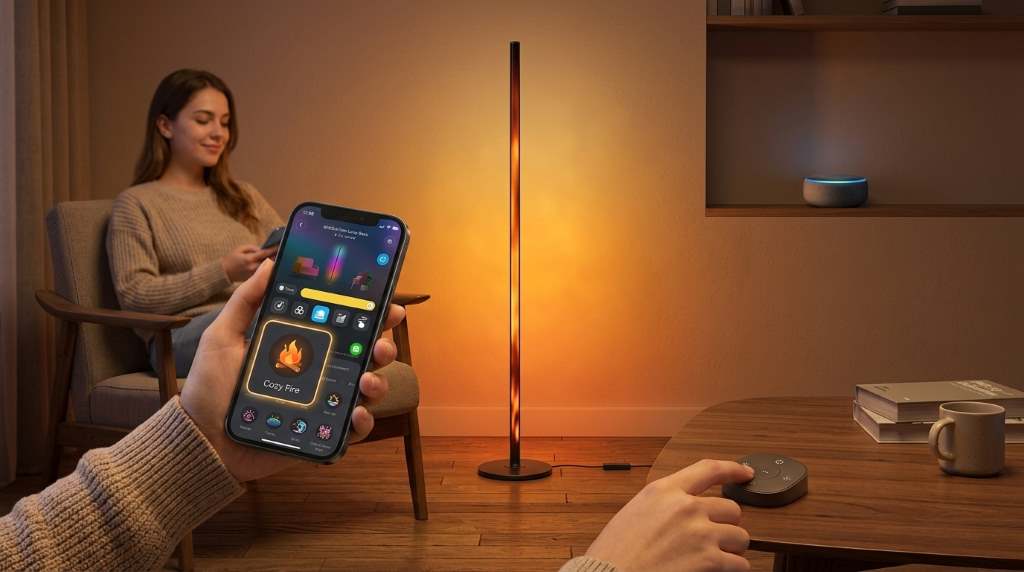
Yes, the Govee RGBIC Floor Lamp Basic is easy to use once initial setup finishes. Most daily controls work through the Govee Home app, while voice assistants add hands-free convenience. The lamp offers up to 1,000 lumens, making it useful for ambient and moderate room lighting. Additionally, RGBIC technology lets different sections display multiple colors simultaneously.
For a closer look at its practical features, the Govee RGBIC Floor Lamp Basic provides a useful starting point. However, ease of use involves more than plugging in the lamp. Setup, Wi-Fi pairing, app controls, physical buttons, voice commands, and troubleshooting all affect the experience.
What Makes This Floor Lamp Easy To Use?
The biggest advantage comes from its straightforward control system. You can operate the lamp through physical controls, the Govee Home app, or compatible voice assistants.
Therefore, you can choose the control method that fits your routine. Someone wanting simple lighting can use basic controls, while enthusiasts can explore detailed customization.
Simple Physical Controls
The control box provides essential functions without requiring your phone. You can turn the lamp on or off and cycle through basic lighting options.
That simplicity matters when you need light immediately. However, advanced color scenes and detailed adjustments require the Govee Home app.
App-Based Control
The Govee Home app provides the main interface for customization. You can adjust brightness, select colors, choose scenes, create effects, and configure schedules.
Consequently, the app makes the lamp far more versatile than its physical controls suggest. Beginners can start with presets before exploring custom lighting effects.
How Difficult Is Initial Setup?
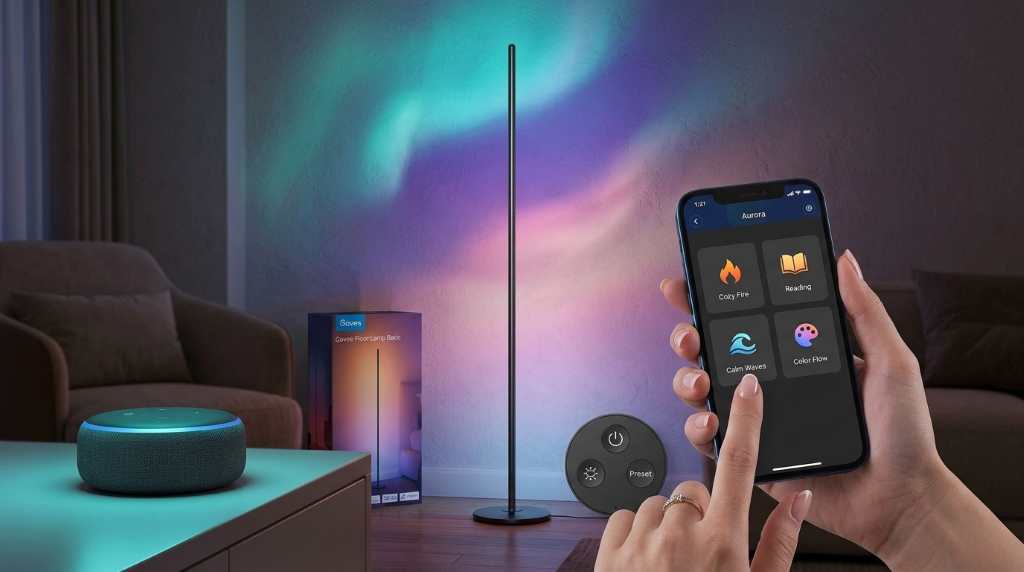
Initial setup remains relatively simple, although it involves several connected steps. You first assemble the lamp, connect its power supply, and install the Govee Home app.
Next, add the lamp inside the app and follow the pairing instructions. The lamp generally connects through Bluetooth during setup before using compatible 2.4GHz Wi-Fi.
A Practical Setup Sequence
- Assemble the lamp sections and secure the base.
- Place the lamp near a suitable power outlet.
- Install and open the Govee Home app.
- Create or sign into your Govee account.
- Add the floor lamp from the device menu.
- Complete Bluetooth pairing when prompted.
- Connect the lamp to compatible 2.4GHz Wi-Fi.
- Test brightness, colors, scenes, and voice controls.
Following that order prevents most unnecessary setup confusion. Furthermore, keeping your phone close during pairing can make the process smoother.
Does The Govee Home App Feel Complicated?
The app offers many features, so beginners may initially see more options than expected. Nevertheless, everyday controls remain straightforward once you understand the main interface.
You can change brightness or colors without learning advanced settings. Later, you can explore scenes, music synchronization, scheduling, and customized effects.
What Beginners Can Control Easily
- Power the lamp on or off.
- Increase or decrease brightness.
- Select individual colors.
- Choose preset lighting scenes.
- Adjust available white-light settings.
- Activate music synchronization.
- Create customized lighting effects.
That layered approach makes the lamp accessible to different users. You can keep your routine simple without sacrificing advanced capabilities.
Is Voice Control Easier Than The App?
Yes, voice control can make everyday operation even easier. Compatible Alexa and Google Assistant setups allow common commands without opening your phone.
For example, you can turn the lamp off while leaving your couch. Likewise, you can request brightness or color changes when your hands remain occupied.
When Voice Control Works Best
Voice control works especially well for routine commands. It suits users who frequently change lighting during gaming, watching television, cooking, or relaxing.
However, voice commands cannot replace the app for detailed customization. Therefore, use voice control for convenience and the app for precise adjustments.
What About Wi-Fi And Bluetooth Setup?
Connectivity represents the main area where beginners may encounter friction. The lamp uses Bluetooth during setup and compatible 2.4GHz Wi-Fi for smart functionality.
Consequently, a phone connected to a 5GHz-only network can create pairing problems. Before setup, confirm that your router provides a compatible 2.4GHz connection.
Common Connectivity Problems
- Phone cannot discover the floor lamp.
- Wi-Fi pairing repeatedly fails.
- The lamp disconnects after setup.
- Voice assistants cannot find the device.
- App commands respond slower than expected.
First, move your phone closer to the lamp during pairing. Then confirm Wi-Fi credentials and restart the pairing process if necessary.
Also, avoid placing the lamp where thick walls severely weaken wireless signals. A stable network generally produces a smoother smart-lighting experience.
Is It Easy To Adjust Brightness And Colors?
Brightness and color adjustments rank among the easiest functions. The app lets you select colors visually and adjust brightness according to your preference.
Moreover, RGBIC technology allows different sections to display different colors simultaneously. That feature creates gradients and animated effects without requiring complicated manual programming.
For Everyday Lighting
Choose a comfortable white setting when you need practical illumination. Then lower brightness for evening use or increase it when the room needs stronger ambient light.
For entertainment, switch to colorful scenes instead of manually selecting every color. This approach saves time while still producing visually dynamic lighting.
Does Music Sync Make It Harder To Use?
Music synchronization adds complexity, but you do not need it for normal operation. You can simply ignore the feature when you want conventional lighting.
When activated, music-related modes can create changing colors that respond to surrounding audio. Therefore, the feature works best as an optional entertainment enhancement rather than a required setting.
What Competitor Reviews Often Miss
Many competing articles focus heavily on colors, brightness, and smart-home compatibility. They often provide less practical guidance about setup friction and everyday control.
A better evaluation considers what happens after unboxing. That includes Wi-Fi requirements, app learning, physical controls, voice setup, placement, and troubleshooting.
Key Usability Factors To Consider
| Usability Factor | What To Expect |
|---|---|
| Assembly | Simple multi-section assembly before powering the lamp. |
| App setup | Guided pairing through the Govee Home app. |
| Wi-Fi | Compatible 2.4GHz Wi-Fi helps complete smart setup. |
| Physical control | Useful for basic power and simple lighting changes. |
| Voice control | Convenient for common commands after integration. |
| Advanced customization | Requires learning more features inside the app. |
| Music sync | Optional entertainment feature with reactive lighting effects. |
This broader usability view reveals an important distinction. The lamp remains easy for basic use, while advanced features naturally require more exploration.
How Can You Make Setup Easier?
A few preparation steps can reduce setup time considerably. Start by checking your Wi-Fi configuration before opening the app.
- Confirm your router broadcasts a 2.4GHz network.
- Keep your smartphone near the lamp.
- Install the latest Govee Home app version.
- Place the lamp near its intended outlet.
- Complete basic pairing before configuring voice assistants.
- Test the lamp before creating custom scenes.
Additionally, finish one configuration stage before starting another. For example, confirm app control before connecting Alexa or Google Assistant.
Where Does The Lamp Become Less Convenient?
The lamp is not equally simple for every user. People wanting a traditional switch-and-dimmer experience may dislike relying heavily on an app.
Furthermore, advanced customization can take time because the app exposes numerous options. Users who prefer tactile controls may find that approach less intuitive.
Wi-Fi dependence can also create frustration when network conditions become unstable. Therefore, consider your home network before choosing a connected floor lamp.
Is It Suitable For Different Types Of Users?
For Smart Lighting Beginners
Yes, beginners can use the lamp without learning every feature. Start with power, brightness, color selection, and preset scenes.
Then gradually explore scheduling and custom effects. This prevents the app’s extensive feature set from becoming overwhelming.
For Gamers
The lamp suits gaming spaces particularly well because RGBIC effects create dynamic vertical lighting. Music synchronization can also enhance an entertainment-focused room.
However, gamers should prioritize stable Wi-Fi for reliable app and smart-home control. Placement near a wall or corner can also improve the ambient wash.
For Living Rooms And Bedrooms
The lamp works well when you want atmosphere without installing permanent lighting. Its slim vertical design can occupy a corner while producing colorful wall illumination.
For reading or detailed work, however, consider a dedicated task light. Ambient floor lighting should not replace purpose-built illumination when visual precision matters.
How Does It Compare With More Advanced Govee Models?
Govee’s newer floor lamps can offer higher brightness and broader lighting capabilities. For example, newer models can reach 1,725 lumens and provide adjustable warm-to-cool white lighting.
That does not automatically make them easier to use. The Basic model remains attractive when straightforward smart RGBIC lighting matters more than maximum output.
Choose The Basic Model If You Want
- A relatively simple smart floor-lamp experience.
- Colorful RGBIC lighting with animated effects.
- App-based brightness and color control.
- Voice control for everyday commands.
- Music synchronization for entertainment.
- A slim lamp suited to corners.
Choose a more advanced model when stronger illumination or expanded white-light control matters more. In that case, paying more can deliver meaningful functional improvements.
Final Verdict: Is It Really Easy To Use?
Yes, the Govee RGBIC Floor Lamp Basic is easy to use for ordinary lighting tasks. Its physical controls handle basics, while the app unlocks customization and smart features.
The main learning curve comes from Wi-Fi pairing and the app’s extensive options. Once setup finishes, everyday operation becomes considerably more intuitive.
Therefore, this lamp suits users who want smart lighting without complicated hardware installation. If you value vibrant effects, app control, and voice convenience, it remains a practical choice.
Before buying, confirm your Wi-Fi compatibility and decide whether ambient lighting meets your brightness needs. Then explore the app gradually instead of trying every feature immediately.
Ready to simplify your smart-lighting setup? Choose the Govee RGBIC Floor Lamp Basic when easy controls, colorful effects, and smart convenience match your room.
Frequently Asked Questions
Is the Govee RGBIC Floor Lamp Basic easy for beginners?
Yes, beginners can handle basic lighting controls easily after completing the initial app setup.
Does the Govee RGBIC Floor Lamp Basic require Alexa?
No, you can control the lamp through the Govee Home app without Alexa or Google Assistant.
Does the Govee RGBIC Floor Lamp Basic need Wi-Fi?
Wi-Fi enables its connected smart features, while Bluetooth assists with initial device pairing.
Can I control brightness from the app?
Yes, the Govee Home app lets you adjust brightness alongside colors and lighting effects.
Is the Govee RGBIC Floor Lamp Basic good for reading?
It can provide useful ambient illumination, but dedicated task lighting works better for focused reading.